
A mobile content management system is simply a platform built from the ground up to let you write, edit, and publish content from your phone or tablet. It’s like having a portable command center for your website, freeing you from your desk and letting you work wherever you are without losing critical features.
Unlocking Content Freedom in a Mobile World

The whole idea for a mobile CMS came from a very common, very frustrating problem. Traditional content management systems were designed for desktops, and anyone who has tried to fix a typo or update a post on a phone using a clunky, non-responsive backend knows it’s a painful experience. A true mobile CMS puts the entire content workflow right in the palm of your hand.
This isn’t just about shrinking an interface down to fit a smaller screen. It marks a fundamental shift in how we think about creating content. For years, the process was rigid; you might jot down ideas on the move, but the actual work had to wait until you were back at a computer. A mobile-first system completely breaks down that barrier.
Why Mobile-First Management Matters Now
The push for mobile content solutions is accelerating. The global mobile content management market was already valued at USD 2.48 billion in 2022 and is expected to grow dramatically. This isn't surprising, given how many professional tasks we now handle on our phones and tablets. This growth reflects a real business need for agility and remote productivity. You can read more about the mobile content market's projected growth to see the full picture.
Many modern mobile content management systems are built differently than their desktop-bound predecessors. They often use a "headless" or decoupled architecture, which separates the content repository (the "body") from the presentation layer (the "head"). This structure is a perfect match for mobile workflows because it lets you manage content in one place and deliver it anywhere—to any device or platform—via APIs. Our guide on what is a headless CMS dives much deeper into how this works.
At its core, a mobile CMS is about empowerment. It gives technical bloggers, documentation teams, and non-technical marketers the same ability to manage high-performance static sites from anywhere, at any time.
This approach brings some clear advantages to the table, especially for anyone working with static site generators:
- Speed and Agility: You can push urgent updates, fix embarrassing typos, or publish breaking news directly from your phone or tablet in a matter of minutes.
- Enhanced Security: Many mobile-friendly systems are "client-side," operating directly between your browser and a Git repository. This drastically reduces the attack surface compared to old-school, database-driven systems.
- Streamlined Collaboration: Your team can contribute and review content on the fly, speeding up publishing cycles without being tethered to a specific office or computer.
What Makes a Mobile CMS Actually Mobile?
So, what’s the real difference between a CMS that works on a phone versus one that was built for it? It's not just about shrinking down a desktop interface. A true mobile content management system completely reimagines the workflow for a small, touch-based screen, turning your phone into a legitimate publishing powerhouse instead of a frustrating last resort.
It all starts with a fully responsive admin interface. And I mean truly responsive. Every menu, button, and input field should feel like it belongs on your phone’s screen, no matter the size. If you find yourself pinching, zooming, or endlessly scrolling sideways just to find the "Publish" button, you're not using a mobile-first tool. It should feel as intuitive as any other native app.
A Frictionless Editing Experience
Beyond just fitting on the screen, the content editor itself needs to be designed for your thumbs. Tiny toolbars and cramped text boxes are a recipe for typos and frustration. A great mobile CMS gives you an editor with breathing room.
This usually comes in one of two flavors:
- WYSIWYG Editors: For those who want to see the final product as they type. These visual editors make formatting text and dropping in media dead simple, perfect for non-technical creators.
- Markdown Support: For developers and writers who live in Markdown, a clean editor with good syntax highlighting and easy-to-tap shortcuts for formatting is non-negotiable.
The whole point is to make writing feel effortless, not like a painful compromise you have to make because you're away from your desk.
Then there's media management. Getting a photo from your camera roll into your post should take a few taps, period. If the process involves emailing files to yourself or waiting until you get back to a laptop, the system has failed. To dig deeper, our guide on effective media file upload strategies breaks down how modern workflows should handle this.
A true mobile CMS is defined by how much friction it removes. Every single feature should be geared toward one thing: helping you get content out the door faster, from anywhere, without ever needing to open a laptop.
More Than Just a Pretty Interface
A great user experience is table stakes, but the real magic happens under the hood. For anyone who creates content while traveling or in places with sketchy Wi-Fi, two features are absolutely critical.
First is offline access. This is a game-changer. It means you can write an entire article on a plane, on the subway, or from a coffee shop with a weak signal. The app saves everything locally, right on your device.
That leads directly to the second must-have: intelligent content syncing. As soon as you're back online, the CMS should automatically push all your offline changes to your central repository (like GitHub) without you having to do a thing. It’s a seamless handoff that ensures no work is ever lost. Together, these two features give you the freedom to be productive without ever worrying about your internet connection.
Comparing Mobile CMS With Traditional Systems
To really appreciate what a mobile-first CMS brings to the table, it helps to see how it stacks up against the old-school options. The world of content management is pretty crowded, and not every system is designed for the reality of working from anywhere, on any device.
When you start digging into the different options, a comprehensive guide on the best CMS platforms can shed light on the deep architectural differences. Those differences aren't just technical jargon; they have a massive impact on everything from user experience to security.
The Old Guard: Traditional Monolithic CMS
Systems like WordPress are what we call "monolithic." The backend where you write and the frontend your visitors see are all fused into one big application. Imagine a classic station wagon—it’s got everything in one package, but it's heavy, needs constant upkeep, and isn't exactly nimble.
This all-in-one approach makes for a pretty awful mobile experience. The admin dashboard is usually just a shrunken, pinched version of the desktop site, full of tiny buttons and menus that are a nightmare to navigate on a phone. Because it constantly has to talk to a server and a database, it's also slower and leaves a lot of doors open for security risks.
The features that make a true mobile CMS different are all about breaking free from that desktop-centric model.
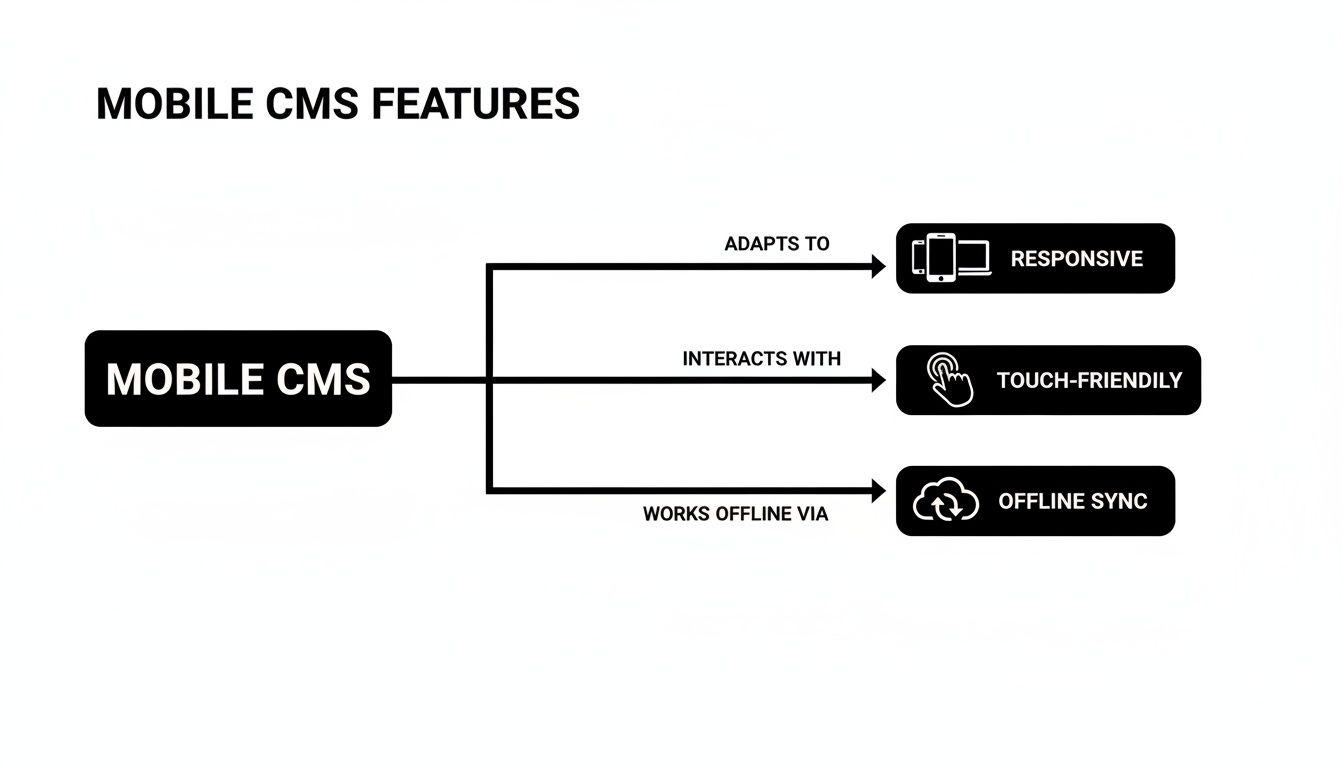
As you can see, a mobile-first design is more than just making things fit on a smaller screen. It’s about completely rethinking the workflow for a world on the move.
The Flexible But Complex: Headless CMS
Headless platforms like Contentful came along to fix the monolithic problem by "decoupling" the content from the presentation. Basically, the CMS becomes a pure content vault that serves up your text and images through an API to any frontend you can imagine—a website, an app, even a smartwatch. It’s like having a powerful engine that you can drop into any car body you want.
While this approach is incredibly powerful, it often just swaps one problem for another. Getting it all working requires a developer to build and maintain the pipeline between the API and your site. For writers, marketers, and other non-technical folks, it's often overkill and still leaves you tethered to a desktop to manage your content effectively.
The Sweet Spot: Client-Side Mobile CMS
A client-side mobile content management system takes a different, smarter route. Instead of a clunky backend or a complex API setup, the entire tool runs in your browser and syncs directly with a Git repository, like one on GitHub. This is the perfect match for modern, fast, and secure static site workflows.
A client-side, Git-based mobile CMS finds the perfect balance. It delivers the simplicity non-technical users crave while providing the security, speed, and version control that developers demand.
This architecture has some clear advantages:
- Simplicity: The interface is built to be visual and intuitive, hiding the technical guts of Git behind a friendly editor. You can learn more about this approach by reading about cloud content management systems.
- Performance: With no database to query or server-side code to run, the system is incredibly fast and light.
- Security: Your content lives in your own Git repository, and the CMS itself has no backend to attack. This drastically shrinks the potential for vulnerabilities.
CMS Approaches Compared
To make the distinctions clearer, here’s a quick breakdown of how these three approaches differ in practice.
| Attribute | Traditional CMS (e.g., WordPress) | Headless CMS (e.g., Contentful) | Client-Side Mobile CMS (e.g., JekyllPad) |
|---|---|---|---|
| Architecture | Monolithic (backend and frontend coupled) | Decoupled (API-first content repository) | Client-Side (runs in-browser, Git-based) |
| Mobile Experience | Poor; often a shrunken desktop UI | Varies; depends on the connected frontend | Excellent; designed specifically for touchscreens |
| Dependencies | Server, database, plugins | API, developer-built frontend | Web browser, Git repository |
| Best For | All-in-one websites, blogs, non-technical users | Complex multi-channel content delivery | Technical bloggers, docs teams, static sites |
Each model has its place, but for creators who need speed, security, and the freedom to work from anywhere, the client-side approach is a clear winner.
How Real Creators Use a Mobile CMS

The theory behind a mobile CMS is nice, but seeing it in action is where things really click. It’s less about the technology and more about how it gets out of your way, letting you focus on creating. When you’re not chained to your desk, you gain a level of agility that completely changes how you work.
Let's walk through a few real-world examples. These stories show how different people—from developers to marketing pros—rely on a mobile CMS to stay productive and responsive, no matter where they happen to be. Each one solves a very common, very annoying content management headache.
The Traveling Tech Blogger
Imagine you’re a tech blogger who just shipped a detailed tutorial for your Hugo-powered website. You're at the airport, killing time before a flight, and you pull up the new post on your tablet. That's when you spot it: a glaring typo right in the middle of a code snippet. Ugh. The old way meant frantically digging out your laptop, connecting to spotty Wi-Fi, firing up a code editor, and wrestling with the command line.
With a mobile content management system hooked into your GitHub repository, the fix is almost laughably simple.
- Open the CMS in your tablet’s web browser.
- Tap your way to that specific blog post.
- Correct the typo in the editor.
- Hit "Save."
That’s it. The change is automatically committed and pushed to your repo, triggering a fresh build. This isn't just about convenience; it's a massive shift in your workflow. The barrier to fixing small but critical mistakes just vanished.
The Agile Documentation Team
Now, think about a documentation team managing a huge knowledge base built with Astro. Their site is hosted on GitHub Pages, and they’re constantly pushing updates. A support engineer is on a call with a customer and realizes a key detail is missing from an installation guide.
In a typical setup, they'd have to file a ticket or Slack a technical writer, introducing a delay. But with a mobile CMS, anyone on the team can contribute directly, regardless of their comfort level with code.
A mobile CMS breaks down the walls around content. It empowers everyone, from engineers to support staff, to make immediate fixes and improvements, turning the website into a truly collaborative hub.
Right from their phone, the support engineer can log into the CMS, add the missing line of text, and save it. The documentation is updated in minutes, helping every user who comes after. This kind of workflow encourages a sense of shared ownership and keeps the docs from ever going stale.
The Non-Technical Marketer
Finally, let’s look at a marketer who runs the company blog. Their job involves scheduling posts, updating event pages, and wrangling articles from different writers. The thought of running Git commands or editing raw YAML files is not just intimidating—it’s a non-starter.
A visual, mobile-first CMS is a game-changer. From their phone, this marketer can now:
- Schedule content: Write and schedule a new post during their morning commute.
- Manage authors: Review and publish a guest post that was submitted as a pull request.
- Update pages: Quickly edit event details or swap out a promotional banner.
This flexibility is especially powerful for creators focused on monetization. When you're implementing monetization strategies like a rolling paywall, being able to tweak paywall rules or update promotional copy on the fly is essential. A mobile CMS lets them manage these crucial elements from anywhere.
For this marketer, the mobile content management system is the friendly face of a powerful Git-based workflow. It delivers all the perks of a static site—speed, security, and scalability—without the steep technical learning curve.
How to Choose the Right Mobile CMS for You
Picking the right mobile content management system isn't about chasing the longest feature list. It's about finding the tool that actually fits your workflow, your team's technical skills, and what you’re trying to build. The wrong choice introduces friction and headaches; the right one feels like a productivity superpower.
Think of it like buying a vehicle. A sports car is thrilling but useless for hauling lumber. A giant truck is a workhorse but a nightmare to park downtown. Your CMS is the vehicle for your content, so you need to find the perfect fit. The best way to start is by asking a few honest questions.
Prioritize Your Core Needs
Before you get dazzled by features, take a step back and define what's truly important. A solo blogger has a completely different set of needs than a large software documentation team, so this first step is critical.
Get started by ranking these fundamental decision points:
- Security: How vital is it to lock down your content and protect your site from attacks?
- Performance: Do you need your pages to load instantly for your audience?
- Offline Access: Will you be working on the go, in places with spotty Wi-Fi?
- Version Control: Is having a bulletproof history of every single content change a must-have?
- Ease of Use: How crucial is it for non-technical folks to jump in and contribute easily?
Answering these questions gives you a powerful filter to sift through the options and quickly eliminate tools that won't work for you.
Your ideal mobile CMS is the one that solves your biggest headaches without introducing new ones. Focus on what removes friction from your daily work, not just what looks impressive on a feature comparison chart.
Match Features to Your Priorities
Once your priorities are clear, you can connect them to specific features and technologies. This is where the technical details really start to matter, especially for creators working with static sites where the CMS architecture has a huge impact.
If security is your top priority, you should be looking at systems with a backend-less, client-side architecture. Tools built around a direct GitHub integration are a perfect example. By eliminating the traditional server and database—the most common attack vectors—your content becomes as secure as your Git repository itself.
When performance is everything, that same client-side approach pays off big time. These systems get out of the way, letting your static site generator do its thing. The result? You preserve the blazing-fast load times that static sites are famous for, without a server-side process slowing things down.
For those who demand offline capabilities and native version control, a CMS with deep Git integration is non-negotiable. This setup lets you write and edit content entirely offline. When you reconnect, every change is tracked as a commit. It’s the gold standard for a robust, transparent content history.
Finally, think about ease of implementation. A traditional CMS often means wrestling with server configurations and database management. In stark contrast, modern tools like JekyllPad offer a simple "connect to GitHub" onboarding that gets you working in minutes. This simplicity breaks down technical barriers, empowering everyone from individual bloggers to entire agencies.
While an incredible 43.3% of all websites run on WordPress, its backend requirements have created an opening for nimbler, Git-native tools that better serve the static site world. You can dig into more stats on the CMS market landscape to see how different platforms compare.
Frequently Asked Questions About Mobile CMS
Stepping into the world of modern content management always brings up questions, especially when new tools challenge the way we've always done things. Let's clear the air and tackle some of the most common questions people have about using a mobile content management system.
Think of this as your practical guide to understanding everything from security to whether it'll even work with your current projects.
Can I Really Use a Mobile CMS for a Complex Website?
Absolutely. There's a common myth that a mobile-first CMS is just for simple blogs. That couldn't be further from the truth. Modern systems designed to work with static site generators like Hugo, Jekyll, or Astro are more than capable of handling massive websites. We're talking complex documentation hubs, e-commerce stores, and sprawling corporate portals.
The secret is its decoupled, Git-based architecture. This approach separates your content—the words and images—from the code that displays it. You can manage articles or product listings from your phone, while developers are free to build a lightning-fast, sophisticated frontend. The mobile CMS is just the friendly interface; the real power is under the hood.
Is a Mobile Content Management System Secure?
Security is actually one of the biggest wins for modern mobile CMS solutions, especially the ones that are client-side and Git-based. Traditional platforms are a bundle of servers, databases, and plugins, with each one being a potential backdoor. A client-side system, on the other hand, operates directly between your browser and your GitHub repository.
This simple design drastically shrinks the attack surface. There's no backend server or database to hack. Every action is authenticated through your GitHub account, and the final static site is—by its very nature—incredibly secure.
Your content is basically protected by GitHub’s world-class infrastructure. It's a level of security that's tough to match with older, all-in-one systems.
Do I Need to Be a Developer to Use a Mobile CMS?
Not at all. While the underlying tech is built for developers, the best mobile CMS platforms are designed for everyone else. They wrap all that complexity in a simple package, giving you intuitive visual editors (WYSIWYG), live previews, and straightforward controls.
This is what bridges the gap. It empowers marketers, writers, and editors to manage a high-performance static website without ever touching a line of code, opening a terminal, or learning how Git works. All the technical stuff, like commits and pushes, just happens automatically in the background.
Will a Mobile CMS Work with My Existing Static Site?
In most cases, yes. This flexibility is a huge advantage of a Git-based mobile CMS. If your website is built with a popular static site generator—like Jekyll, Hugo, Gatsby, or Eleventy—and the code lives on GitHub, you can usually plug in a mobile CMS in just a few minutes.
The system is smart enough to read your site's existing file structure and front matter, giving you a friendly interface to edit the content you already have. This means you can add a modern, mobile-friendly workflow to your project without a painful migration or a complete rebuild.
Ready to stop wrestling with clunky backends and embrace a truly mobile workflow? JekyllPad is a browser-based, client-side visual CMS that connects directly to your GitHub repository, making content management for your static site effortless on any device. Learn more and get started for free at https://www.jekyllpad.com.