
A cloud content management system (CMS) is simply a platform for creating and managing your website's content that lives online, not on a server in your office. It takes the whole operation—from drafting blog posts to updating product pages—and moves it to the internet. This means your team can access it from anywhere, and you're no longer on the hook for buying or maintaining expensive hardware. The biggest wins here are flexibility, easier teamwork, and lower costs.
What Are Cloud Content Management Systems

Think about the difference between writing a document in Microsoft Word on your desktop versus working with your team in a Google Doc. One is stuck on a single machine, making collaboration clunky. The other is live, accessible to everyone, and always current. That's the exact shift that cloud content management systems offer.
With a traditional setup, you'd install CMS software on your own server. That means your IT team is constantly busy with maintenance, security patches, and software updates. A cloud CMS flips that model on its head. A specialized provider handles all the technical heavy lifting—server uptime, security, and updates are all their problem, not yours.
This frees up your team to do what they do best: create great content. A writer can log in from a coffee shop, an editor can approve changes from home, and a marketer can publish a new landing page from a conference. All they need is a web browser.
Why This Model Is Gaining Popularity
The move to the cloud is all about speed and simplicity. A Gartner report found that 47% of digital workers say finding the information they need to do their job is a major struggle, largely because it's scattered across disconnected, on-premise systems. Cloud platforms solve this by creating a single, accessible hub for all your content. To get the full picture, it helps to understand what is a CMS platform and how to choose one effectively.
The appeal of a cloud CMS really boils down to a few core advantages:
- Reduced Overhead: You don't have to buy servers or pay a dedicated IT team just to keep the CMS running.
- Enhanced Collaboration: Geographically diverse teams can work together seamlessly, speeding up everything from writing to approvals.
- Automatic Updates: The provider takes care of all software and security updates behind the scenes, so your platform is always secure and modern.
- Scalability on Demand: If you get a sudden surge in website traffic, the cloud infrastructure scales automatically to handle it. No frantic calls to IT needed.
In essence, a cloud CMS is your central command center for digital content. It gives your team the power to create, edit, and publish to any digital channel without needing a developer for every little change.
Understanding Different Cloud Flavors
Not all cloud content management systems are built the same way. They come in a few different "flavors," each with a unique architectural design. One of the most popular modern approaches is the "headless" model, which separates your content repository (the "body") from the front-end design (the "head").
We dive deep into this concept in our guide on what a headless CMS is, but the key takeaway is flexibility. This API-driven design lets you write content once and publish it everywhere—your website, a mobile app, a smart watch, or even a digital billboard. This move away from rigid, all-in-one systems is a huge reason why so many businesses are embracing cloud-native content platforms.
Comparing Cloud CMS Architectures
When you start looking at cloud content management systems, it quickly becomes clear they aren't all built the same. Under the hood, different architectural models dictate how your content is stored, managed, and ultimately delivered to your audience. Getting a handle on these differences is the key to picking a platform that actually fits your team's workflow and future goals.
The big three you'll encounter are SaaS (Software-as-a-Service), Headless, and Hybrid. Each one represents a unique philosophy on how content should be handled. It's less about which one is "best" and more about which one is the right tool for your specific job.
The All-Inclusive SaaS Model
Think of a traditional SaaS CMS like renting a premium, move-in-ready storefront in a well-managed shopping mall. Everything is included right out of the box. You get the showroom (your website front-end), the stockroom (your content database), checkout counters (e-commerce tools), and even the security and maintenance crew.
This all-in-one approach is incredibly straightforward. It gives your team a single platform with intuitive tools, often with drag-and-drop editors, so you can build pages and manage content without needing a developer. The vendor takes care of all the infrastructure, security patches, and updates, which is a huge relief for businesses that just want to get online without any technical drama.
But that convenience has its limits. Just like in a real mall, you can't just knock down a wall or completely redesign the layout. Your ability to customize is usually confined to the templates and features the platform offers. Pushing your content to other places—like a mobile app or a smart display—can be a real challenge, if not impossible.
Key Takeaway: The SaaS model is all about simplicity and speed to market. It’s perfect for standard websites, company blogs, and small e-commerce sites where the main goal is a solid, predictable online presence.
The Flexible Headless CMS Approach
A headless CMS takes a completely different route by separating your content from how it’s displayed. Forget the storefront analogy for a moment; picture a sophisticated, high-tech warehouse for your content. This warehouse doesn't care what kind of store you're building. It just focuses on organizing your content "inventory" and making it available through a universal delivery system—an Application Programming Interface (API).
With this setup, your developers are free to build any number of custom "storefronts" to showcase that content. They could build a blazing-fast website using modern frameworks like React or Vue.js, a native mobile app for iOS and Android, an interactive kiosk for a physical store, or even a skill for a voice assistant. You create the content once in your headless CMS, and the API can push it to any front-end you dream up.
This gives you incredible flexibility and makes your content strategy resilient to future changes. When the next big digital channel comes along, you don't have to replatform—you just build a new front-end that pulls from your existing content warehouse. The trade-off, of course, is that you need the development resources to build and maintain those custom front-ends.
The Hybrid Model: Best of Both Worlds?
The hybrid CMS tries to give you the best of both the SaaS and headless worlds. It's like having that easy-to-manage mall storefront, but with a dedicated loading dock and delivery service out back. Marketers get the familiar, user-friendly page builders and content editors they need to run the main website efficiently.
At the same time, developers get API access to pull that same content and use it for other applications and channels, just like a pure headless system. This model strikes a practical balance, offering marketer-friendly tools alongside developer-friendly flexibility. It's a great fit for businesses that need to maintain a traditional website with ease but also want to start exploring what's possible with omnichannel content.
To help you visualize the differences, here’s a quick breakdown of how these architectures stack up.
Comparing Cloud CMS Architectures
| Architecture | Core Concept Analogy | Best For | Flexibility | Technical Skill Required |
|---|---|---|---|---|
| SaaS | An all-inclusive, move-in-ready retail storefront. | Standard websites, blogs, and small businesses needing a quick setup. | Low | Low |
| Headless | A central content warehouse with an API delivery service. | Omnichannel experiences, mobile apps, and complex custom websites. | High | High (for front-end) |
| Hybrid | A retail store with a separate, powerful delivery API. | Businesses needing both a traditional website and omnichannel capabilities. | Medium-High | Medium |
Choosing the right model is the first and most important step. For a more detailed look, our in-depth comparison of CMS models digs even deeper into how these architectures work. Understanding this landscape will empower your whole team to find a cloud CMS that truly helps you grow.
Core Features of a Modern Cloud CMS

A modern cloud CMS is so much more than a digital filing cabinet. Think of it as the central nervous system for your entire content operation—the active, intelligent hub that connects your team, your assets, and your audience.
When you're looking at different platforms, it's easy to get bogged down in feature lists. The trick is to move beyond basic storage and identify the core capabilities that will actually help your business grow. These are the features that separate a simple tool from a true strategic asset.
Streamlined Collaborative Workflows
One of the biggest wins with a cloud content management system is how it smashes through content bottlenecks. These platforms are built from the ground up for teamwork, with sophisticated tools for managing workflows and approvals.
Picture the journey of a single blog post. A writer drafts it, then it goes to an editor for review, then to legal for a quick check, and finally to a marketer to schedule. A proper cloud CMS orchestrates this whole dance seamlessly.
- Role-Based Permissions: This is key. It means everyone has access only to what they need, preventing accidental edits to finished work or someone wandering into a section they shouldn't.
- Version Control: No more "Final_v2_final_final.docx"! Every single change is tracked. You can see who did what and when, and if something goes wrong, you can roll back to a previous version with a click.
- Automated Notifications: Instead of chasing people down on Slack, the system automatically pings the next person in line when a task is ready for their attention. This keeps everything moving.
This kind of organized process doesn't just reduce chaos; it radically speeds up your entire content lifecycle. Your team can get high-quality work out the door faster and more consistently.
An Intuitive Authoring Experience
Let's be honest: your content creators are the ones who will be living inside this system day in and day out. If the interface is a nightmare to use, you can kiss productivity and creativity goodbye. A great authoring experience isn't a nice-to-have; it's a deal-breaker.
This means a clean, user-friendly editor that feels natural. Many of the best systems now offer visual, drag-and-drop page builders or component-based editing. This lets non-technical users assemble beautiful, on-brand pages from pre-built blocks without ever needing to bug a developer.
A powerful authoring environment empowers marketers to be self-sufficient. It reduces their dependence on developers for everyday content updates, freeing up technical resources to focus on more complex, value-adding projects.
API-First Design for Flexible Delivery
People find your content everywhere these days—on websites, mobile apps, smartwatches, you name it. An API-first design is the secret to reaching them wherever they are. This approach, which is the heart of headless and hybrid systems, treats your content as structured data that can be beamed out to any front-end through an API.
This flexibility is a game-changer. You can publish a single piece of content and have it appear on:
- Mobile applications
- Smartwatch displays
- In-store digital signage
- Voice assistant skills (like Alexa or Google Assistant)
An API-first strategy essentially future-proofs your content. When the next big channel pops up, you won’t have to start from scratch. You’ll just build a new "head" that pulls content from the CMS you already have.
Integrated Digital Asset Management
Great content relies on great visuals, but managing thousands of images, videos, and PDFs can turn into a complete mess. An integrated Digital Asset Management (DAM) system brings order to that chaos by creating a central, searchable library for all your media.
With a built-in DAM, your team can easily upload, tag, find, and reuse assets. This stops people from re-uploading the same image ten times, ensures everyone is using the correct, on-brand files, and saves a ton of time. It's no longer just a feature; it's a critical component of any efficient content operation.
The market reflects this reality. The global cloud-based content management services market was initially valued at USD 2.3 billion and is now projected to hit USD 7 billion by 2030. This incredible growth shows just how essential features like integrated DAM have become. You can explore more data on this market growth to see the trend for yourself.
Cloud CMS Versus On-Premise Systems
When you're picking a content management system, your first big choice is where it will "live." You can go the traditional route with an on-premise CMS, or you can opt for a modern cloud content management system. The difference between them is fundamental.
Think of it like this: an on-premise CMS is like owning a house. You have total control, from the foundation to the paint on the walls. But you’re also on the hook for everything—the leaky roof, the broken furnace, and all the security. It’s all your responsibility.
A cloud CMS, on the other hand, is like renting a high-end apartment in a fully serviced building. The building management handles all the infrastructure, security, and maintenance. You just get to focus on what you do best—in this case, creating great content and connecting with your audience—without ever worrying about the plumbing.
To get a clearer picture, let's break down how these two models stack up against each other. The following table highlights the core differences you'll encounter.
Cloud CMS vs On-Premise CMS: A Head-to-Head Comparison
| Factor | Cloud CMS | On-Premise CMS |
|---|---|---|
| Initial Cost | Low; typically a subscription fee (OpEx). | High; requires purchasing servers, licenses, and infrastructure (CapEx). |
| Deployment | Fast, often ready within hours or days. | Slow, can take weeks or months to procure and set up hardware. |
| Maintenance | Handled entirely by the provider. No internal IT burden. | Managed by your in-house IT team. Requires constant updates and patches. |
| Scalability | Automatic and elastic. Scales instantly to handle traffic spikes. | Manual and limited. Requires purchasing and adding new hardware. |
| Security | Managed by expert teams with robust, enterprise-grade protocols. | Depends entirely on your internal team’s expertise and resources. |
| Accessibility | Accessible from anywhere with an internet connection. | Typically restricted to the corporate network or requires a complex VPN setup. |
As the table shows, the decision impacts everything from your budget to your team's day-to-day workload.
Costs And Investment: Worlds Apart
The financial models for these two approaches couldn't be more different. On-premise systems demand a massive upfront investment, known as Capital Expenditure (CapEx). You're buying powerful servers, expensive software licenses, and paying for someone to put it all together.
Cloud systems flip this model on its head. They run on Operating Expenditure (OpEx), where you pay a predictable subscription fee, usually monthly or annually. This fee covers everything from hosting and support to security and updates, making powerful technology accessible without breaking the bank.
This shift is a huge reason the enterprise content management market, valued at USD 50.15 billion, is projected to rocket past USD 190.87 billion by 2035. Businesses want agility, and the subscription-based cloud model delivers. You can dive deeper into the numbers in this enterprise content management market forecast.
Handling The Unexpected: Scalability And Maintenance
Here’s where the difference really hits home. Imagine your marketing campaign goes viral and website traffic explodes. With an on-premise system, that’s an emergency. Your IT team has to scramble to physically add more server capacity—a process that is both slow and costly.
A cloud CMS, built on a massive, distributed network, just… works. It scales automatically to handle huge traffic spikes without anyone on your team lifting a finger. Your site stays fast and online right when it matters most.
The Maintenance Burden: With an on-premise solution, your team is on the hook for every single security patch, software update, and hardware fix. In the cloud, the provider manages all of that behind the scenes, so your platform is always secure and running the latest version.
Speed To Market And Business Agility
Getting an on-premise CMS off the ground can take weeks, if not months. You have to order hardware, configure networks, and run through complex installations. With a cloud CMS, you can often be up and running in a few hours.
This speed is a direct line to business agility. When you can launch new projects and websites that quickly, you can react to market changes and grab opportunities before your competitors. While some organizations with incredibly strict data sovereignty rules might still need on-premise solutions, for most businesses focused on growth and efficiency, the cloud has become the obvious choice.
The Shift to Git-Based Content Workflows
Beyond the usual SaaS and headless systems, a different, more developer-friendly way of thinking is gaining ground. We're talking about Git-based content workflows, an architecture that treats every piece of content—from blog posts to images—just like code. Instead of a separate database, it uses platforms like GitHub or GitLab as the single source of truth for the entire website.
Think of a traditional CMS as a heavily guarded library. To check out or change a book, you have to go through the librarian and follow a rigid process. A Git-based workflow, on the other hand, is like a shared blueprint. Everyone on the team can see the full history of changes, propose edits, and track exactly who approved what. It creates a transparent and bulletproof record of the project's entire life.
This approach is a natural fit for static site generators like Jekyll, Hugo, and Astro. These tools don't build pages on the fly for every visitor. Instead, they pre-build the entire website into a neat package of HTML, CSS, and JavaScript files, resulting in a site that's incredibly fast, simple, and secure.
Unlocking Unprecedented Performance and Security
The most immediate win here is a massive performance boost. Since static sites are just a collection of pre-rendered files, there's no database to query or server to chug through complex requests. Pages load almost instantly, which is a huge deal for both user experience and your SEO rankings.
Security gets a major upgrade, too. By its very nature, this setup eliminates the most common web attack vectors. There's no direct connection to a database or a complicated backend, drastically shrinking the attack surface and making the site incredibly resilient.
By separating the content creation process from the live website, Git-based workflows create a much safer and more stable environment. Changes are reviewed and merged in a controlled way before they ever see the light of day, which minimizes the risk of breaking the site.
This move toward leaner, more efficient architectures is part of a much bigger trend. The global content management system market, currently valued at USD 35.16 billion, is projected to hit USD 79.30 billion by 2033. Cloud-based models already make up 58.40% of that market, signaling a clear industry shift towards more agile solutions. You can discover more insights about the CMS market growth on snsinsider.com.
Bridging the Gap for Non-Technical Users
For a long time, the biggest knock against Git-based workflows was the steep learning curve. Content creators—writers, marketers, designers—were suddenly expected to learn Git commands, navigate code repositories, and write in raw Markdown files. It was a huge barrier.
This is exactly where modern tools are changing the game. A new wave of visual editors has emerged, offering a friendly interface that sits right on top of that powerful Git foundation.
This screenshot shows the clean, intuitive interface of JekyllPad, a browser-based CMS that connects directly to a GitHub repository.
What you're seeing is a familiar, word-processor-like experience that completely hides the underlying complexity of Git. A marketer can write a blog post, format it, and drop in images without ever seeing a line of code or a terminal window. Behind the scenes, every save automatically creates a commit in GitHub, preserving all the powerful version control and collaboration benefits. To learn more, check out our guide on the benefits of a GitHub-based CMS.
Tools like JekyllPad open the door for the entire team to contribute effortlessly. They make this high-performance, high-security architecture accessible to everyone, not just the engineering team. This makes it a perfect fit for:
- Blogs and Documentation Sites: Where speed and a clear version history are critical.
- Marketing Websites: That need to be lightning-fast, secure, and easy for the marketing team to update on their own.
- Portfolios and Project Sites: Where performance and simplicity are the name of the game.
By combining the rock-solid, decentralized nature of Git with intuitive visual editors, this modern approach offers a compelling alternative to traditional cloud CMS for a growing number of websites.
How to Choose the Right Cloud CMS
Picking the right cloud content management system is a huge decision. It's something that will directly shape how your team works and how fast your business can move. It’s easy to get sidetracked by a long list of shiny features, but the smart money is on starting with what you actually need.
The best way to begin is by asking a few brutally honest questions. What’s our real budget? And how tech-savvy is our team, really? Just answering those two questions will slash your list of potential candidates in half.
Defining Your Core Requirements
Before you even look at a single demo, you need a clear checklist of your must-haves. A good CMS isn't just a piece of software; it's a solution that should make your specific business challenges easier to manage.
To get started on your list, think about these key areas:
- User Experience: How easy does this need to be for your content team? A clunky, confusing interface can bring productivity to a grinding halt.
- Customization and Flexibility: Are you looking for a system that can bend to your unique workflows, or is a straightforward, out-of-the-box setup good enough?
- Omnichannel Delivery: Is this content just for a website, or do you need to send it everywhere—mobile apps, social media, smart displays, and beyond?
Getting clear on these points helps you define what "the right CMS" actually means for your organization. As you explore your options, it's also worth looking at specialized tools; this knowledge base software comparison shows just how varied the landscape can be.
Matching Architecture to Your Goals
Once you know what you need, you’ll find that your requirements naturally lead you toward a certain type of CMS architecture. For instance, if your absolute top priorities are lightning-fast performance and bulletproof security, a Git-based workflow is probably your best bet.
This decision tree helps visualize that first big choice, guiding you toward either a Git-based system or a more traditional database-driven one.
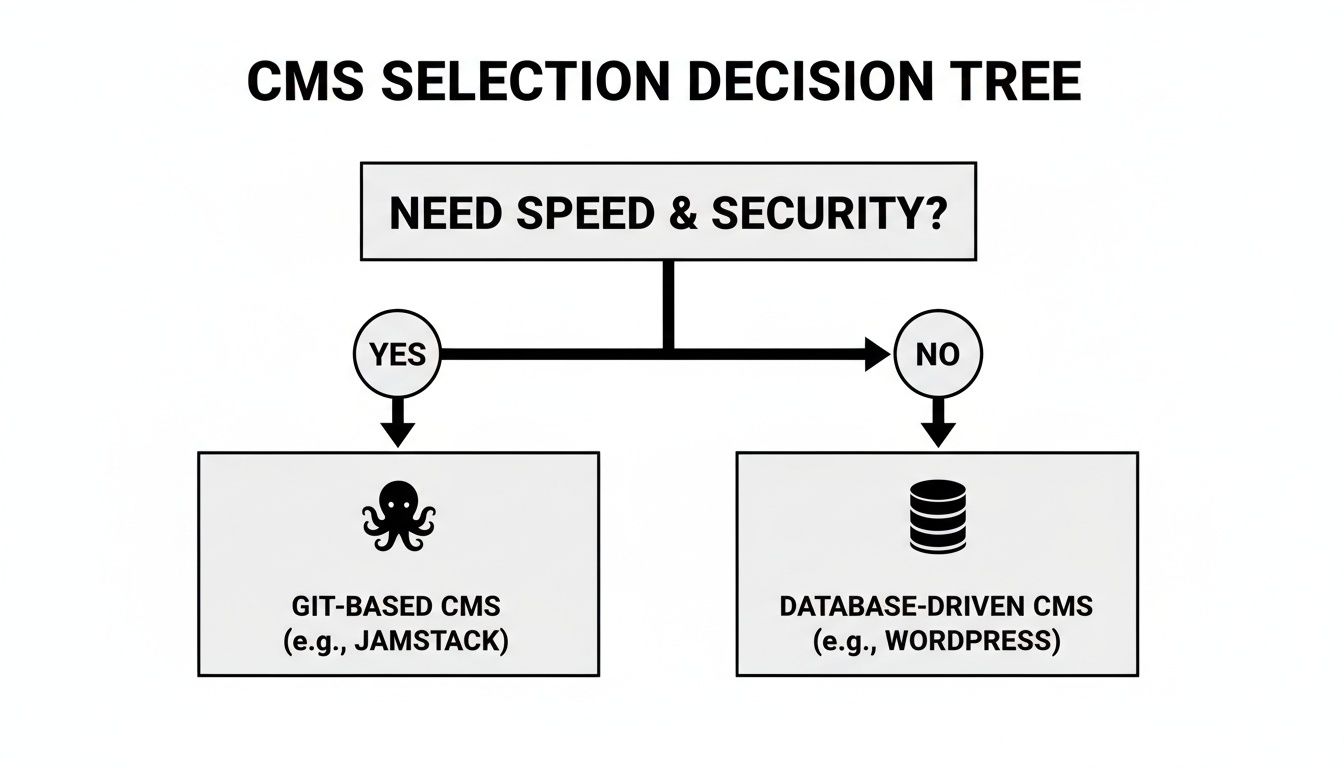
As you can see, teams that put a premium on speed and security are often a perfect match for modern, Git-native content management.
By looking back at the different architectures—SaaS, Headless, and Git-based—and mapping them to real-world business needs, you can cut through the marketing noise. This approach helps ensure you pick a cloud content management system that truly fits your goals and sets you up for success down the road.
Frequently Asked Questions About Cloud CMS
Even after breaking down the different models and benefits, it's natural to have a few lingering questions when you're thinking about moving to a cloud content management system. Let's tackle some of the most common ones that pop up.
How Secure Are Cloud Content Management Systems?
This is usually the first question on everyone's mind, and for good reason. Handing over your content can feel like a leap of faith. The reality is, reputable cloud CMS providers live and breathe security. It’s their core business, and they often invest far more in protection than a single company could justify for an on-premise setup.
These platforms have dedicated security teams working around the clock, undergo rigorous third-party audits, and maintain certifications like SOC 2. You’ll typically find security features like:
- Data Encryption: Your data is scrambled both while it's traveling over the internet (in transit) and while it's sitting on their servers (at rest).
- Advanced Threat Detection: They use sophisticated systems to spot and stop malicious activity before it ever becomes a problem.
- Strict Access Controls: You get fine-grained control over who can see and edit what, ensuring sensitive information stays that way.
When you look at Git-native tools like JekyllPad, the security model is even tighter. The application runs entirely within your web browser and connects directly to your own GitHub repository. This means your data isn't passing through extra servers, dramatically reducing the potential points of attack.
Can I Migrate My Existing Content To a Cloud CMS?
Absolutely. Migrating your content is a well-trodden path. Nearly every major cloud CMS provider offers tools, APIs, and extensive documentation to help you move everything over as smoothly as possible. The basic process involves exporting from your old system and importing into the new one.
Of course, the complexity can vary. If you have a lot of custom content types, you might need a bit of technical help to map everything correctly. For anyone shifting to a static site workflow, however, the process is often refreshingly simple—it can be as straightforward as organizing your Markdown files and images within a Git repository.
What Is The Difference Between a Cloud CMS And a DAM?
It's helpful to think about this in terms of scope. A cloud CMS is your command center for all digital content—your website pages, blog articles, product descriptions, you name it. It handles the entire lifecycle from creation to publication.
A Digital Asset Management (DAM) system, on the other hand, is a specialist. Its sole focus is to store, organize, tag, and distribute your media files: images, videos, PDFs, and brand logos.
Many modern cloud CMS platforms now come with some pretty solid DAM features built right in. But for large organizations with enormous media libraries, a dedicated, standalone DAM that integrates with the CMS is often the best way to maintain tight control over every single brand asset.
Ready to see how simple and secure managing a static site can be? JekyllPad gives you a clean visual editor that works directly with your GitHub repository. You get all the power of a Git-based workflow without having to live in the command line. Get started for free and feel the difference. Learn more at JekyllPad.