
At its core, a headless CMS is simply a content management system where the place you store your content (the "body") is completely separate from how and where you display it (the "head").
Instead of being locked into a single website template, a headless CMS makes your content available through an API. This means you can pull that same content into a mobile app, a smart display, an IoT device, or any other digital platform you can dream up. It’s all about flexibility.
Headless Vs. Traditional CMS: What’s The Real Difference?
To really get what a headless CMS is, let's use an analogy.
Think of a traditional CMS like WordPress as an old-school, all-in-one television. The screen (the frontend) and all the internal guts that make it work (the backend) are fused together in one big box. It does its one job—showing content on that specific screen—very well. But you can't just take the channel tuner out and use it in your car.
A headless CMS, on the other hand, breaks that model wide open. It’s only the content hub—the brain that stores and organizes all your articles, images, and data. It doesn't have a built-in screen or "body" at all. Instead, it uses an API (Application Programming Interface) to send that content out to any screen, anywhere. This decoupling is what makes it so powerful.
A headless CMS is designed with one primary goal in mind: to store and deliver structured content. The presentation of that content is left entirely up to the developer, providing complete creative control.
This architectural shift is making big waves. The global headless CMS software market is projected to surge from $3.95 billion to a massive $26.66 billion by 2035. This boom is driven by the need for omnichannel experiences, where content has to flow seamlessly to every device and platform. You can dig into the numbers in this headless CMS software market report.
The Core Difference: Decoupling
The most important concept to grasp here is the "separation of concerns." In a traditional, monolithic system, content management and content delivery are bolted together. A headless architecture splits them apart.
- The Backend: Its only job is to be a great place to store, manage, and organize content. Nothing more.
- The Frontend: This is the user-facing part, which can be built with any modern technology you like—React, Vue, Svelte, you name it—to create a completely custom experience.
- The API: This acts as the secure bridge, allowing any frontend to request content from the backend on demand.
To see this in action, it helps to put the two models side-by-side.
Headless CMS vs Traditional CMS at a Glance
This table gives you a quick comparison of the fundamental architectural differences between headless and traditional (monolithic) content management systems.
| Feature | Traditional CMS (Monolithic) | Headless CMS (Decoupled) |
|---|---|---|
| Architecture | Tightly coupled (backend and frontend are one unit) | Decoupled (backend and frontend are separate) |
| Content Delivery | Delivers content to a specific website template | Delivers content via API to any platform |
| Frontend Flexibility | Limited to the provided themes and templates | Total freedom; use any frontend technology |
| Developer Focus | Template customization and plugin management | Building custom applications and user experiences |
| Target Use Case | Single websites, blogs, simple web applications | Multi-channel, IoT, mobile apps, complex sites |
Ultimately, both systems handle the same core content management functions, like creating, editing, and publishing. A headless approach simply rethinks how that managed content connects to the final user interface, handing developers an incredible amount of freedom in the process.
How a Headless Architecture Actually Works
To really get what a headless CMS is all about, you have to look under the hood at its API-first design. The whole idea is beautifully simple: your content is treated as pure, structured data, completely untethered from how or where it gets displayed. This magic happens thanks to Application Programming Interfaces (APIs), which act as the go-between for your content hub and any application that needs it.
Let's use a restaurant analogy. Your headless CMS is the kitchen—it's where all the premium ingredients (your content) are prepped and stored. The customer's table is the "head"—your website, a mobile app, or even a smart-fridge display. The waiter is the crucial link connecting the two.
The waiter is your API. It takes a specific order from the table, relays it to the kitchen, and brings back exactly what was requested. The API does the same thing, fetching precisely the content needed from the CMS and delivering it in a clean, predictable format to any device that asks for it.
The Role of the API
The API is the engine that makes the entire headless system hum. It’s essentially a universal contract that says, "If you ask for content this way, I'll give it to you in a standard format," which is almost always JSON. This simple agreement gives developers total freedom on the presentation side.
- Frontend Freedom: Developers can use modern frameworks they love—like React, Vue, or Svelte—to build incredibly fast and dynamic user experiences. They're not locked into a clunky, proprietary templating system.
- Omnichannel Delivery: That same API can push content to a corporate website, an iOS app, and an in-store digital kiosk, all at the same time. You manage the content in one place and deliver it everywhere.
- Future-Proofing: When the next big thing comes along (think smart watches or VR headsets), you just build a new "head" to pull content from the API. The backend content hub never has to change.
This diagram shows the difference between the all-in-one traditional CMS and the flexible, decoupled model of a headless setup.
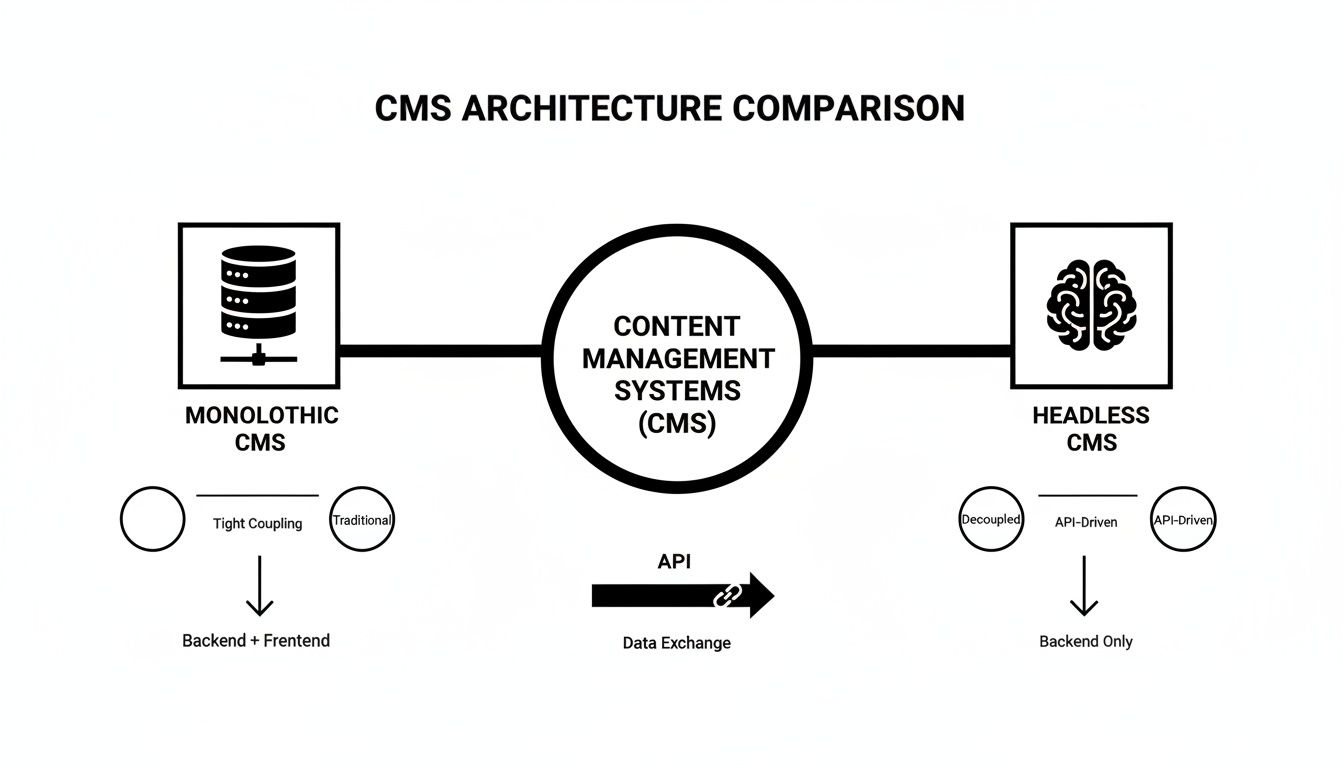
The big takeaway here is how the API becomes the central nervous system, creating a one-to-many relationship between a single piece of content and all the different places it needs to live.
Connecting to the Frontend
Once the API delivers the raw content, it's up to the frontend application to bring it to life. This is where a headless CMS really proves its worth, especially when combined with modern development approaches like the Jamstack.
For example, a developer can use a static site generator (SSG) to call the API during a "build" step. The SSG pulls in all the content from the headless CMS and uses it to pre-generate every page of the website.
The result is a lightning-fast site made of static HTML, CSS, and JavaScript files. This method massively improves performance and security because the final website has no live connection to a database.
It’s a powerful combination. If you want to learn more about how this piece of the puzzle works, check out our guide on what an SSG is and why it's changing the game. By neatly separating content management from presentation, a headless architecture gives your team the keys to build exactly the experience they imagine, without compromise.
Why Go Headless? The Key Benefits Explained
Making the switch to a headless architecture is more than just a tech upgrade—it's about building a real competitive edge. Companies are increasingly leaving behind old-school, all-in-one systems to gain a level of flexibility and performance that just wasn't possible before. The numbers tell the story.
Across the globe, 44% of organizations have already moved to a headless CMS. That figure climbs to a surprising 53% in smaller companies, showing it's not just an enterprise play. In fact, a whopping 73% of organizations now use headless architecture in some capacity. It's clear this approach is delivering serious value. For a deeper dive into these trends, you can explore the latest data on CMS market share.
So, what’s driving this massive shift? Let’s break down the tangible benefits.
Unmatched Frontend Freedom for Developers
Ask any developer what they love most about headless, and they'll likely tell you it's the freedom. Traditional CMS platforms often lock them into proprietary themes or clunky templating languages, forcing them to spend more time fighting the system than building great experiences.
A headless CMS throws those constraints out the window. Since your content is just data served over an API, developers are free to use whatever modern tools they love. Whether it's React, Vue, or Svelte, they can build the "head"—the user-facing part—from scratch, exactly how they want.
A headless CMS empowers developers to use the best tools for the job, resulting in higher-quality applications and a more motivated, efficient development team. They build the 'head' however they see fit.
This isn't just about making developers happy. It means your website or app can be faster, more interactive, and tailored perfectly to what your users actually need.
Create Once, Publish Everywhere (COPE)
The real magic of decoupling content from presentation shines when you need to be everywhere your audience is. Headless architecture is built on a "Create Once, Publish Everywhere" (COPE) model. You write a blog post, update a product description, or launch a new campaign one time, in one place.
Then, that same piece of content can be seamlessly delivered to an ever-growing list of channels:
- Your main website, built with a speedy static site generator.
- A native mobile app for both iOS and Android.
- In-store digital signs or interactive displays.
- Automated email marketing campaigns.
This omnichannel readiness is a game-changer. It puts an end to the mind-numbing task of copying, pasting, and reformatting content for every new platform. Your content becomes a central, reusable resource, ensuring your brand message is consistent everywhere and dramatically cutting down the time it takes to get new ideas out the door.
Enhanced Security and Scalability
By separating your content backend from your public-facing website, you drastically reduce the potential points of attack. In a traditional CMS, the database, plugins, and frontend code are all tangled together on the same server, creating a wide-open target for security threats.
With a headless setup, your content management system can be tucked away behind a firewall, completely inaccessible to the public. The only way in or out is through a secure API. When you pair this architecture with a static site generator—which serves pre-built, plain HTML files—you create a fortress. There’s no database to hack and no live server code to exploit on the frontend, resulting in a far more secure and resilient platform that can handle huge traffic spikes without breaking a sweat.
We've covered the upsides, but it's important to look at the full picture. A headless approach isn't the right fit for every single project, and it comes with its own set of challenges.
Pros and Cons of a Headless CMS Approach
A balanced summary of the key advantages and potential drawbacks to consider before migrating to a headless CMS.
| Pros (Advantages) | Cons (Disadvantages) |
|---|---|
| Complete design freedom for developers. | Requires more technical expertise to set up. |
| Improved performance and faster load times. | Initial development costs can be higher. |
| Enhanced security by separating services. | Lacks a built-in visual editor by default. |
| Future-proof and easily adaptable. | Content editors may face a steeper learning curve. |
| Omnichannel content delivery from a single source. | Can be overkill for simple websites. |
Ultimately, the decision to go headless depends on your team's skills, your project's goals, and your long-term vision. For teams looking for maximum flexibility and performance, the pros often far outweigh the cons.
2. Where Headless CMS Really Shines: Real-World Use Cases
Theory is great, but let's talk about where the rubber meets the road. Seeing how a headless CMS solves actual business problems is what makes its value crystal clear. The freedom to send content anywhere through an API unlocks a whole new playbook that older, traditional systems just can’t compete with. This is the engine powering modern digital experiences for everyone from global retail brands to nimble tech startups.
The market trends tell the same story. The headless CMS industry is projected to balloon into a $26.66 billion market by 2035. Here in the United States, demand is expected to leap from $0.3 billion to $2.4 billion over that same period. This isn't just hype; it's a direct response to the need for flexible, multi-channel content delivery. You can dig deeper into these numbers in this US headless CMS market analysis.
So, what does this look like in practice?
Omnichannel E-commerce Experiences
For any e-commerce brand, a consistent experience is non-negotiable. A headless CMS gives a retailer a single source of truth for all product information—descriptions, pricing, inventory, you name it. This centralized content hub can then feed any number of front-end applications.
Imagine managing content for:
- Your Website: A lightning-fast, SEO-optimized storefront built with a modern framework like Next.js.
- A Mobile App: A slick, native iOS or Android app designed for a tailored shopping journey.
- In-Store Displays: Interactive kiosks or digital signs that pull real-time promotions and stock levels.
This is the classic "create once, publish everywhere" model. It ensures a customer gets the same, accurate information whether they’re browsing on their laptop at home, on their phone during their commute, or looking at a screen in your brick-and-mortar store. No more content silos, just streamlined, consistent messaging.
Multi-Platform Content Publishing
Media companies and digital publishers face a similar challenge: their audience is scattered everywhere. They need to get articles, videos, and podcasts out to a dozen different platforms, and they need to do it fast.
With a headless CMS, they can. An editor can write one story and have it automatically formatted and pushed out simultaneously. Think about a breaking news alert. It can instantly appear on the main website, pop up as a notification in the mobile app, and even get pushed as an audio brief to smart speakers like Amazon Alexa. All from a single piece of content, which dramatically speeds up publishing and expands reach without creating extra work.
The team at Sanity.io created a great visual that shows how structured content can be adapted for wildly different channels, from a website to a print magazine.
This perfectly illustrates the power of separating your content from its presentation. The content itself is pure and flexible, ready to be shaped for any medium.
SaaS In-App Content and Documentation
For Software-as-a-Service (SaaS) companies, a headless CMS is a game-changer for managing the content that lives inside their products. We’re talking about things like onboarding tooltips, in-app feature announcements, or the articles in a help center.
By pulling this content from a headless CMS, product and marketing teams can update crucial user-facing text without shipping a new version of the entire application. Need to clarify a tooltip or announce a new feature? Just update it in the CMS, and it goes live instantly. This agility means teams can respond to user feedback and improve the product experience in near real-time, no code deployment required.
Integrating a Headless CMS into a Modern Tech Stack
A headless CMS isn't an island; it's the content hub in a modern, composable architecture. It truly shines when paired with the Jamstack (JavaScript, APIs, and Markup), an architectural approach for building websites that are incredibly fast, secure, and easy to scale.
Instead of being locked into one giant, monolithic system, this model lets you pick the best tool for each specific job. Your headless CMS handles the content, your favorite frontend framework builds the user interface, and APIs stitch everything together. This "pick and mix" approach is what modern web development is all about.
Connecting Content to Code
So, how does a developer actually build a site with this kind of setup? The whole process hinges on connecting the headless CMS to a frontend application, which is usually a static site generator (SSG) or a modern framework like Next.js or Astro.
Think of the SSG as the construction crew for your website. During a "build," it calls the headless CMS's API, fetches all the content it needs—blog posts, product data, you name it—and uses that data to pre-build every single page of your site as static HTML files.
This pre-rendering step is the secret sauce behind the incredible performance of Jamstack sites. Since the pages are already assembled before a user even arrives, they load in the blink of an eye. This makes for a fantastic user experience and gives you a serious SEO advantage.
The API is the bridge between your content and your code. This clean separation gives developers total freedom to create a custom front end without ever being limited by the backend CMS.
The Power of a Git-Based Workflow
To really take things to the next level, many teams embrace a Git-based workflow. Git, the version control system that powers platforms like GitHub, becomes the single source of truth for both your site's code and its content. This creates an incredibly powerful and collaborative environment.
Here’s what happens when an editor makes a change in the CMS:
- Commit to Git: The updated content is automatically saved and committed to a Git repository.
- Trigger a Build: That commit kicks off a new, automated build of the website.
- Deploy Changes: The static site generator rebuilds only the affected pages and deploys the fresh versions to your hosting provider.
This workflow makes content management transparent and version-controlled. Every edit is tracked, and if you ever need to revert a change, it’s a trivial task. It also brings the worlds of developers and content creators closer together, since everyone is contributing to the same core repository.
New tools are making this even easier by providing a user-friendly visual layer over this powerful developer workflow. You can learn more about how a GitHub-based CMS can simplify this entire process for everyone on your team, technical or not. By weaving a headless CMS into modern development practices, you’re not just building something fast and secure—you’re creating a system that’s truly collaborative and efficient.
Is a Headless CMS Right for Your Project?
Deciding to go headless isn't just a technical choice; it's a strategic move that shapes how you'll manage and deliver content for years to come. Now that we’ve walked through the architecture, benefits, and common uses, it's time to figure out if this modern approach actually fits what you’re trying to build.
A good place to start is your content delivery plan. Are you just running a single website? Or is your vision bigger, involving mobile apps, digital kiosks, or even smartwatches? If you need to be everywhere at once, a headless CMS is practically a no-brainer. It sets your content free, ready to be deployed on any new channel that pops up down the road.
Key Questions for Your Team
Next, take a hard look at your team's skills and what they truly need to succeed. The conversation is less about the technology itself and more about what it unlocks for them.
- Is top-tier performance a deal-breaker? If you need lightning-fast load times for SEO and to keep users from bouncing, pairing a headless CMS with a static site generator is the way to go.
- Does your development team crave freedom? A headless architecture lets developers work with the tools and frameworks they love, which almost always leads to a better end product and a happier team.
- Do you need to plug into other systems? The API-first nature of a headless CMS makes it incredibly easy to connect your content to e-commerce platforms, analytics dashboards, or marketing automation software.
Ultimately, a headless CMS is the right choice when flexibility, performance, and scalability are non-negotiable. It prepares your digital presence for the future by separating what you say from where you say it.
If your team is already working with modern frameworks, a headless setup will feel like a natural extension of your workflow. For instance, exploring an Astro headless CMS solution shows just how smoothly content can mesh with today’s development practices. This path gives you the power to build exceptional, future-ready digital experiences.
Still Have Questions? Let's Clear Things Up
Even after you've wrapped your head around the architecture, it's natural to have questions about how a headless CMS actually fits into your team's day-to-day work. Let's tackle some of the most common ones.
Is This Going to Be a Nightmare for My Non-Technical Team?
Not at all. This is probably one of the biggest misconceptions about going headless. While a developer is essential for the initial setup—building the website or app that pulls in the content—the experience for content creators is often simpler and more focused.
Think of it this way: instead of a cluttered interface with design settings, layout options, and plugin menus, your writers get a clean, streamlined environment dedicated purely to creating content. They don't have to worry about accidentally breaking the site's design. The content creation part is usually just as intuitive as any traditional CMS.
But Can We See What It Looks Like Before Publishing?
Yes, absolutely. In the early days, this was a real pain point, but it's a solved problem now. Modern headless platforms and the frontend frameworks they connect to have excellent preview features.
These systems work by linking the content backend to a staging version of your website. This gives editors a live, pixel-perfect preview of how their changes will appear on the actual site before they hit the publish button. It’s a must-have for any serious content workflow.
This means your marketing team can work with total confidence, knowing their content will look exactly as they expect, without needing a developer to double-check everything.
I've Heard "Decoupled" and "Headless" Thrown Around. What's the Difference?
You'll often hear these terms used interchangeably, but there's a slight technical difference.
A true headless CMS is 100% API-first. It has zero frontend presentation layer—its only job is to store and deliver content wherever you ask it to.
A decoupled CMS, on the other hand, also separates the backend and frontend but might come with an optional or default presentation system (like templates). For all practical purposes, though, both describe the same core idea: your content isn't locked into a single website design.
Ready to manage content on your static site without the technical friction? JekyllPad provides a visual, Git-based CMS that lets you focus on creating content, not fighting with code. Get started for free at JekyllPad.