
Ever wondered how developers and creators get beautiful, fast websites up and running without spending a dime on hosting? Often, the answer is GitHub Pages. It’s a free hosting service from GitHub that cleverly turns the code sitting in your repository into a live website.
At its core, GitHub Pages takes simple files—your standard HTML, CSS, and JavaScript—and publishes them directly to the web. This makes it an incredibly popular choice for anyone looking to showcase their work, from individual portfolios to full-blown project documentation.
What Exactly Is GitHub Pages

Think of your GitHub repository as a digital workshop where you build your projects. GitHub Pages is like having a "publish" button right inside that workshop. It transforms the code you've carefully crafted into a real, functional website that anyone can visit. And the best part? It's completely free.
The secret to its speed and simplicity lies in how it serves static content. Unlike a dynamic site that constantly needs to talk to a server and a database to build a page for each visitor (like a WordPress blog), a static site is pre-built. All the pages are just plain HTML, CSS, and JavaScript files, sitting there ready to go. This makes them incredibly fast and secure because there are far fewer moving parts.
The Magic of Automated Deployment
One of the most beloved features of GitHub Pages is its hands-off deployment. You simply designate a specific branch in your repository for publishing. The moment you push new code to that branch, GitHub automatically kicks off a build process. It takes your source files, runs them through a static site generator like Jekyll if you're using one, and deploys the updated site.
This tight integration means your Git workflow is your publishing workflow. You never have to mess with old-school FTP clients or complicated deployment scripts again. This automation is a huge win for a few reasons:
- Effortless Updates: Fix a typo or add a new blog post just by committing and pushing your changes. It's that simple.
- Built-In Version Control: Since your website is just code in a repo, its entire history is tracked by Git. If an update breaks something, rolling back to a previous version is trivial.
- Zero-Cost Hosting: For personal projects, open-source documentation, or a simple portfolio, you get robust hosting without ever seeing a bill.
Why Static Is a Superpower
The simplicity of static hosting is its greatest strength. With no backend server logic or database to worry about, the potential for security breaches is dramatically reduced. Pages load in a flash because they are just simple files served from a powerful content delivery network (CDN), which means a better experience for your visitors and a nice little boost for your SEO.
GitHub Pages has carved out a special place in the world of web hosting. In an ecosystem full of complex and costly options, its zero-cost model and seamless GitHub integration make it the default choice for countless developers and teams.
This straightforward approach has made GitHub Pages a massive success. It powers 0.2% of all websites tracked by W3Techs as of early 2026—a truly impressive slice of the market. You can dig into these industry statistics to see how it stacks up. Its popularity proves that for many projects, a fast, reliable static site is all you really need.
To quickly get a handle on what GitHub Pages offers, this table breaks down its most important aspects.
GitHub Pages Core Features at a Glance
| Feature | Description | Benefit |
|---|---|---|
| Free Hosting | Host one site per account/organization and unlimited project sites at no cost. | Makes it accessible for students, hobbyists, and open-source projects. |
| Custom Domains | Easily map your own domain name (e.g., www.your-domain.com) to your site. |
Provides a professional and branded web presence. |
| Jekyll Integration | Built-in support for Jekyll, a popular static site generator, for easy blogging. | Simplifies content management without needing a complex CMS. |
| HTTPS Enforcement | Automatically secures your custom domain with a free SSL certificate. | Enhances security and visitor trust, which is also great for SEO. |
| Git-Based Workflow | Updates are made by pushing commits to your repository's designated branch. | Your entire website benefits from version control, collaboration, and history. |
This combination of features makes it an incredibly practical tool for a wide range of web projects.
Choosing Your GitHub Pages Site Type
When you’re ready to launch a site with GitHub Pages, one of the first decisions you'll make is what type of site to create. It's a choice that shapes how your site is structured and where it lives online, so getting it right from the start is key.
GitHub gives you three options, and each one is tied to a specific kind of repository. Think of it like setting up different online addresses. You have your main personal or business headquarters, and then you have separate showcases for individual projects.
User and Organization Sites
First up are User and Organization sites. These are essentially the same thing, just for different account types—one for your personal GitHub profile and one for a GitHub organization.
This type of site is meant to be your main web presence. It's the perfect spot for a personal portfolio, a blog, or the central hub for an organization's open-source projects. To get one started, you have to create a repository with a very specific name.
- The Magic Repository Name: The repo must be named
username.github.iofor a user ororgname.github.iofor an organization. - A Clean URL: This naming convention automatically gives you a clean, root-level URL, like
https://username.github.io. - One and Only: You can only have one User or Organization site per account. It’s your official, central home base.
Everything you push to the publishing branch of this special repository becomes part of this single, primary website.
Project Sites
Now for the most common option: the Project site. Unlike the single User or Organization site you get, you can create as many Project sites as you want. Each one is linked to a specific repository in your account—anything that isn't named username.github.io.
Project sites are fantastic for things like documentation for a software library, a small website for an event, or a landing page to show off a specific app. Their URLs clearly show this relationship by living under your main domain.
A Project site is published to a subpath of your main GitHub Pages URL, like
username.github.io/repository-name. This makes it obvious that the site is about a specific project, not your main portfolio.
For example, say you have a repository called cool-slider. The Project site for it would live at https://username.github.io/cool-slider. This keeps all your projects neatly filed under your main GitHub identity while giving each one its own dedicated space.
Key Configuration Differences
The setup for each site type has a few important differences, especially when it comes to the source branch. This is a common trip-up for people just starting out, and knowing the difference will save you a headache later.
Here’s a simple breakdown of how they usually work:
| Site Type | Repository Name | Published URL | Typical Source Branch |
|---|---|---|---|
| User | username.github.io |
https://username.github.io |
main or master |
| Organization | orgname.github.io |
https://orgname.github.io |
main or master |
| Project | Any other name (e.g., my-cool-project) |
https://username.github.io/my-cool-project |
gh-pages |
While you can technically customize the source branch for Project sites, using a separate gh-pages branch has been the go-to convention for years. It’s a smart practice because it keeps your project’s source code (living on the main branch) completely separate from the compiled static files for its website. This keeps your repository clean and much easier to manage.
Powering Your Site with Static Site Generators
Sure, you can build a perfectly fine website on GitHub Pages with just plain old HTML and CSS. But to unlock its real potential, you’ll want to bring in a Static Site Generator (SSG).
Think of an SSG as a smart assembly line for your website. You feed it the raw materials—like blog posts written in simple Markdown and a few template files—and it spits out a complete, optimized static site. This is how you go from hand-coding every single page to managing a complex site with ease. It's the secret sauce behind most of the polished, professional sites you see hosted on GitHub Pages.
Jekyll: The Native Integration
GitHub Pages and Jekyll go way back. For a long time, this popular Ruby-based SSG was the only officially supported generator, and that tight integration still exists today.
What does that mean for you? It means GitHub understands a Jekyll project right out of the box. Just push your Jekyll source files to the repository, and GitHub Pages automatically handles the rest. It runs the build process behind the scenes and deploys the finished static files for you. No extra configuration, no complicated setup. This makes Jekyll the most straightforward way to get a blog or a documentation site up and running on the platform.
Expanding Beyond Jekyll with GitHub Actions
But what if you're a fan of a different tool? The world of SSGs is huge, with fantastic options like Hugo, Eleventy, and Astro offering different features and performance benefits. For years, using these with GitHub Pages was a pain. You had to build the site on your own computer and then commit just the finished HTML files to your repository—a clunky, manual process.
That all changed with GitHub Actions.
GitHub Actions is a powerful automation engine built right into GitHub. It lets you create custom scripts, or "workflows," that run automatically in response to events in your repo, like pushing new code. This was a complete game-changer, as it opened the door to automating the build process for any static site generator.
This opens up a ton of possibilities, whether you're building a personal blog, a project page, or a full-blown documentation site for your organization.
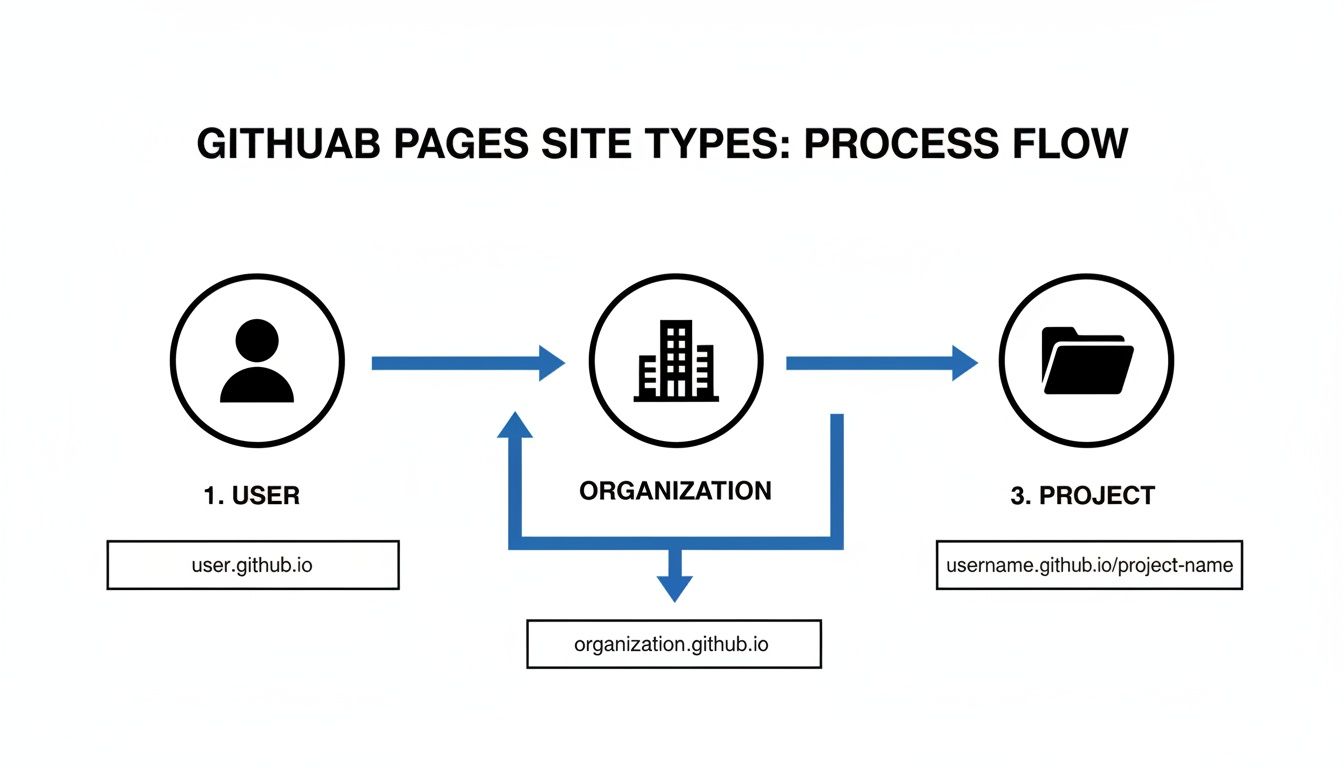
As you can see, the platform supports everything from a simple username.github.io site to more complex project sites living under a specific repository path.
How a Modern SSG Workflow Works
Using GitHub Actions might sound intimidating, but the idea is actually very simple. You just add a special configuration file to your repository that gives GitHub a set of instructions.
A GitHub Actions workflow is like giving GitHub a recipe. It tells the server to install your favorite SSG, run the build command, and then put the finished website files in the right place to go live.
This whole process is automated. Here’s a quick rundown of what happens every time you push a change:
- Trigger: The workflow kicks off automatically when you push new code to your main branch.
- Setup: A clean virtual machine starts up, installs your SSG (like Hugo or Eleventy), and any other tools your site needs.
- Build: The workflow runs your SSG’s build command (e.g.,
hugoornpx @11ty/eleventy). This takes all your content and templates and generates apublicor_sitefolder full of static HTML, CSS, and JavaScript. - Deploy: Finally, the workflow pushes that folder of finished files to the branch designated for publishing, and your site is updated.
This hands-off process, often called a CI/CD pipeline, means you're free to use any of the best static site generators available today without giving up the convenience of GitHub's automated hosting. You truly get the best of both worlds: a modern development experience with the tools you love, paired with free, reliable, and fast hosting.
Knowing the Platform's Boundaries
GitHub Pages is a fantastic tool, but it's not the right fit for every single project out there. It's important to understand where its limits are—not as flaws, but as deliberate design choices that keep the service free, fast, and stable for millions of users.
Think of the usage limits as friendly guardrails. They’re in place to make sure one massive, high-traffic site doesn't slow things down for everyone else who relies on the platform for their project sites and documentation.
Core Resource Limits
GitHub is pretty open about its "soft" limits, and honestly, they're more than generous for the vast majority of personal sites, blogs, and project pages. If you find your site consistently bumping up against these numbers, it’s usually a great sign—it means you've graduated to a point where a dedicated hosting solution is your next logical step.
Here are the key numbers to keep in mind:
- Published Site Size: Your entire published site—all the HTML, CSS, images, and other files—should stay under 1 GB.
- Monthly Bandwidth: You get a generous 100 GB of data transfer each month.
- Builds Per Hour: The behind-the-scenes build process (when Jekyll works its magic) is capped at 10 builds per hour.
For most blogs, portfolios, or documentation, you’ll likely never even notice these limits. But if you're planning on hosting huge video files or your site suddenly goes viral, you might get close to that bandwidth cap.
A good way to think about these limits is as a built-in health check for your project. Hitting a limit often just means you've reached a level of success where it makes sense to invest in a more powerful hosting platform.
When GitHub Pages Is Not the Right Tool
The biggest thing to remember about GitHub Pages is baked right into its design: it only serves static content. It can’t run server-side code (like PHP or Python) or talk to a database. This is a fundamental constraint that makes it the wrong choice for certain kinds of websites.
For instance, you simply can't build these types of sites directly on GitHub Pages:
- E-commerce Stores: Processing payments and managing shopping carts requires a backend server, which GitHub Pages doesn't do.
- Web Apps with Databases: Anything that needs to save user info, like a forum or social media app, won't work here.
- Sites with Server-Side Logic: If your site depends on languages like PHP, Python, or Node.js to create pages on the fly, it's a non-starter.
This doesn't mean you can't link to these kinds of services from your GitHub Pages site. A common strategy is to use GitHub Pages for a sleek marketing site or blog and then have it connect to a separate, full-featured web application hosted somewhere else.
The trick is knowing these limitations from the start. When you match your project's needs to the right tools from day one, you save yourself a ton of future headaches and give your site the room it needs to grow.
How GitHub Pages Stacks Up Against the Competition
Choosing where to host your site can feel like a big decision. Let's break down where GitHub Pages really shines and how it compares to other popular options out there.
Think of GitHub Pages as the go-to choice for simplicity and pure developer focus. It’s built right into the workflow you likely already know and use every day. Its main rivals are modern static hosting platforms like Netlify and Vercel, and on the other side, the old guard of traditional shared hosting.
Each of these has its own place, so let’s see where GitHub Pages fits in.
Modern Static Hosting Platforms
Platforms like Netlify and Vercel took the blueprint that GitHub Pages created and supercharged it. They start with the same core idea—build a site directly from a Git repository—but then they bolt on a whole suite of powerful automation and services.
These platforms offer a more souped-up developer experience with features that GitHub Pages just doesn't have on its own.
- Advanced Deployments: You get things like deploy previews for every single pull request, A/B testing capabilities, and the ability to instantly roll back to a previous version if something goes wrong.
- Serverless Functions: Need a contact form or some simple user authentication? You can add dynamic functionality using serverless functions without ever having to spin up or manage a backend server.
- Global CDN: While GitHub Pages is certainly quick, these services often leverage more powerful, enterprise-grade Content Delivery Networks (CDNs) to make your site load even faster for visitors around the globe.
Of course, all that extra power comes at a cost—both in complexity and potentially in dollars. Their free tiers are quite generous, but if your site gets a lot of traffic or you need those premium features, you'll be looking at a paid plan. When you're weighing your options, it's always a good idea to explore various alternatives to get a full picture of the market.
Traditional Shared Hosting
At the other end of the spectrum, you have traditional shared hosting from providers like Bluehost or GoDaddy. For a long time, this was pretty much the only game in town for getting a website online. These services are built to run dynamic, server-side applications—think WordPress.
With shared hosting, you get access to a server, a database, and the ability to run backend code like PHP. This makes it a solid choice for things like e-commerce stores, forums, or complex content management systems. You can dive into a detailed comparison of CMS options to get a better sense of how these systems work.
The big trade-off with shared hosting is maintenance. You're on the hook for everything: server updates, security patches, and performance tuning. With a static host like GitHub Pages, all of that is handled for you.
For a personal blog, portfolio, or documentation site, shared hosting is usually complete overkill. It can be slower because you're sharing server resources with other websites, and the setup is far more hands-on than a simple git push.
Making the Right Choice
So, which one is right for you? It all comes down to what your project actually needs.
GitHub Pages is still the undisputed champ when it comes to simplicity, cost (it's free!), and its perfect integration into the developer workflow. It's the ideal platform for personal websites, project documentation, and blogs where your primary focus is on creating content, not fiddling with infrastructure.
GitHub Pages vs Netlify vs Vercel
When looking at the modern static hosting providers, a direct comparison helps clarify the trade-offs. Here’s a quick look at how GitHub Pages measures up against two of the most popular alternatives, Netlify and Vercel.
| Feature | GitHub Pages | Netlify | Vercel |
|---|---|---|---|
| Hosting Model | Free static hosting | Generous free tier, paid plans | Generous free tier, paid plans |
| Build Process | Basic Jekyll builds, Actions | Advanced build pipelines, plugins | Optimized for Next.js, Functions |
| Deploy Previews | No (manual setup required) | Yes, for every pull request | Yes, for every pull request |
| Serverless Functions | No | Yes (Netlify Functions) | Yes (Vercel Functions) |
| Ideal For | Project sites, docs, blogs | All-around static sites, JAMstack | React/Next.js apps, frontend-heavy sites |
This table shows that while GitHub Pages is fantastic for core static hosting, Netlify and Vercel are built for more complex applications that need a richer feature set right out of the box.
If your goal is to get a fast, secure, and reliable website online with zero fuss and zero cost, you really can't go wrong with GitHub Pages. Once your project's needs grow and you start wanting things like deploy previews or serverless functions, moving to a platform like Netlify or Vercel is a natural next step.
Simplifying Content Creation with a Visual CMS
Let's be honest: the standard Git-based workflow is powerful for developers, but it can be a real headache for writers, marketers, and other content creators. Expecting your team to master command-line syntax, navigate Git branches, and wrangle Markdown or YAML files in a code editor is a recipe for a slow, frustrating content pipeline. This friction is exactly why so many teams end up stuck with clunky, traditional content management systems.
But it doesn't have to be an either/or situation. What if you could get all the benefits of a static site—speed, security, version control—with a user-friendly editor that anyone can use? That’s where a Git-based visual CMS comes into play, acting as the perfect bridge between your technical setup and your creative team.
The Power of a User-Friendly Interface
A visual CMS effectively hides all the Git complexity behind an intuitive interface. Instead of cloning repos and pushing commits, your content team gets a familiar, word-processor-like experience. This simple shift opens up content creation on your GitHub Pages site to everyone, not just the developers.
This approach delivers some serious wins:
- No Git Knowledge Required: Your writers and editors can jump right in and create content without ever needing to open a terminal.
- Reduced Developer Overhead: Developers are no longer the bottleneck for every little content update, freeing them up to focus on what they do best: building features.
- Faster Content Cycles: A new blog post, a quick documentation fix, or a landing page tweak can go from idea to published in minutes.
Think of a visual CMS as a tool that turns your GitHub repository into a collaborative content hub. It keeps all the technical advantages of a static site while delivering the simple, accessible experience your whole team needs.
Tools like JekyllPad were built from the ground up to solve this exact problem. By connecting directly to your GitHub account, they provide a clean, straightforward editing environment where anyone can contribute with confidence. We dive deeper into this in our guide on how a GitHub-based CMS can streamline your workflow.
How a Visual CMS Works with GitHub Pages
The process behind the scenes is incredibly elegant. When a team member makes a change in the visual editor—whether it's fixing a typo or publishing a brand-new article—the CMS handles all the Git commands automatically. It creates a new, properly formatted commit and pushes it to the right branch in your repository, all without the user seeing a single line of code.
Here's a look at how an intuitive interface can manage content that's actually stored in a GitHub repository.

The key takeaway is that the technical heavy lifting is done for them, letting them focus purely on creating great content.
This push immediately triggers the same automated deployment process you already have set up. Whether you're using Jekyll's built-in integration or a custom GitHub Actions workflow, the platform sees the new commit, kicks off a build, and deploys the updated site. Your non-technical colleagues can now publish directly to your live GitHub Pages site on their own, making your entire content operation faster and more efficient.
Common Questions About GitHub Pages
As you start exploring GitHub Pages, you're bound to have a few questions. Let's tackle some of the most common ones that come up, so you can build your site with confidence and sidestep any potential hiccups.
Can I Use My Own Domain Name?
You bet. GitHub Pages makes it easy to use your own custom domain, which adds a professional touch to any project. You can point a root domain (like your-cool-project.com) or a subdomain (blog.your-cool-project.com) to your site.
Setting it up is pretty straightforward. You just add the domain in your repository’s settings and then configure a couple of records with your domain registrar. The best part? GitHub automatically handles the security side by issuing a free SSL certificate through Let's Encrypt, so your site will be served over HTTPS.
Is GitHub Pages Any Good for SEO?
Absolutely. In fact, sites hosted on GitHub Pages can be fantastic for SEO. Because they're just static files, they load incredibly fast, and site speed is a huge factor for search engines like Google.
You also get full control over the HTML. That means you can nail all the on-page SEO essentials:
- Crafting perfect title tags and meta descriptions for every single page.
- Implementing structured data (like Schema.org markup) to get richer search results.
- Building a clean, crawlable link structure that search engines can easily follow.
Tools like Jekyll or Hugo make this even simpler by letting you manage SEO elements in templates, ensuring everything is consistent across your site.
Since you have direct access to the code, nothing is holding you back. If you can write it in HTML, you can put it on your GitHub Pages site.
What Happens If I Go Over the Usage Limits?
GitHub Pages has some generous "soft" limits to keep things fair. The main ones to know are a 1 GB maximum site size and 100 GB of monthly bandwidth.
If your site starts consistently pushing past these numbers, you’ll likely get a friendly email from GitHub Support. They won't just shut you down without notice. Instead, they’ll suggest it might be time to find a hosting solution built for higher traffic, giving you plenty of time to figure out your next move.
Can I Host a Private Site?
This is a really common question, and the answer has a bit of nuance. You can definitely publish a site from a private repository, but the published website itself will always be publicly visible. There's no built-in way to password-protect it or restrict access.
This is great if you want to keep your source code under wraps while still having a public site (like for a proprietary documentation project). But if you need a truly private website that requires a login, you’ll have to look at other hosting options.
Ready to make updating your GitHub Pages site as easy as writing an email? JekyllPad is a visual, browser-based editor designed for your whole team. Connect your GitHub repository and start creating and editing content without ever needing to see a line of code. Give it a try at https://www.jekyllpad.com.