
The real heart of the GitHub vs GitLab debate comes down to a fundamental difference in philosophy. Think of GitHub as a best-of-breed platform, laser-focused on world-class open-source collaboration and community. On the other hand, GitLab presents itself as a comprehensive, all-in-one DevSecOps platform.
The decision isn't about which one is "better," but which one fits your specific needs. Are you looking for a massive, integrated ecosystem, or does a single, unified toolchain sound more appealing?
Choosing Your Platform: GitHub vs GitLab at a Glance
When you get down to it, picking between GitHub and GitLab is about aligning a platform with your team's workflow, security requirements, and overall development culture. Both are incredibly powerful, Git-based platforms that underpin modern software development, but they come at the problem from completely different angles. Let's break down the key differences to set the stage.
Core Philosophical Differences
At its core, GitHub was built on a "best-of-breed" model. It absolutely nails the essentials—like source code management and pull requests—and then opens the door to a massive marketplace of third-party integrations to handle everything else. This gives you incredible flexibility to assemble your own perfect toolchain, piece by piece.
GitLab takes the opposite route, championing a "single application" philosophy. It aims to be the only tool you need for the entire DevOps lifecycle. Planning, coding, security scanning, and monitoring are all baked right in and designed to work together seamlessly. This means you get a cohesive, ready-to-go experience from the start.
Key Takeaway: GitHub gives you the LEGO bricks and a universe of connectors to build your ideal workflow. GitLab hands you a pre-built, all-inclusive toolkit designed for a unified process from day one.
Market Position and Adoption
GitHub has been around longer, and that head start gives it a huge advantage in community size and market share. It’s the dominant player, with a staggering 82.8% adoption rate among developers, according to the most recent Stack Overflow survey. GitLab, while a powerful contender, sits at a 37% adoption rate.
This isn't surprising, given GitHub launched in 2008, a full three years before GitLab appeared on the scene. That wide adoption has cemented GitHub as the de facto hub for open-source projects, making it familiar territory for almost every developer. For teams managing static sites, this vast community is a major plus, especially when considering tools like a GitHub-based CMS for simplified content workflows.
Core Differences Between GitHub and GitLab
To quickly see how their philosophies translate into features, this table breaks down the most important distinctions. It’s a great starting point for understanding where each platform truly shines.
| Aspect | GitHub | GitLab |
|---|---|---|
| Core Philosophy | Best-of-breed, ecosystem-driven | All-in-one, single platform |
| CI/CD | GitHub Actions (composable) | Built-in CI/CD (integrated) |
| Primary Strength | Open-source community & collaboration | End-to-end DevSecOps lifecycle |
| Hosting Model | Cloud & Enterprise Server | Cloud & Self-Managed |
| Marketplace | Extensive app marketplace | Limited, focused integrations |
Ultimately, GitHub's marketplace model offers unparalleled choice, while GitLab's integrated approach provides unmatched convenience. Your team's preference for one over the other will likely be the deciding factor.
Comparing Core Development Workflows
Forget the feature checklists for a moment. The real difference between GitHub and GitLab shows up in the day-to-day grind of building something. How your team writes code, tracks what needs to be done, and works together is shaped by the philosophy baked into each platform. These aren't just minor UI tweaks; they're two fundamentally different ways of looking at the software development lifecycle.

It all boils down to their core architecture. GitHub built its reputation on being the best at version control and code collaboration, creating a vibrant ecosystem of third-party tools around it. GitLab, on the other hand, went for an all-in-one approach, building everything from CI/CD and issue tracking to infrastructure management into a single platform. This split in philosophy has a massive impact on how a team gets work done.
Repository Management and Code Reviews
Both platforms handle the basics of Git flawlessly, but you can really see their different personalities in the code review process. GitHub’s Pull Request (PR) is a lightweight, conversation-driven tool. It’s designed for a clear, focused discussion around a specific set of changes, which makes it perfect for open-source projects and teams that need to move fast.
GitLab’s Merge Request (MR) is a much more heavyweight, data-rich beast. Right out of the box, an MR often includes a ton of integrated information, such as:
- Code quality reports that show how the new code affects the overall health of the codebase.
- Security scan results that flag potential vulnerabilities before they ever get merged.
- Review Apps that spin up a live, temporary environment with the proposed changes for hands-on testing.
This all-in-one feedback loop is a huge win for teams that are serious about DevSecOps, because it puts all the critical information right inside the code review. For those on GitHub, mastering the repository workflow is crucial for efficiency. You can learn more about how to effectively manage and update a GitHub repository to get your team’s process dialed in.
Key Insight: GitHub's Pull Request is all about lean collaboration and discussion, making it fast and easy to use. GitLab's Merge Request is a comprehensive quality gate, embedding test results and security reports directly into the review for a more structured, all-in-one workflow.
Issue Tracking and Project Management
When it comes to project management, the GitHub vs GitLab debate highlights those philosophical differences again. GitHub gives you a flexible, almost unopinionated system with GitHub Projects. It’s essentially a powerful Kanban-style board that you can customize with different fields and automate to move issues along. This freedom allows teams to create whatever process works for them, from a simple to-do list to a complex multi-stage pipeline.
GitLab takes a different path, offering a highly structured and hierarchical project management system built right in. It’s designed to support more formal methods like Agile and Scrum without needing to plug in other tools.
- Epics: Let you group related issues to track bigger features or initiatives.
- Milestones: Help you organize issues into time-boxed sprints or releases with firm deadlines.
- Issue Boards: Provide a visual workflow similar to GitHub Projects, but they’re more tightly integrated with the rest of GitLab.
- Roadmaps: Give you a high-level, time-based view of how your epics and milestones line up over the coming months or quarters.
This built-in structure makes GitLab incredibly compelling for organizations that need a single, authoritative place for all their planning and execution. A documentation team, for instance, could use an Epic to manage a complete site redesign, with individual issues for each new page or content update. This kind of organization makes sure every commit is tied to a specific task—a process that benefits from clear communication. To help with that, you can check out our detailed guide on https://www.jekyllpad.com/blog/git-commit-message-best-practices.
At the end of the day, GitHub's flexibility empowers you to build your own system, while GitLab's structured approach gives you an enterprise-grade framework right out of the box.
Evaluating CI/CD and Automation Capabilities
When the conversation turns to automation, the GitHub vs. GitLab debate really heats up. This is where you see their core philosophies diverge in a big way. It’s not just a feature-for-feature comparison; it’s about two fundamentally different ways of thinking about building, testing, and deploying code.

GitLab built its reputation on a powerful, native CI/CD system that’s baked right into the platform. From the second you create a repo, GitLab is ready to run pipelines. This approach is potent because it’s designed with "convention over configuration" in mind, giving you a smooth, out-of-the-box experience that just works.
GitHub, on the other hand, introduced GitHub Actions later on, creating an incredibly flexible and composable system. It treats CI/CD as just one of many potential workflows you can build. This marketplace-driven model gives developers immense power to connect different tools, but it often means you have to do a bit more work upfront to get what GitLab provides natively.
The GitLab CI/CD Experience
GitLab’s CI/CD is all about simplicity and power. Everything you need is managed in a single YAML file, .gitlab-ci.yml, right in your repository's root. This one file outlines your entire pipeline—stages, jobs, and rules.
For a static site deployment, the process is pretty clean:
- Define Stages: You'd set up stages like
build,test, anddeploy. - Create Jobs: A
buildjob would run a command likejekyll build, and adeployjob would push the compiled files to your server. - Use Runners: GitLab Runners are the agents that execute these jobs. You can use the shared runners on GitLab.com or set up your own for complete control over the environment.
Because it’s so tightly integrated, you get features like Review Apps—which spin up a temporary URL to preview changes for every merge request—with minimal fuss. It’s a complete feedback loop, all inside one tool.
The GitHub Actions Workflow
GitHub Actions works on a different model. Instead of one big pipeline file, it uses individual workflow files stored in the .github/workflows/ directory. Each file is triggered by a specific event, like a push to a branch, a new pull request, or even a comment on an issue.
This modularity is its biggest asset. The GitHub Marketplace is bursting with thousands of pre-built actions from the community. Need to deploy to AWS or send a Slack alert? There's an action for that.
Real-World Scenario: Deploying a Jekyll site with GitHub Actions means chaining together actions for checking out code, setting up a Ruby environment, building the site, and finally deploying to GitHub Pages. It’s powerful, for sure, but it feels more like assembling a custom solution from different parts, whereas GitLab gives you a more guided, all-in-one template.
Runner and Container Management
How each platform handles runners is another key difference. GitHub provides hosted runners for Linux, Windows, and macOS. They’re convenient, but free plans have usage limits. Self-hosted runners give you more freedom but mean you’re managing the infrastructure yourself.
GitLab also has shared runners but gives you finer control over your self-hosted ones, letting you tag them for specific jobs or organize them into groups. This is a huge plus for larger teams with complex build needs. For teams exploring advanced deployment strategies, understanding Docker and Kubernetes for container management is crucial, as both platforms lean heavily on these technologies for their CI/CD pipelines.
Ultimately, GitLab's CI/CD feels like a purpose-built machine, designed to cover the entire DevOps lifecycle from start to finish. GitHub Actions feels more like a powerful, event-driven automation engine that can do CI/CD and so much more, offering incredible flexibility but with a slightly steeper initial learning curve.
A Look at Hosting Models and Pricing
When you're deciding between GitHub and GitLab, you're doing more than just picking a feature set—you're making a major financial and operational commitment. The choice really comes down to their hosting models and how their pricing aligns with your team's needs and budget.
Whether you want a simple cloud setup or need total control with a self-hosted server, the true cost goes way beyond the sticker price. This decision will shape your team's workflow and your expenses for years to come, so let's break down what each platform brings to the table.
Cloud Solutions: GitHub.com vs. GitLab.com
For most people, the cloud-hosted (SaaS) option is the easiest way to get started. Both platforms offer solid, fully managed services, which means you don't have to worry about maintaining servers.
GitHub.com is famous for its generous free plan. It gives you unlimited public and private repositories and a healthy amount of GitHub Actions minutes. This makes it a no-brainer for individual developers, open-source projects, and small teams just getting started. If you’re managing a static site, the free plan is often all you need, especially when you figure out how to use GitHub Pages for hosting at no extra cost.
GitLab.com also has a strong free plan that includes its own built-in CI/CD and some basic security features right out of the box. But the real power of GitLab shines in its paid plans, which roll a massive suite of security, compliance, and project management tools into one subscription.
Key Insight: GitHub’s cloud platform is all about accessibility and community, offering core tools for free or at a very low cost. GitLab’s cloud version is positioned as a complete, all-in-one DevSecOps platform, where paying more gets you an integrated toolchain without needing other services.
Self-Hosted Options and the Real Cost
For organizations with tight security policies, compliance mandates, or data residency rules, self-hosting isn't just a nice-to-have; it's a requirement.
- GitHub Enterprise Server: This gives you the classic GitHub experience, but on your own infrastructure. It’s built for large companies that need maximum control but don't want to give up the polished UI and massive ecosystem of integrations GitHub is known for.
- GitLab Self-Managed: GitLab actually started as a self-hosted tool, and it’s still a huge part of its DNA. It lets you run the entire GitLab platform—from code management to deployment monitoring—on your own servers, giving you complete control over your environment.
But self-hosting comes with hidden costs. You're not just paying for the license; you also have to factor in the price of servers, storage, and networking. Then there’s the ongoing maintenance—updates, security patches, and the general administrative headache of keeping it all running. This Total Cost of Ownership (TCO) can add up quickly, which often makes the cloud options a much better deal for teams without a dedicated IT department.
A Pragmatic Look at Pricing Tiers
The price difference is probably one of the biggest factors for anyone comparing these two platforms. It really shows where each company is focused.
GitLab's paid plans are noticeably more expensive, with its Premium plan starting at $29 per user per month and the Ultimate plan at $99 per user per month. Compare that to GitHub's Team plan at just $4 per user per month and its Enterprise plan at $21 per user per month. You can find a great breakdown of this pricing comparison on spacelift.io.
For a small agency or a startup, GitHub’s Team plan is an incredible value. You get all the essential collaboration features for a fraction of the cost. On the other hand, a large enterprise that needs built-in security scanning (SAST/DAST) and advanced compliance features might find GitLab's all-inclusive plans are worth the higher price, since it means they don't have to buy and manage a handful of separate security tools.
Security and Compliance: Two Different Philosophies
When you're choosing between GitHub and GitLab, security isn't just another item on a feature list—it's often the deciding factor. Both platforms take code protection seriously, but their approaches are a world apart, revealing their core philosophies. GitHub treats security as a powerful, specialized layer, while GitLab bakes it into every single step of the development lifecycle.
GitHub's Specialized Security Suite
GitHub centralizes its most potent security tools under one umbrella: GitHub Advanced Security. Think of it as a dedicated security operations center for your code, designed to find and fix issues before they ever hit production.
It's built on a few key pillars:
- Dependabot: This is your automated dependency watchdog. It scans for known vulnerabilities in the packages you use and automatically opens pull requests to patch them.
- CodeQL: A genuinely impressive analysis engine that lets you query your code as if it were a database. You can write custom queries to hunt for specific, complex security flaws unique to your applications.
- Secret Scanning: It’s a lifesaver. This feature constantly scans your repositories for things that should never be there—API keys, tokens, private certificates—and alerts you the moment one is committed.
GitHub’s model gives you best-in-class tools that are incredibly effective. They operate as a distinct, powerful check in your workflow, ensuring a high standard of security.
GitLab’s Built-in DevSecOps
GitLab’s approach is fundamentally different. It champions a DevSecOps model, which means security isn't a separate step or an afterthought; it's woven directly into the CI/CD pipeline. Every merge request can trigger a full suite of automated security scans, giving developers instant feedback.
This "shift-left" approach makes security a shared responsibility, not just a job for a separate team.
Key features are built right in:
- Static Application Security Testing (SAST): Scans your raw source code for potential vulnerabilities.
- Dynamic Application Security Testing (DAST): Tests your application while it's running to find issues that only appear at runtime.
- Container Scanning: Checks your Docker images against known vulnerability databases.
This all-in-one platform strategy is a massive advantage for large organizations that need a single, unified toolchain. It's a big reason why enterprises like IBM, Sony, and NASA have adopted GitLab. For more on how its integrated model shapes its market strategy, you can read this analysis of GitLab on Investing.com.
Key Takeaway: GitHub provides elite, focused security tools through its Advanced Security package. GitLab, on the other hand, delivers a comprehensive DevSecOps platform where security is an automated, native part of every developer's workflow.
Permissions and Compliance
How you control access to your code is another area where their philosophies diverge. GitHub keeps things simple and direct with a team-based permission model. You create teams, assign repositories, and grant one of five access levels (Read, Triage, Write, Maintain, Admin). It’s clean, intuitive, and works perfectly for most projects.
GitLab, catering to its enterprise audience, offers a much more granular and hierarchical system. It has five distinct roles (Guest, Reporter, Developer, Maintainer, Owner) that cascade down through groups, subgroups, and individual projects. This level of control is essential for large companies needing to mirror complex organizational charts and meet strict compliance mandates like SOC 2 or HIPAA.
Final Verdict When to Choose GitHub vs GitLab
Picking between GitHub and GitLab isn’t about crowning a single winner. It’s about finding the platform that slots perfectly into your team's world. The right choice depends entirely on your context—your team's size, how you like to work, your security requirements, and of course, your budget.
At its heart, the GitHub vs GitLab debate comes down to a fundamental difference in philosophy. GitHub acts as the center of a vibrant, best-of-breed ecosystem, while GitLab is built as a complete, all-in-one DevSecOps platform. Neither approach is better, but one will almost certainly feel more natural for your team.
Choose GitHub for Flexibility and Community
GitHub is the clear frontrunner for teams that thrive on community, flexibility, and a rich ecosystem of tools. Its sheer scale as the world’s largest code host makes it the de facto home for open-source development, lowering the barrier for collaboration and discovery.
You should seriously consider GitHub if you are:
- An Open-Source Project: The network effect here is massive. You'll find it far easier to attract contributors on the platform where millions of developers already live and work.
- A Startup or Small Agency: The affordable Team plan and a very generous free tier deliver incredible value. You get top-tier source control without the hefty price tag.
- A Team with a Custom Toolchain: If your daily workflow leans on a curated mix of tools like Jira, CircleCI, and SonarQube, GitHub’s huge marketplace and powerful Actions let you build a completely customized setup.
Choose GitLab for a Unified Platform
GitLab shines for organizations looking for a single source of truth to manage the entire software development lifecycle. By bundling everything into one application, it simplifies your toolchain, tightens security, and creates a seamless experience from initial idea to final deployment.
You should lean toward GitLab if your organization is:
- An Enterprise with DevSecOps Goals: GitLab’s integrated SAST, DAST, and container scanning tools provide a powerful, out-of-the-box DevSecOps workflow, weaving security directly into your CI/CD pipeline from day one.
- Seeking Strict Compliance and Control: For teams in regulated industries, the granular, hierarchical permission models and robust self-hosting options give you the complete control you need over your code and infrastructure.
- A Team That Values All-in-One Simplicity: If you’d rather avoid juggling multiple subscriptions and integrations, GitLab’s single-platform model puts everything you need—from planning to monitoring—under one roof.
Final Takeaway: Go with GitHub for its unparalleled community and a flexible, ecosystem-driven approach. Choose GitLab for its powerful, all-in-one DevSecOps platform that works great right out of the box.
This decision tree helps visualize how your security priorities might point you toward one platform over the other.
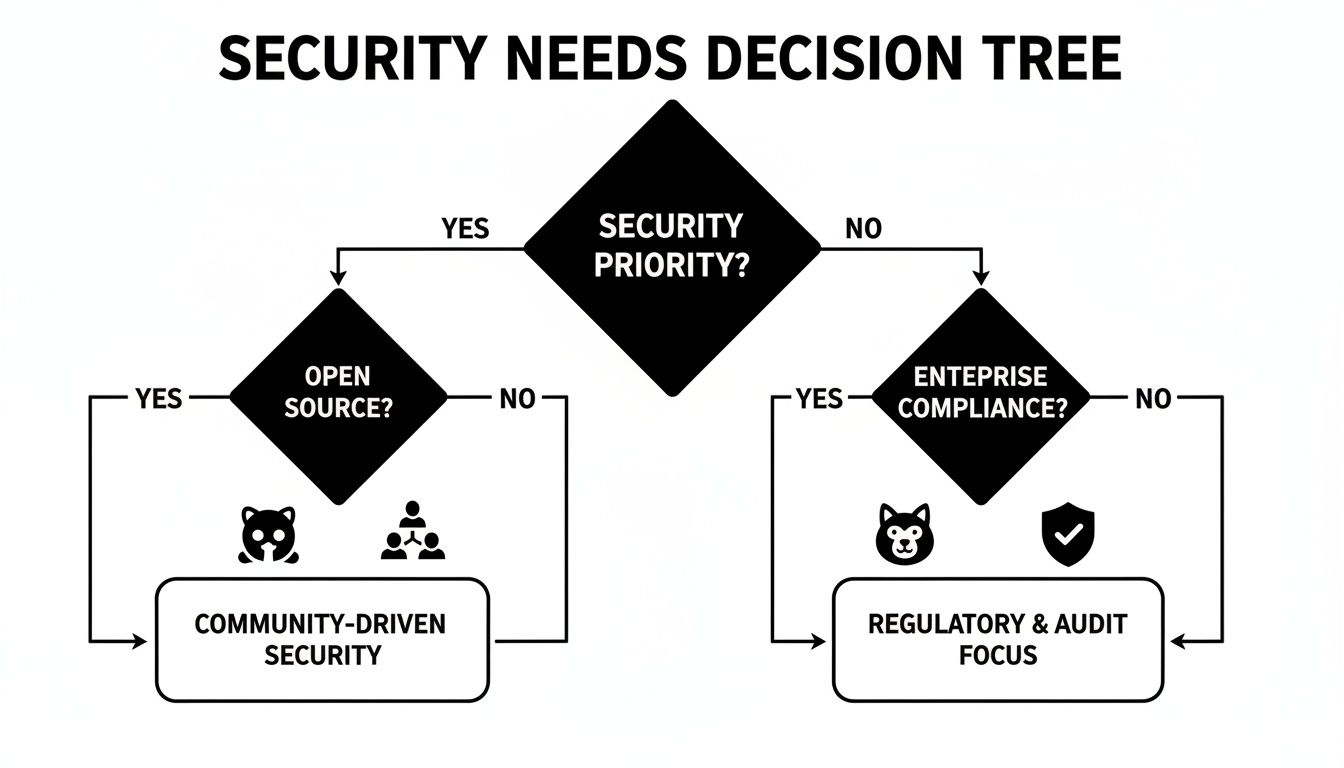
As the graphic shows, teams that prioritize open-source collaboration will likely find GitHub a natural fit. On the other hand, those who need enterprise-grade compliance and tightly integrated security will find GitLab better suited to their needs. In the end, your specific goals will light the way.
Frequently Asked Questions
You've seen the side-by-side comparison, but some questions always come up when you're on the verge of making a decision. Let's tackle the most common ones.
Which Platform Is Better for Open Source Projects?
For open-source, GitHub is pretty much the default choice. It's not just a platform; it's the center of the open-source universe. The massive community and network effect mean your project is more likely to be discovered and attract contributors.
Its entire workflow—from forking a project to submitting a pull request—is optimized for public collaboration. While you can absolutely run an open-source project on GitLab, nothing beats GitHub for discoverability and its incredibly low barrier to entry for new contributors.
How Difficult Is It to Migrate Between Platforms?
Migrating isn't a simple button-click, but it’s manageable if you know what to expect. Going from GitHub to GitLab is generally the smoother path. GitLab has a really solid built-in importer that handles repositories, issues, and even pull requests quite well.
The other way around, from GitLab to GitHub, is a bit more involved. The biggest lift is manually rewriting your .gitlab-ci.yml pipelines into GitHub Actions workflows. GitLab also has features like epics and nested issue hierarchies that don't map one-to-one in GitHub, so you'll need a plan for how to handle that data.
The real work isn't moving the code; it's translating the automation. CI/CD pipelines are where you'll spend most of your time, since GitHub Actions and GitLab CI are built on fundamentally different models for how they run.
What Is the Biggest Philosophical Difference?
This is the core of the debate: "best-of-breed" vs. "all-in-one."
GitHub focuses on being the absolute best at source code management and collaboration. For everything else, it leans on its massive marketplace, letting you assemble your own perfect toolchain with specialized apps. It’s all about flexibility and choice.
GitLab, on the other hand, believes in a single, unified platform for the entire DevSecOps lifecycle. It wants to be the only tool you need, from initial planning and coding all the way through to security scanning and monitoring. The choice really comes down to whether you prefer building a custom toolkit or having one integrated solution right out of the box.
For content teams looking to simplify their workflow on either platform, JekyllPad offers a visual, browser-based CMS that integrates directly with your GitHub or GitLab repository. Edit content, manage front-matter, and publish your static site without ever touching the command line. Learn more at https://www.jekyllpad.com.