
When you're trying to pick a CMS, the first and most important choice comes down to how it's built. The real comparison of cms isn't just about features; it’s about the underlying architecture. Traditional platforms like WordPress do everything in one box—they manage content and build the website on the fly. On the other hand, modern static site generators split those jobs apart, creating pre-built files that are incredibly fast and secure.
Your decision really boils down to a simple trade-off: Do you want the all-in-one convenience of a traditional system, or do you prioritize the raw speed and security that comes with a static approach?
Choosing the Right CMS Architecture for Your Goals

Picking a Content Management System (CMS) is a critical decision that will shape your daily workflow, your site's performance, and how easily you can grow in the future. The field is essentially divided into two main camps: the classic, database-powered systems and the lean, file-based Static Site Generators (SSGs).
Think of a traditional CMS like WordPress. Every time a visitor lands on a page, the server has to query a database, assemble the content, and then serve the final page. This dynamic approach offers a ton of flexibility and a massive plugin library, which is great for users who aren't comfortable with code.
SSGs work completely differently. They take your content and run it through a build process before it ever goes online, generating a complete website made of plain HTML, CSS, and JavaScript files. If you want to dive deeper into the mechanics, our guide on what is an SSG is a great place to start, but the core benefit is simple: no live database means no complex server-side processing. This results in a massive performance boost and a much smaller attack surface.
For a more granular look at these different philosophies, this breakdown of Headless CMS vs Traditional CMS architectures offers some excellent insights.
Quick Look Traditional CMS vs Static Site Generator (SSG)
To make sense of the high-level differences, here's a simple table that lays it all out.
| Attribute | Traditional CMS (e.g., WordPress) | Static Site Generator (e.g., Jekyll, Hugo) |
|---|---|---|
| Core Architecture | Monolithic; database-driven. | Decoupled; Git-based and file-driven. |
| Performance | Slower; pages are built on every request. | Extremely fast; pages are pre-built. |
| Security | Higher risk due to database and plugins. | Inherently secure; no live database to attack. |
| Hosting | Requires specific server environments (PHP, MySQL). | Can be hosted on any simple static host or CDN. |
| Developer Experience | Often involves a complex plugin ecosystem. | Streamlined; uses modern development tools and Git. |
| Best For | Blogs, small business sites, non-technical users. | Docs, marketing sites, developer-centric projects. |
At the end of the day, there's no single "best" answer. The right choice is entirely dependent on your project's goals, your team's technical skills, and what you value most—be it security, raw speed, or ease of use.
The Shifting Landscape of Content Management
To really compare CMS platforms, you first have to get a feel for the world they live in. It's not like the old days with just a handful of big names. Today, we're looking at a sprawling ecosystem, kicked into high gear by the massive shift to the cloud and the non-stop e-commerce boom. This has created a huge appetite for content management solutions that are flexible, can scale, and are easy to get up and running.
The numbers tell the story. The global CMS market was already worth a staggering $28.15 billion in 2023. But it’s not stopping there—projections show it could nearly double to $54.16 billion by 2032. This isn't just happening in established markets like North America, which currently holds 34.2% of the market share. Emerging digital economies in China and India are jumping in and quickly becoming major forces. For a closer look at the data, the full Content Management System market analysis offers a deep dive.
A New Playing Field
While large corporations still account for over 67% of the market, the real story is with smaller businesses. The small and medium-sized enterprise (SME) segment is where the most exciting growth is happening, expanding at a compound annual growth rate (CAGR) of 14.2%. This points to a massive shift: CMS tools are no longer just for the big guys. They're becoming more affordable and accessible for smaller teams and solo creators.
This democratization has led to a much more diverse and interesting market. Legacy giants like WordPress still have a huge presence, of course, but they're now one of many options. The stage is crowded with specialized tools, from powerful headless systems built for delivering content to multiple channels at an enterprise scale, to nimble, Git-based static site generators that developers love for their raw speed and security.
Choosing a CMS today means navigating a marketplace where niche solutions are thriving. The "one-size-fits-all" approach is fading, replaced by a need to match the tool precisely to the project's unique requirements, team skills, and long-term goals.
The Power of Specialization
This explosion of choice is a good thing. A marketing team can spin up a campaign site on a user-friendly traditional CMS without needing to write a line of code. At the same time, an engineering team can manage thousands of pages of technical documentation using a workflow they already know and trust—Git. This specialization means teams can pick tools that fit their existing skills and processes like a glove.
Instead of trying to shoehorn every task into one monolithic system, businesses can now assemble a "stack" of best-in-class tools for each job. Grasping this idea is critical when you start comparing your options. You aren't just picking software; you're choosing a workflow and an underlying philosophy. Understanding this market context is the first real step toward making a smart decision that solves today’s problems and sets you up for whatever comes next.
Comparing Critical Features Across CMS Architectures
To make a smart comparison of cms platforms, you have to look past the marketing and get into the features that define your daily work. The best choice isn't about which one is "better," but how each system handles core tasks like writing content, tracking changes, and getting your site live. These details aren't just for developers; they shape the entire workflow for your content and marketing teams.
A feature that feels liberating to a developer can be a major headache for a writer. This section dives into those critical differences, showing you how each CMS approach plays out in the real world, with all its trade-offs and advantages.
H3: Content Editing: WYSIWYG vs. Markdown
The content editor is the heart of any CMS—it's where your team spends most of its time. Traditional platforms like WordPress became popular largely because of their WYSIWYG (What You See Is What You Get) editor. It’s a visual interface that lets non-technical users format text, drop in images, and design complex pages without ever touching code.
If you have a marketing team building visually rich landing pages, a WYSIWYG editor is a game-changer. It gives instant feedback and lowers the barrier to entry, letting content creators work without needing a developer on standby.
On the other side of the spectrum, Static Site Generators (SSGs) and many modern headless systems have embraced Markdown. It’s a simple, text-based language for formatting that gets converted to HTML when the site is built. Developers love it because it’s clean, predictable, and works beautifully with version control.
The catch? For someone who isn't a developer, Markdown can feel like a step backward. Writing in plain text without seeing the final result can be confusing. This is exactly the problem tools like JekyllPad solve—they provide a friendly, visual editor that writes clean Markdown behind the scenes. You get a great user experience on top of a powerful, Git-based workflow.
H3: Version Control: Database vs. Git
How a CMS tracks changes to your content is a fundamental—and often overlooked—difference. Traditional systems like WordPress store everything in a central database. All your posts, pages, and settings live there. While this works, it makes proper version control a real challenge. Rolling back a page to a previous version is often a messy, all-or-nothing process, and seeing who changed what and when usually requires a clunky third-party plugin.
Git-based SSGs flip the script entirely by treating content just like code. Every article is a simple text file, typically written in Markdown, and stored in a Git repository. This unlocks the same powerful version control that software developers have relied on for years.
- Complete History: You can see every single change made to a document, who made it, and when.
- Easy Rollbacks: Need to undo a change? It’s as simple as reverting to an earlier commit. No drama.
- Branching Workflows: Your team can work on new features or articles in separate "branches," get feedback through pull requests, and merge them into the live site only when they're perfect.
This Git-centric model transforms content management from a simple save/overwrite process into a structured, auditable, and collaborative workflow. It's the standard for software development for a reason, and applying it to content brings unparalleled safety and control.
For projects with strict editorial reviews or detailed technical documentation, a Git-based workflow is a massive advantage. It guarantees content integrity and gives you a transparent audit trail for every update.
H3: Hosting and Deployment: Managed Platforms vs. Static Hosting
The architecture of your CMS has a direct impact on where and how you can host your site. A traditional, database-driven website requires a specific server environment, usually with things like PHP and MySQL running. This often pushes you toward specialized managed hosting platforms that handle all the server maintenance, security, and updates for you.
That convenience comes at a price—both in monthly costs and potential vendor lock-in. Performance can also take a hit, as the server has to build each page from the database every time a visitor requests it.
Static sites, however, are a completely different story. Because they are just a collection of pre-built HTML, CSS, and JavaScript files, you can host them almost anywhere—on any static hosting provider or Content Delivery Network (CDN). This opens up some huge benefits:
- Lower Costs: Static hosting is dramatically cheaper than traditional hosting, and many providers like Netlify or Vercel have generous free plans.
- Global Performance: By deploying your files to a CDN, your site is served from a data center physically close to your user, making it load incredibly fast no matter where they are.
- Simplified Deployment: Pushing a code change to your Git repository can automatically trigger a new build and deploy your site. This creates a smooth, automated CI/CD (Continuous Integration/Continuous Deployment) pipeline.
This modern deployment model is a core strength of the static site world, offering incredible performance and scalability for a fraction of the cost.
H3: Core Architecture: Monolithic vs. Headless
Finally, let's talk about the underlying architecture. A monolithic CMS like WordPress bundles everything together: the backend where you manage content and the frontend template that displays it are part of the same system. This makes it easy to get started, but it can be restrictive if you want to do something outside the box.
A headless CMS takes the opposite approach by decoupling the backend from the frontend. The CMS is purely a content API. It stores and organizes your content, then delivers it to any frontend you want—a website, a mobile app, a digital kiosk, you name it. This gives developers total freedom to build with modern tools. For example, many are now connecting headless platforms to new frameworks; you can explore how to set up an Astro headless CMS to see a real-world example.
Static Site Generators offer a third, powerful path. They are "headless" by nature since the content is separate from the presentation, but they add a key step: pre-building the entire frontend into static files. This gives you the flexibility of a decoupled system combined with the unbeatable speed and security of a static site.
Feature Matrix: CMS Architecture Comparison
To really see how these differences stack up, it helps to put them side-by-side. The table below breaks down the key features across the three main CMS architectures, from the way you edit content to how you deploy your site.
| Feature | Traditional CMS (WordPress) | Git-Based SSG (Jekyll/Hugo) | Headless CMS (Contentful) |
|---|---|---|---|
| Content Editing | Primarily WYSIWYG, visual and user-friendly for non-techs. | Markdown-focused, favored by developers. Visual editors exist. | Varies; often rich-text editors that are a hybrid of both. |
| Version Control | Database-driven; relies on plugins for limited history. | Native Git integration; full, granular version control. | Built-in versioning, but not as robust or open as Git. |
| Hosting | Requires specific server environment (e.g., PHP/MySQL). | Can be hosted on any static provider or CDN. | The CMS is hosted; the frontend can be hosted anywhere. |
| Performance | Slower; pages are built dynamically on each request. | Extremely fast; pages are pre-built and served from a CDN. | Fast, but depends on the frontend implementation. |
| Security | Larger attack surface; requires constant updates/plugins. | Highly secure; no database or live server-side processing. | Generally secure, but API endpoints can be a target. |
| Flexibility | Limited by themes and plugins. | Highly flexible, but requires development skills. | Maximum flexibility; content can go to any platform. |
| Tech Stack | Monolithic (PHP/MySQL). | Decoupled; use any frontend technology (e.g., Jekyll, Hugo). | Decoupled; fully API-driven. |
This matrix highlights the trade-offs. A traditional CMS excels in ease of use for non-technical teams, while a Git-based SSG offers unparalleled performance, security, and developer workflow. A headless CMS provides the ultimate flexibility for delivering content to multiple platforms. Your choice depends entirely on your team's skills, project requirements, and long-term goals.
Matching Your CMS to Real-World Business Needs
The best feature matrix in the world doesn't mean much until you connect it to a real project. A successful comparison of cms platforms isn't about finding the single "best" one, because that doesn't exist. It's about matching the right architecture to your specific business goals, team skills, and content strategy.
This is where theory meets reality. A system that’s perfect for a solo developer’s portfolio could be a complete disaster for a fast-moving marketing team. Let's walk through three common scenarios to see how these choices play out in the real world.
Use Case 1: Small Business Websites and Blogs
For many small businesses, the goal is simple: get a professional-looking website online quickly and without a fuss. The site needs to be easy to update with news, blog posts, or service changes, often by people who aren't developers.
This is the classic scenario where a traditional CMS like WordPress really shines. Its greatest strength is its incredibly low barrier to entry. Thanks to a massive library of themes and plugins, a non-technical user can build and manage a sophisticated site without touching a line of code.
- Plugin Ecosystem: Need an appointment booking form, an SEO tool, or a simple e-commerce store? There’s a plugin for that. This extensibility means the site can grow right alongside the business.
- User-Friendly Interface: The familiar WYSIWYG editor feels intuitive for marketers, business owners, and anyone tasked with writing content.
- Massive Community Support: With millions of users, finding tutorials, support forums, and affordable developers for WordPress is never a problem.
For a local bakery, a consulting firm, or a community blog, the sheer convenience and accessibility of a traditional CMS often outweigh the performance and security benefits of more modern architectures. The priority here is operational ease, not technical purity.
Use Case 2: Technical Documentation and Developer Portfolios
Now, let's pivot to a completely different set of needs. Imagine a software company publishing hundreds of pages of technical documentation, or a developer showcasing their work in a portfolio. The priorities here shift dramatically.
In this world, accuracy, version control, and performance are everything. This is where a Git-based Static Site Generator (SSG) becomes the clear winner. The entire workflow is built around the tools developers already know and use every single day.
For technical content, precision is non-negotiable. A Git-based workflow provides a complete, auditable history of every single change, ensuring documentation is always accurate and that any error can be instantly traced and corrected.
Content is typically written in Markdown and managed directly in a Git repository. This approach delivers some serious advantages:
- Superior Version Control: Every edit is a commit. Teams can use branches to work on new documentation and merge changes through pull requests, which creates a powerful peer-review process.
- Blazing-Fast Performance: Since the site is just a collection of pre-built static files, it loads almost instantly. This provides a fantastic user experience for developers who need information now.
- Rock-Solid Security: With no live database or server-side code to exploit, the attack surface is virtually nonexistent, which is critical for protecting valuable technical information.
For any project where content integrity and developer-centric workflows are key, the SSG model is the logical choice. This is the exact environment where tools that bridge the gap between raw technical power and usability, like a GitHub-based CMS, become incredibly valuable.
Use Case 3: Large-Scale Marketing and Multi-Channel Content
Finally, let's consider a large enterprise with complex marketing demands. This company isn't just publishing to its website; it’s pushing content to a mobile app, an internal knowledge base, and maybe even digital displays in its physical stores.
Trying to manage this with a traditional CMS would be a nightmare of copy-pasting, duplicated content, and inconsistent branding. A Git-based SSG could handle the website perfectly but wouldn't solve the multi-channel problem. This is the ideal scenario for a headless CMS.
By decoupling the content backend (the "body") from the presentation frontends (the "heads"), a headless CMS like Contentful or Sanity acts as a single source of truth. Content is created once in a central hub and then delivered via an API to any platform or device imaginable.
- Unmatched Flexibility: Developers are free to use any modern frontend framework—like React, Vue, or Svelte—to build unique, high-performance experiences for each channel.
- Built for Scale: A headless architecture is designed to handle high traffic and massive volumes of content, making it perfect for global marketing campaigns.
- Future-Proofing Your Content: As new devices and platforms emerge, you just build a new frontend to pull content from the existing API. You never have to rebuild your entire content infrastructure from scratch.
For organizations laser-focused on creating a consistent brand experience across dozens of touchpoints, the flexibility and scalability of a headless CMS are essential. It provides the architectural freedom needed to adapt and innovate in a constantly changing digital environment.
Understanding the Dominance of WordPress
You can't have an honest CMS comparison without talking about the elephant in the room. WordPress isn't just another platform; for millions of people, it's the default way to build a website, a status it has earned over nearly two decades. Its evolution from a humble blogging tool into a comprehensive website builder is a masterclass in the power of open-source community and user-friendliness.
At its heart, the incredible success of WordPress comes down to one simple, powerful idea: make publishing on the web accessible to anyone, regardless of their technical skills. That core philosophy is what fueled its initial explosion in popularity and it remains its biggest selling point today.
The Power of an Open Ecosystem
The real engine driving WordPress is its massive, sprawling ecosystem of themes and plugins. With over 60,000 free plugins in the official directory alone, you can bolt on almost any feature you can dream up—e-commerce shops, complex booking systems, sophisticated SEO tools, you name it—often with just a few clicks.
This incredible extensibility creates a self-perpetuating cycle. A huge user base attracts developers to create more plugins, which makes the platform even more powerful, attracting even more users. It’s a network effect that other platforms have found nearly impossible to challenge.
While other systems might offer more elegant technical solutions, none come close to the sheer volume of ready-made tools and community support that WordPress brings to the table. For many, this practical advantage trumps any architectural drawbacks.
This ecosystem also means you're never truly on your own. A massive global community of developers, designers, and agencies specializes in WordPress, so finding affordable help for customizations or troubleshooting is usually straightforward.
Market Share by the Numbers
The sheer scale of WordPress adoption is hard to overstate. It is the undisputed king of the web, powering a staggering 43.6% of all websites globally and holding a commanding 62.7% of the CMS market share as of October 2025. This growth leaves rivals in the dust; Shopify, the next closest competitor, accounts for just 6.8% of the market. These aren't just numbers—they prove that WordPress is the foundational technology for a huge slice of the internet. You can find more details in the latest CMS market share report.
Addressing the Downsides
Of course, that kind of popularity comes with some serious strings attached. The very things that make WordPress so approachable—its reliance on a dynamic database and a vast library of third-party plugins—are also its biggest Achilles' heels.
- Security Vulnerabilities: Every plugin you install adds another layer of code to your site, creating a potential new doorway for attackers. Securing a WordPress site requires constant vigilance, from keeping the core software updated to patching themes and every single plugin.
- Performance Bottlenecks: Because WordPress is database-driven, every time someone visits a page, the server has to run code and query the database to assemble it. For sites with a lot of traffic, this can lead to sluggish load times unless you're willing to invest in powerful hosting and sophisticated caching setups.
- Maintenance Overhead: A WordPress site is never "done." It requires ongoing work. The constant flow of updates can cause compatibility headaches, where updating one plugin accidentally breaks another. This creates a maintenance burden that you simply don't have with simpler, static systems.
These are the reasons why many developers and businesses are now exploring WordPress blog alternatives that put speed and security first. While WordPress still reigns supreme, it’s critical to weigh its pros and cons against your project's specific needs.
Ultimately, choosing WordPress is about balancing its undeniable convenience against its built-in complexities. If you prioritize a massive feature set and ease of use above all else, it’s still a fantastic choice. But if top-tier performance, ironclad security, and a clean development workflow are your top priorities, its limitations become much more difficult to ignore.
A Practical Framework for Making Your Final Choice
You've waded through the features and comparisons, and now it's time to make a decision. The right CMS isn't just about the tech; it's about what works for your team, your budget, and where you want to go next. Think of this as your final gut-check—a list of critical questions to ensure the platform you pick is the right one for you.
Answering these questions honestly will help you cut through the noise. It’s about finding that sweet spot where the technology aligns perfectly with how your team actually works.
The Decisive Checklist
Before you sign on the dotted line, gather your team and walk through these points. Your answers will pretty clearly point you toward a traditional, headless, or Git-based CMS.
- Team Skills: Who’s actually going to be in the driver's seat every day? If it's your marketing team, a user-friendly visual editor is probably non-negotiable. But if your developers are handling content, a Git-based workflow with Markdown could make their lives a whole lot easier.
- Budget and Hosting: What does your budget look like over the long haul? Remember to factor in hosting and maintenance. Static site hosting is often dramatically cheaper, whereas managed hosting for a platform like WordPress can become a significant recurring expense.
- Performance and Security Needs: How much do lightning-fast load times and ironclad security matter to your business? For an e-commerce store or a site with tons of traffic, the snappy performance and hardened security of a static site can be a serious competitive edge.
- Scalability and Future Growth: Are you thinking about pushing content to mobile apps, smart displays, or other channels down the road? A headless or Git-based system gives you the flexibility to expand your reach without having to replatform everything later.
This decision tree gives you a good idea of the thought process when considering a popular platform like WordPress, based on what your project truly needs.
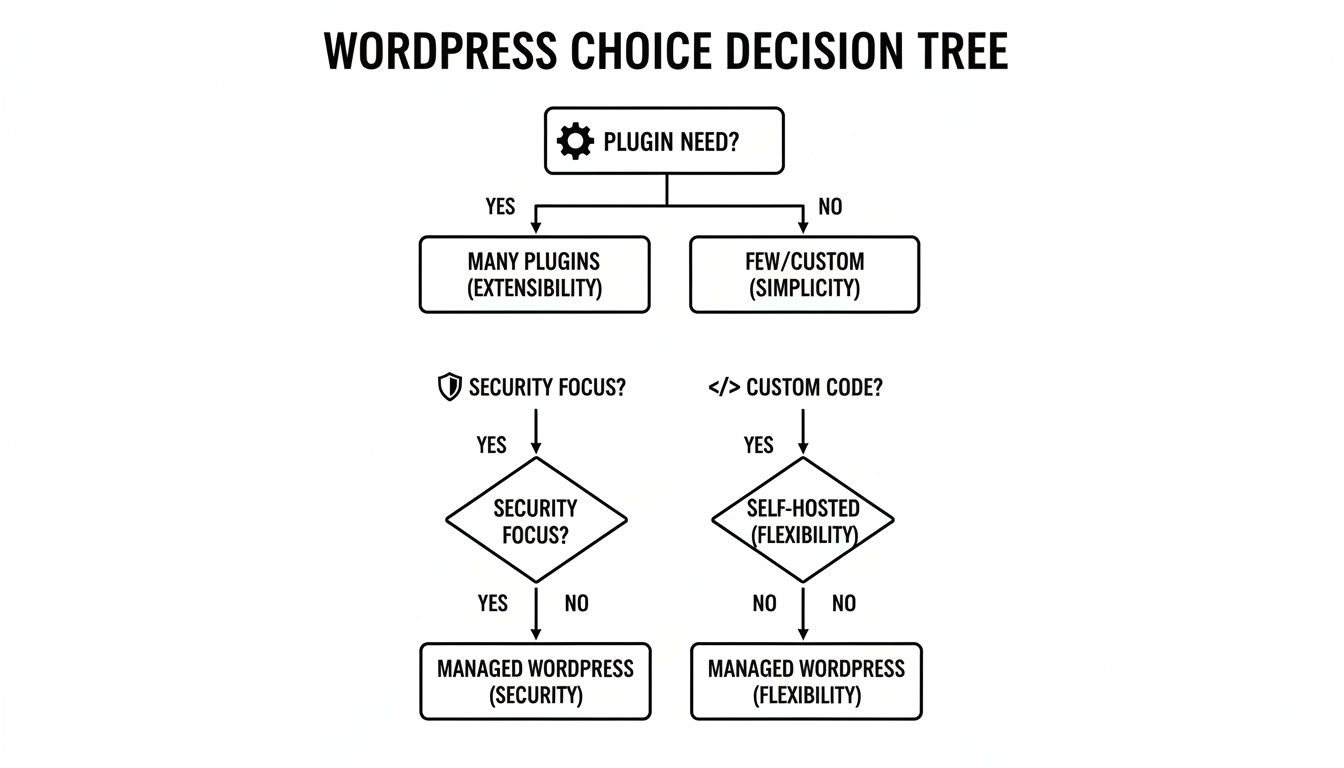
As the chart shows, if you find yourself heavily reliant on plugins, have less stringent security demands, and aren't doing much custom coding, a traditional CMS is often the path of least resistance.
Your final choice is a commitment to a workflow, not just a piece of software. A Git-based system, especially one managed with an editor like JekyllPad, weaves content management directly into your development process. This naturally encourages collaboration, gives you bulletproof version control, and makes deployment a breeze.
At the end of the day, the best CMS is the one that gets out of your team's way and lets them do their best work. By thinking through these factors, you can move past a simple feature list and make a strategic choice that will pay off for years to come. Pick the system that fits your process, not the other way around.
Common Questions About Picking a CMS
Making a big tech decision always brings up a few last-minute questions. We get it. Here are some straightforward answers to the most common things we hear from teams trying to sort through their CMS options.
What’s the Real Difference Between a Traditional and a Headless CMS?
The biggest difference is how your content connects to what your visitors actually see. A traditional CMS like WordPress is monolithic; the backend where you write and the frontend your audience sees are all one big, interconnected system.
A headless CMS, on the other hand, completely decouples those two pieces. It's just a content repository. All your articles, images, and data get sent out via an API to whatever frontend you build—a website, a mobile app, you name it. This gives developers a ton of flexibility but definitely takes more technical work to get running.
How Big of a Deal Is Security When Choosing?
It’s a massive deal. Traditional platforms, especially popular ones with a universe of plugins, are constant targets for hackers running automated attacks. Because they rely on live databases and server-side code, they have a much larger surface area for potential vulnerabilities, which means you're on the hook for constant patching and updates.
Static site generators are inherently more secure. They pre-build everything into plain HTML files, which means there’s no live database or server-side code to attack in the first place. This isn’t just a nice-to-have feature; it's a fundamental security advantage.
When you're comparing options, look closely at the security model for each platform, how they push updates, and what their track record looks like.
Can I Switch to a Different CMS Later On?
Yes, you can almost always migrate, but the pain and price of doing so can swing wildly. Moving from one traditional CMS to another can be a huge headache because of different database setups and content formats that just don't play nice together.
Switching from a traditional system to a static or headless one is often simpler on the content side, but it typically means you have to rebuild your website's frontend from scratch. If you think you might switch down the road, do yourself a favor: pick a CMS that lets you export your data easily. That one little check can save you a world of trouble later on.
Ready to manage your static site with a simple, powerful visual editor? JekyllPad integrates directly with your GitHub repository, giving you the best of both worlds—an intuitive content workflow for your team and the unmatched security of a Git-based system. Try it for free at https://www.jekyllpad.com.