
A GitHub-based CMS isn't your typical content management system. Instead of using a clunky database, it treats your website's content—all the text, images, and other files—just like code, storing everything in a Git repository. This might sound technical, but it simply means content changes are saved directly to GitHub, which gives both developers and editors a far more transparent and powerful way to work together.
What Is a GitHub Based CMS
Imagine managing your website’s content with the same precision and collaboration tools that software developers use to build complex applications. That’s the entire idea behind a GitHub based CMS. Forget the traditional databases; here, everything from your latest blog post to the tiny bit of marketing copy on your homepage lives as a simple file (often Markdown) inside a Git repository.
Think of it as a shared document on steroids. Every single change, whether it's a quick typo fix or a complete rewrite of a page, is meticulously tracked. You can see who changed what, when they did it, and even why. If someone makes a mistake? No problem. You can roll back to any previous version with a click, taking away that constant fear of accidentally breaking the live site.
The Content as Code Philosophy
This whole approach is often called "content as code," and it’s a game-changer. It brings the disciplined, transparent, and collaborative spirit of software development into the world of content management. The benefits become obvious almost immediately:
- Complete Version History: Every edit is saved forever, creating a perfect audit trail. You never lose work and can compare different versions of a page side-by-side.
- Structured Workflows: Content updates can follow a proper review process, just like code. A writer can submit a change, and an editor can approve it before it ever goes live.
- Unified Team Collaboration: Developers and content creators finally work in the same environment (GitHub). This breaks down the usual silos and makes communication so much smoother.
This modern architecture fundamentally changes how websites are built and managed. When you pair a GitHub based CMS with a static site generator, you can build websites that are ridiculously fast, secure, and easy to scale. If you're new to that concept, we've broken it all down in our guide on understanding static site generators.
The shift to this model has been significant. What started as a niche tool for developers has exploded into a mainstream choice for building modern websites. In fact, analyst reports show the headless CMS market, which includes many Git-based systems, grew to represent roughly 20% of the CMS market by early 2025—a huge jump from under 8% just five years ago. This trend points to a massive demand for more efficient, developer-friendly workflows. You can dive deeper into these CMS market trends and platforms to see the data for yourself.
Ultimately, this structure gives everyone on the team what they need: a safe, clear workflow for editors and total control for developers.
Let's quickly compare the two approaches side-by-side to make the distinction crystal clear.
Traditional CMS vs GitHub Based CMS at a Glance
This table breaks down the core differences in philosophy and architecture between old-school systems like WordPress and the modern GitHub-based approach.
| Aspect | Traditional CMS (e.g., WordPress) | GitHub Based CMS |
|---|---|---|
| Content Storage | Relational Database (e.g., MySQL) | Git Repository (Flat Files) |
| Editing Interface | Integrated Admin Dashboard (WYSIWYG) | Separate Client (e.g., JekyllPad) |
| Workflow | Edit directly on the live server | Propose changes via commits/pull requests |
| Version Control | Limited, often plugin-dependent | Native, granular Git history |
| Security | Larger attack surface (database, plugins) | Highly secure (pre-built static files) |
| Performance | Dynamic, requires server processing | Extremely fast (served from a CDN) |
| Collaboration | Siloed between editors and developers | Unified environment for all team members |
As you can see, a GitHub-based CMS represents a fundamental shift in how we think about building and maintaining websites, moving from a monolithic, all-in-one system to a more flexible, secure, and collaborative model.
How Your Content Travels Through a Git Workflow
To really wrap your head around a GitHub-based CMS, it helps to see it in action. Let’s follow a single blog post on its journey from a rough draft to a published page. This turns abstract ideas like "version control" into a real-world workflow that’s both powerful and surprisingly simple.
This Git-based approach is a specific application of effective content management strategies, but with a developer-friendly twist that prioritizes safety and a clear audit trail.
Step 1: From Draft to Commit
The journey starts in a user-friendly editor, not a scary command line. A writer opens up their CMS—something like JekyllPad—and starts typing away. They're probably using a simple Markdown editor or a visual interface, adding images and filling out fields like the post title and author.
When they hit "Save," something interesting happens in the background. The CMS bundles all their work—the new text, the added images—into what Git calls a commit. Think of a commit as a snapshot in time. It captures a precise set of changes with a short, descriptive message, creating a new saved version instead of just overwriting the old one.
Step 2: Proposing Changes with a Pull Request
Once the commit is saved, the CMS doesn’t just push it live. Instead, it creates a pull request (or "PR") on GitHub. A pull request is basically a formal proposal to merge the new content into the main project. It’s like saying, "Hey team, I've got this new blog post ready. Can you take a look?"
This step is a fantastic checkpoint for quality control. It creates a natural review stage where an editor or developer can jump in.
- Review the Changes: They can see exactly what was added, removed, or tweaked, line by line.
- Leave Comments: If a sentence is clunky or a fact needs a source, they can comment directly on the specific change.
- Suggest Edits: They can even propose corrections that the author can accept with a single click.
This whole process gets rid of messy email chains or endless Slack threads. All the feedback is neatly organized in one spot, creating a transparent history of the entire editorial process.
Step 3: Merging and Automated Deployment
After everyone gives their thumbs-up on the pull request, a team member with the right permissions hits the "Merge" button on GitHub. This is the moment the new content officially becomes part of the website's main source code.
Merging is the trigger that kicks off the final, automated part of the journey. This is where a Continuous Integration/Continuous Deployment (CI/CD) pipeline takes over. Tools like GitHub Actions or Netlify are always watching, and the moment they see that merge, they spring to life.
Key Takeaway: The merge event is the green light. It tells the build server, "The new content is approved and ready. It's time to update the live website."
The automated process usually follows a few quick steps:
- Building the Site: The server runs a command that tells a static site generator (like Jekyll or Hugo) to rebuild the entire website. It mashes the templates and the latest content together to create a fresh set of static HTML, CSS, and JavaScript files.
- Running Checks: Some teams set up automated tests to quickly check for broken links or other common errors.
- Deploying to the Host: Once the build is successful, the pipeline automatically pushes the new files to the web host, such as GitHub Pages. Just like that, the changes are live.
This visual gives you a simple, linear look at how content flows from creation to publication.
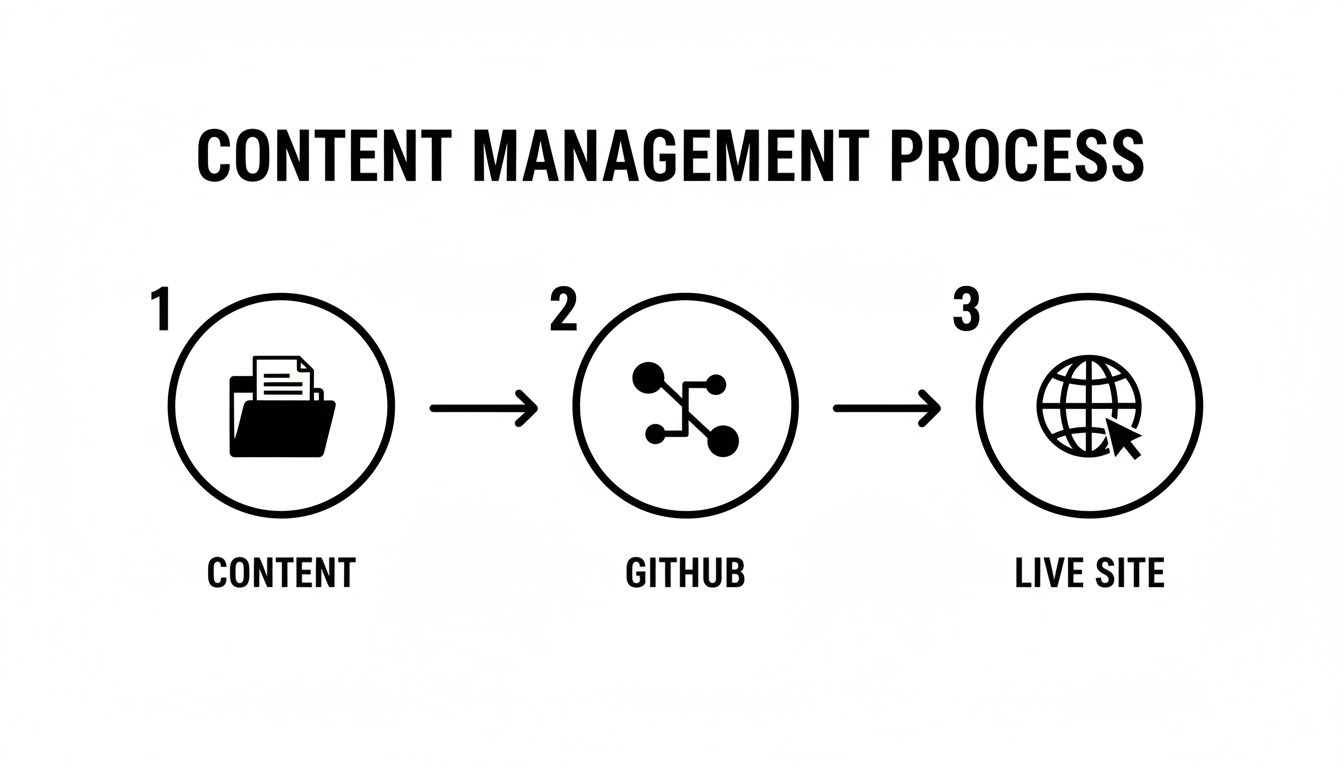
As the diagram shows, the GitHub repository sits at the heart of it all. It connects the raw content files to the live website through that automated build step, keeping everything in sync.
Exploring Different GitHub Content Management Models
Not every GitHub-based CMS is built the same. While they all use Git, that's often where the similarities end. The term "GitHub CMS" is really a broad umbrella covering a few distinct ways of handling content, each with its own philosophy and ideal workflow. Getting these differences is the key to picking a tool that actually fits your team, not one that forces you into a box.
Think of it like choosing a car. A sports car, a pickup truck, and a minivan will all get you down the road, but they solve very different problems. Likewise, these CMS models all use a GitHub repository, but how they use it and where your content truly lives can vary dramatically. Let's break down the main approaches you'll run into.
The Git-Backed Headless Model
First up is what I call the Git-backed headless CMS. This model feels a lot like a traditional system at first. It gives you a polished editing interface and stores all your content in its own dedicated database. The connection to GitHub is less about content storage and more about automation and deployment.
When a writer hits "publish," the CMS's backend takes the content from its database, formats it into files (like Markdown or JSON), and pushes those files to your GitHub repo. That push is what kicks off your build process.
- Content Storage: A proprietary database managed by the CMS provider.
- GitHub’s Role: A destination for content files that triggers your automated build and deploy pipeline.
- Best For: Enterprise-level teams who need complex content models, granular user permissions, and localization, but still want the performance benefits of a modern Git-based workflow.
This approach gives you a powerful, feature-rich editing experience, but it does add a layer of complexity. Your content technically lives in two places: the CMS database is the master source, and the Git repository holds the copy used for deployment.
The Git-Native or API-Based Model
Next, we have the Git-native model. This is a much more direct approach. It treats your GitHub repository as the one and only source of truth. There's no separate database to worry about. Instead, these tools talk directly to your repository's files using the GitHub API.
When a user opens a page to edit it, the CMS makes an API call to read the file's content. When they hit save, it makes another API call to commit the changes straight back to the designated branch. It’s a beautifully simple and transparent connection.
Key Insight: With a Git-native CMS, there is no separate database to manage or sync. The content in your repository is the content. This direct manipulation is the core principle of this model.
This is exactly how platforms like JekyllPad operate, cutting out the middleman entirely. It runs in the browser and communicates directly with GitHub, ensuring your data never leaves the safety of your own ecosystem. It's a pure, un-siloed workflow.
The Flat-File CMS Model
Finally, there are flat-file CMSs. While they aren't exclusively tied to GitHub, they are a perfect match for it. These systems do away with databases completely, storing all content, configuration, and settings in plain text files (like Markdown, YAML, or JSON) organized in a simple folder structure.
Since the entire website is just a collection of files, it’s tailor-made for version control with Git. Developers can set up the site locally, and content creators can either edit files in a code editor or use a compatible visual CMS that understands the project's file structure. You can find fantastic tools that fit this mold, including seamless options like an Astro headless CMS that make content updates feel effortless.
The growing popularity of all these Git-centric approaches points to a bigger trend. Traditional, all-in-one platforms still dominate, but headless and Git-based systems are catching up fast. Driven by the demand for better performance, security, and developer happiness, these modern workflows are on track to claim a significant slice of the CMS market by 2025. You can see more data on the accelerating adoption of headless and static CMS solutions.
So, which is right for you? It really depends on your project's needs, your team's comfort level with Git, and your ideal workflow.
Comparison of GitHub CMS Implementation Models
To make the choice clearer, here’s a quick breakdown of how these three models stack up against each other. Think about what your team values most—is it a rich feature set, direct Git control, or ultimate simplicity?
| Model | Content Storage | Best For | Example Tools |
|---|---|---|---|
| Git-Backed Headless | Separate Database | Large teams needing advanced, enterprise-grade features. | Contentful, Sanity.io |
| Git-Native (API) | GitHub Repository | Teams wanting direct repository interaction and no database. | JekyllPad, TinaCMS |
| Flat-File | Local File System | Developers who want maximum control and simplicity. | Grav, Statamic |
Each of these models offers a valid path forward. The Git-backed model provides a managed, feature-rich experience. The flat-file model gives developers ultimate control. The Git-native model, however, strikes a powerful balance, offering a clean, direct workflow that keeps your repository as the single source of truth without sacrificing a user-friendly editing experience.
The Real-World Benefits of a Git-Powered CMS
Switching your content over to a GitHub-based CMS isn't just a technical shuffle. It's a strategic move that pays off with some serious, tangible advantages. We're talking about better performance, tighter security, and a much smoother, more collaborative workflow for your entire team.
Let's dig into why so many people are making this change. At its heart, a GitHub-based CMS completely redefines how your content and your website interact. Instead of relying on a database to build pages on the fly, you're working with pre-built, static files. This one architectural shift is the wellspring for almost all of its biggest perks.

Blazing-Fast Performance and Better SEO
Think about how a traditional website works: a visitor arrives, and the server scrambles to pull data from a database and assemble the page right then and there. A Git-based workflow does all that work ahead of time. Your website is simply a collection of HTML files, sitting there ready to be delivered instantly.
The result? Dramatically faster load times. These files can be cached on a global Content Delivery Network (CDN), serving them from a server physically close to your visitor, which makes things even speedier.
- Improved User Experience: Nobody likes to wait. Faster pages mean happier visitors and lower bounce rates.
- SEO Advantage: Site speed is a huge ranking signal for Google. A faster site often means better search visibility. Plain and simple.
Superior Version Control and Fearless Editing
We've all been there—that heart-stopping moment right after you hit "publish" and spot a typo. A GitHub-based CMS pretty much makes that feeling a thing of the past. Since every single change is tracked as a "commit" in your Git repository, you have a complete, bulletproof history of your content.
You can instantly roll back any page to any previous version, at any time. This isn't just a simple undo button; it's a full audit trail that acts as a safety net for your entire content operation.
This empowers your team to experiment and be bold. Go ahead and try that new layout or rewrite that headline, knowing that no mistake is ever permanent.
Enhanced Security by Design
Let's be honest, traditional database-driven websites can be a security minefield. The database itself, the server-side code, and all those plugins create multiple entry points for bad actors.
A GitHub-based CMS shrinks that attack surface down to almost nothing. Because the live site is just a collection of static files, there's no active database connection or server-side script for an attacker to exploit. This simple architecture makes it inherently tougher against common threats like SQL injection and cross-site scripting (XSS) attacks.
It's a security model that offers serious peace of mind and cuts down on the constant cycle of patching vulnerabilities.
Streamlined Collaboration Between Teams
Perhaps one of the most powerful—and often overlooked—benefits is how it brings developers and content creators together. Instead of working in separate, disconnected systems, both teams operate within the same GitHub ecosystem. The old silos that created so much friction and delay start to break down.
The pull request workflow, for example, becomes a natural, transparent editorial process. A writer submits a draft, and an editor can see the exact changes, leave comments line-by-line, and approve the merge—all in one place. It creates a crystal-clear, accountable path for every piece of content.
In many ways, the advantages here mirror the broader knowledge management system benefits that focus on centralizing information and making teams more efficient. By putting your content and code in the same workflow, you create a single source of truth everyone can rely on.
When to Avoid a GitHub-Based CMS
For all their upsides in speed, security, and version control, GitHub-based CMS setups aren’t a silver bullet. It's just as important to know when they don't make sense as when they do. Being honest about the limitations helps you avoid picking a tool that creates more friction than it solves.
This whole approach is a world away from a traditional, dynamic CMS like WordPress. The biggest trade-offs usually pop up around the initial setup and how quickly you need to publish content. For some teams and websites, these differences can be genuine deal-breakers.
If Your Site Has a Constant Flow of Updates
A Git-based workflow is, by its nature, structured and deliberate. That’s a good thing, most of the time. But that same process can turn into a bottleneck for websites that are either gigantic or need to be updated constantly, almost in real-time. The reason is simple: every single content change, no matter how tiny, kicks off a full site rebuild.
Think about these scenarios:
- Massive Websites: For a site with tens of thousands of pages, that rebuild process isn't instant. It can take several minutes. A 10-minute build time is perfectly fine if you're publishing a blog post once a week, but it’s a complete non-starter for a news organization pushing out dozens of articles an hour.
- Rapid-Fire Publishing: Imagine a team where editors make hundreds of small tweaks all day long. Waiting for a site to rebuild after every single save would grind productivity to a halt. In these high-velocity environments, the classic "Publish" button of a traditional CMS is the undeniable champion.
The Bottom Line: If your content strategy relies on getting content live immediately across a massive site, the build step in a GitHub-based CMS will likely feel like an unacceptable delay.
If Your Project Needs Dynamic User Interaction
The static nature of sites built with a GitHub workflow is a massive win for performance and security. But it's also a major weakness for sites whose entire purpose is built on real-time, server-side functions. If your website's main draw is dynamic interaction with users, a traditional system is almost always the right call.
A GitHub-based CMS is generally the wrong tool for:
- User-Generated Content: Think forums, social networks, or even blogs with active comment sections. These all need a database to process and display user submissions on the fly.
- Complex E-commerce: You can definitely run a simple store on a static site. But for large-scale e-commerce with thousands of products, user accounts, and constantly changing inventory, you need the power of a database-driven backend.
- Advanced Personalization: Need to show different content to different users based on their location, browsing history, or profile? That requires server-side logic that a static site simply can’t provide.
If Your Team Has No Technical Backup
Finally, let's talk about the human element. While the day-to-day editing can be made incredibly simple, setting up and maintaining a Git-based workflow isn't exactly point-and-click. It takes someone with a foundational grasp of Git, GitHub, and maybe a bit of command-line knowledge to connect the repository, configure the build process, and fix things if they go sideways.
Tools like JekyllPad are specifically designed to abstract all that complexity away from the content creators, giving them a clean, simple interface. But you still need a developer to assemble the initial architecture. If your team is 100% non-technical and you have zero access to a developer, the all-in-one simplicity of a traditional CMS might be a more practical place to start.
Choosing the Right Tool for Your Team
Picking the right GitHub-based CMS isn't about finding the one "best" tool. It's about finding the best fit for your team's specific rhythm. The perfect choice strikes a delicate balance between the comfort of your content creators and the control your developers demand. To hit that sweet spot, you need to think clearly about your people, your process, and your project's goals.
This guide will walk you through that decision-making process. We'll zero in on three core criteria: your team's technical comfort level, your ideal content workflow, and the scale of your project. By asking the right questions upfront, you can confidently land on a tool that works for everyone.

Assess Your Team's Technical Comfort Level
First things first: who is actually going to be using this thing every day? A powerful tool is completely useless if your writers are too intimidated to touch it. The goal here is to make contributing content easier, not to erect a new technical wall.
Start with a few honest questions:
- Who is creating the content? Are they marketers, documentation specialists, or developers who are already fluent in Markdown and Git?
- What does their ideal editor look like? Does your team need a visual, WYSIWYG (What You See Is What You Get) editor, or are they perfectly happy editing structured data forms or plain text files?
- How much of the Git process can they really handle? Are they willing to learn about commits and pull requests, or do you need a system that makes all the Git jargon completely disappear?
Answering these questions honestly will immediately shrink your list of options. A team of developers might love a setup that lives right inside their code editor, while a marketing team will almost certainly need a friendly, web-based interface.
Define Your Ideal Content Workflow
Next, think about how a piece of content goes from a simple idea to a published page. Your CMS should slot right into this process and make it smoother, not add friction. A clunky workflow creates bottlenecks that can bring your entire content operation to a crawl.
Walk through the journey of a single blog post:
- How important are instant content previews? Do your writers need to see exactly how their work will look on the live site while they're writing?
- What does your review process look like? Is it a quick once-over by a single editor, or a complex, multi-stage approval chain involving several people?
- How do you handle media? Does your team need a simple way to drag and drop images and other files directly into their posts without ever leaving the editor?
The answers will point you toward a system that fits how you actually work. A tool with a great live preview and built-in approval stages is a lifesaver for collaborative teams, whereas a solo blogger might be fine with something much simpler.
Key Consideration: The best GitHub-based CMS feels like a natural extension of your team's existing habits. It should get out of the way and let writers focus on writing, not on fighting with their tools.
Finding a Frictionless Solution Like JekyllPad
For many teams, the holy grail is getting all the benefits of a Git-based workflow—version control, security, performance—without forcing non-technical folks to become Git experts. This is exactly where tools designed to bridge that gap come in.
JekyllPad, for instance, was built for this exact purpose. It gives users a clean, browser-based visual editor that feels instantly familiar to anyone who’s used a traditional CMS. But behind the curtain, every time you save, it translates that action directly into a commit in your GitHub repository.
This approach offers a powerful middle ground:
- Seamless GitHub Integration: It hooks directly into your repository. There’s no complex setup or third-party service to worry about.
- Intuitive Editing: It provides a familiar Markdown and visual editing experience, which completely removes the Git learning curve.
- Empowerment for All: It lets your non-technical team members create and edit content safely within a developer-approved workflow, ensuring everyone can collaborate effectively.
In the end, choosing the right tool is an exercise in empathy for your team. By putting their comfort and workflow first, you can find a GitHub-based CMS that doesn't just meet your technical needs but actually helps everyone create better work, together.
Frequently Asked Questions
Jumping into a GitHub-based CMS can feel like a big shift, especially if your team is used to more traditional systems. It’s natural to have a few questions about how it all works in practice. Let's clear up some of the most common ones we hear.
Can Non-Technical Users Really Use a GitHub-Based CMS?
Absolutely. This is probably the biggest misconception out there. Modern Git-based tools are built specifically for non-technical users, offering clean, web-based interfaces that often feel a lot like WordPress. Think rich text editors and simple forms for filling out content fields.
The best part? The CMS handles all the complex Git commands behind the scenes. A content editor just has to click "Save" or "Submit for Review," and the tool automatically translates that action into the right commits and pull requests. No command line required.
Is a GitHub-Based CMS Good for SEO?
Yes, it’s fantastic for SEO. This approach almost always powers static websites, which means your pages are incredibly fast, secure, and mobile-friendly right out of the gate. Those three factors are huge wins for Google and other search engines.
The clean HTML output is also a dream for search engine crawlers, giving you a rock-solid technical foundation. While you still need to create great content, the underlying tech gives you a serious performance edge from day one.
Key SEO Benefit: The raw speed of static sites directly boosts user experience and Core Web Vitals—major components of modern search ranking algorithms. In SEO, a faster site is almost always a higher-ranking site.
What Happens If Someone Makes a Mistake?
Fixing mistakes is actually one of the biggest strengths of this entire system. Because every single change is saved as a distinct version in your Git history, you can roll back any page to a previous state with just a couple of clicks.
This is way more powerful than the basic revision history you find in most traditional platforms. You get a complete, transparent audit trail of every change ever made, which gives your team a foolproof safety net against errors.
Ready to get a frictionless GitHub workflow without the steep learning curve? JekyllPad provides a seamless, browser-based editor that connects directly to your repository, letting your whole team contribute with confidence. Try it for free at https://www.jekyllpad.com.