
A proper CMS for programmers is built around a Git-based workflow. It treats content just like code, which beats locking it away in some clunky database any day. This approach fits right in with how we already work, giving us version control, a serious performance boost, and much better security than old-school monolithic systems like WordPress.
Why Traditional CMS Drive Modern Developers Crazy
For years, developers have been stuck in a weird spot. Our tools and workflows have been rocketing forward with Git, automation, and static site generators, but content management has felt like it's trapped in the past. Trying to make these monolithic platforms work often feels like coding with one hand tied behind your back, creating friction where there shouldn't be any.

This fundamental disconnect introduces a bunch of pain points that kill productivity and can even drag down the quality of a project.
The Monolithic Burden
Traditional systems smash everything—content, backend logic, and the frontend—into one tightly coupled application. This old way of doing things creates a few major headaches for developers:
- Database Dependencies: You’re stuck managing and backing up a separate database, which is just one more thing to worry about. It’s another point of failure and a classic performance bottleneck.
- Restrictive Theming: Developers often have to wrestle with rigid templating languages and theme structures. This kills creativity and makes it a nightmare to integrate modern frontend frameworks.
- Security Vulnerabilities: The dynamic, server-side nature of these platforms leaves a massive attack surface wide open, meaning you’re on a constant treadmill of updates and security patches.
If you want a deeper dive into the sheer complexity of these systems, resources like the Missing WordPress Manual Ebook exist for a reason. The fact that a guide that thick is even necessary says a lot about the setup and maintenance developers are up against.
The Jamstack Revolution
The rise of the Jamstack (JavaScript, APIs, and Markup) marks a huge shift away from that monolithic model. It’s all about performance, security, and the developer experience, achieved by pre-building sites into static files that can be served straight from a CDN.
The whole idea behind Jamstack is to decouple the frontend from the backend. This separation gives developers the freedom to pick the best tools for the job, instead of being locked into one platform’s way of thinking.
This architectural shift is exactly why a new breed of CMS for programmers has started to appear. These tools are designed from the ground up to plug directly into Git-centric workflows and static site generators like Jekyll, Hugo, and Astro.
Even with this move, you can’t ignore the massive footprint of traditional platforms. WordPress powers 43.2% of all websites on the internet, giving it a staggering 62.8% of the CMS market share. Its dominance makes sense for non-technical users, but it also shines a spotlight on the challenges developers face when forced into its database-driven world, making the need for developer-first alternatives clearer than ever.
Understanding Developer-First CMS Architectures
The old-school, monolithic platforms just weren’t cutting it, so developers did what we do best: we built something better. This new breed of content management systems ditches the restrictive, database-heavy approach and instead embraces the workflows we already use every day. When you look at a modern CMS for programmers, you'll find they generally fall into one of two camps.
Figuring out the core difference between these two architectural models is the key to picking the right tool for your project, your team, and your specific tech stack.
The Git-Based Philosophy: Content as Code
The entire idea behind a Git-based CMS is beautifully simple: content should be treated just like code. Instead of locking away your blog posts or product descriptions in some external database, everything gets saved as flat files—usually Markdown—right inside your project’s Git repository.
This fundamentally changes how content is managed. A minor typo fix? That’s a commit. A brand new landing page? That’s a commit, too. This opens up a ton of advantages that developers immediately appreciate.
- True Version Control: Every single change to your content is tracked. This gives you a complete, auditable history and makes rolling back to a previous version trivial.
- Simplified Stack: You can say goodbye to managing, backing up, or securing a separate database. This cuts down on complexity and removes a major point of failure.
- Seamless Workflows: Content updates follow the exact same pull request workflow as your code. You can use branches for drafts and require reviews before merging.
This "content-as-code" approach is a perfect match for static site generators like Jekyll, Hugo, and Astro. The whole setup—code and content—lives together in one clean repository. It’s an incredibly streamlined system.
By unifying content and code under Git, developers gain unparalleled control and transparency. The entire project history, from the first line of code to the latest blog post, is stored in one place, simplifying everything from deployment to disaster recovery.
The Headless Philosophy: Content as a Service
The other major architecture you'll encounter is the API-first, or Headless CMS. This model works by completely decoupling the content backend (where you write and manage content) from the frontend (where it's displayed). You can think of it as a central content warehouse that you access through an API.
Unlike the Git-based approach, a headless CMS stores your content in its own managed database. Your website or app then fetches that content by making API calls, either at build time or live on the client-side. The core principle is separating what the content is from how and where it gets displayed. If you want to go deeper, our guide explains in detail what a headless CMS is and how it all works.
This separation is fantastic for projects that need to push the same content out to multiple places—a website, a mobile app, and maybe even a digital kiosk. The headless CMS doesn't care about the frontend; it just serves up structured data to any client that asks for it.
Both of these architectures are massive improvements over traditional systems, but they are designed to solve different problems and appeal to different developer priorities.
Comparing the Top CMS Options for Programmers
Choosing a CMS these days isn't about picking the least frustrating option anymore. We've got a whole new generation of specialized tools built around actual developer workflows. To pick the right one, you have to look past the marketing blurbs and dig into how each platform really handles the things that matter day-to-day.
So, let's compare some of the top contenders. We’ll focus on what's truly critical: how well they play with Git, how much control you actually have, what the editing experience is like for non-coders, and what it means for performance. This is where we'll see how a visual Git-based tool like JekyllPad stacks up against the rest of the field.
Git Workflow Integration
For a truly developer-first CMS, this is the absolute deal-breaker. How cleanly does the tool plug into Git, the system that already runs your entire development process?
- JekyllPad (Visual Git-based): This gives you the purest Git-native experience possible. Every single content change—whether it’s a new blog post, a metadata tweak, or an image upload—is just a direct commit to your GitHub repository. The whole thing runs on the client side, talking to the GitHub API to read and write files. It’s a seamless visual layer on top of your repo. No webhooks, no intermediate services. Your repository is the only source of truth.
- Decap CMS (Git-based): This one also has a strong Git-centric workflow. It connects to your repo and commits changes back as files. The catch is that the setup is usually more involved, requiring you to configure authentication backends and define file structures right in your project’s code. It's powerful, for sure, but you're looking at a bigger initial time investment.
- Contentful (Headless API-first): Here's where things are totally different. Contentful doesn't use Git for content at all. Your content lives in its own proprietary database and gets served up via an API. You can trigger builds with webhooks when content is published, but the content itself is completely decoupled from your codebase. This completely breaks the "content-as-code" model.
If your team is all about having a single, unified version history for both code and content, JekyllPad's direct, low-configuration approach is easily the most frictionless way to get there.
Developer Control and Customization
How much freedom do you really have to shape the content structures and tweak the editing environment to match your project's needs?
With JekyllPad, developers keep 100% control over the repository's structure. You define your collections, front matter fields, and data files right in your static site generator's configuration, just like you always would. The CMS simply reads that structure and builds an intuitive UI from it.
Decap CMS also gives you a lot of control, but you have to define the entire content model in a separate config.yml file. This works, but it also creates a new layer of abstraction that you have to maintain alongside your SSG’s native config.
A key differentiator for a visual Git-based CMS like JekyllPad is that it adapts to your project, not the other way around. You don't build your site to fit the CMS; the CMS intelligently maps itself to your existing Jekyll, Hugo, or Astro setup.
Headless options like Strapi and Contentful give you powerful, GUI-based tools for content modeling. This is great for complex schemas, but it can also create a disconnect between the content model and the frontend code. It’s on the developer to make sure the components stay in sync with a content structure defined in a totally separate system.
Content Editor Experience
Let’s be honest: a great CMS for programmers has to also be a great CMS for content creators. How easy is the interface for your non-technical teammates to actually use?
- JekyllPad was built specifically to solve this. It provides a clean, distraction-free WYSIWYG editor right next to a Markdown editor with a live preview. Front matter is handled with simple forms, so writers never have to see or touch YAML syntax. The whole experience feels more like a modern blogging platform than a developer tool.
- Decap CMS has a solid, functional editor, but the interface is more utilitarian and can feel less polished. The user experience is fine, but it clearly doesn't prioritize the same level of visual refinement for non-technical users.
- Contentful and Strapi give you highly structured, form-based editing. While powerful, this can feel pretty rigid for writers working on long-form content. The experience is less about writing flowing prose and more about just filling in a bunch of discrete fields.
Ultimately, the best experience depends on who's using it. For a team of writers and marketers, the polished, user-friendly interface of JekyllPad offers the path of least resistance. To dive deeper into these trade-offs, check out our comprehensive guide on choosing the best CMS for developers.
Performance and Security
Developers choose static sites for a reason: performance. The last thing you want is a CMS that compromises that. Security is just as important.
Right off the bat, Git-based options have a massive advantage here. They don't need a database or any live server-side processing for the CMS itself, which completely eliminates huge security threats like SQL injection.
JekyllPad takes this even further by being a 100% client-side application. It runs entirely in your browser, and the only communication is between your machine and the secure GitHub API. This architecture shrinks the potential attack surface to almost zero. Decap CMS works in a similar way, offering fantastic security.
Headless systems like Contentful are also very secure, as they offload that burden to their team. The trade-off is that your site's performance is now tied to their API uptime and response times, creating an external dependency that Git-based systems simply don't have.
This entire developer-focused approach is part of a much bigger industry shift. The global Enterprise Content Management market is expected to jump from USD 39.2 billion to USD 215.8 billion by 2035, all driven by digital transformation. As companies pour money into content automation, specialized tools that fit into modern developer workflows are becoming critical. You can see more on this trend in the full report on Enterprise Content Management.
Developer-First CMS Comparison Matrix
To pull this all together, here’s a quick-glance comparison of the key criteria we've discussed. This matrix breaks down how each CMS type handles the core needs of a development team, from workflow integration to the end-user experience.
| Criterion | JekyllPad (Visual Git-based) | Decap CMS (Git-based) | Contentful (Headless API-first) |
|---|---|---|---|
| Git Workflow | Pure Git-native: Direct commits via GitHub API. No extra layers. | Strong Git-centric: Commits to repo. Requires more setup/config. | No Integration: Content lives in a database, delivered via API. |
| Developer Control | Maximum: Reads your existing SSG config directly. You control the repo. | High: Control via a separate config.yml file. |
Moderate: GUI-based content modeling, decoupled from the codebase. |
| Editor Experience | User-first: Polished WYSIWYG, live preview, and form-based front matter. | Functional: Utilitarian interface, solid for basic editing. | Structured: Form-based data entry. Powerful but can be rigid. |
| Security Model | Client-side only: Minimal attack surface. Inherits repo permissions. | Client-side: Very secure, no live server or database needed. | Vendor-managed: Secure, but creates an external dependency. |
| Performance | Excellent: No impact on static site performance. Zero server-side processing. | Excellent: Works directly with static files, no performance overhead. | API-dependent: Performance relies on API response times and uptime. |
Looking at the options side-by-side, it becomes clear that the "best" choice really hinges on your team's priorities. For those who want to keep everything tightly integrated with Git and provide a best-in-class experience for content creators without a lot of setup hassle, a visual Git-based system like JekyllPad really hits the sweet spot.
Real-World Use Cases and Workflow Scenarios
Theory is one thing, but how a CMS actually fits into a developer's day-to-day work is what truly matters. The right tool should feel like a natural extension of your process, not another hurdle to jump over. Let's walk through a few common situations where different team setups and project goals call for different approaches.
These examples cut through the marketing fluff to show where the real friction happens and how a visual, Git-based CMS can smooth things out without overcomplicating your stack.
Scenario 1: The Solo Developer and the Jekyll Blog
You're a solo developer with a personal blog built on Jekyll and hosted on GitHub Pages. It's a clean, simple setup. You write a new post in Markdown, then run git add ., git commit -m "new post", and git push. It’s second nature when you’re at your primary machine.
But what about when you’re not? Say you spot a typo while reading on your tablet or want to make a quick update from a different computer. Cloning the whole repo, installing dependencies, and firing up a local server just for a tiny edit feels like overkill. The command-line workflow, for all its power, can be surprisingly clunky for small content tweaks.
This is exactly where a tool like JekyllPad comes in, bridging the gap with a browser-based interface that talks directly to your GitHub account.
- The Problem: The standard Git workflow is too heavy for minor content edits or writing on the go. Manually editing YAML front matter is also an open invitation for syntax errors.
- The Solution: You can log into JekyllPad from any device, pull up your post, and use a clean WYSIWYG editor. It automatically reads your Jekyll
_config.ymland presents your front matter as simple form fields—no more missing colons or indentation mistakes. When you save, it makes a clean, direct commit to your repository, which in turn triggers a new GitHub Pages build.
You get to keep the pure, simple Git-based system you love while adding a layer of convenience that makes content management feel totally effortless.
For solo developers, the name of the game is maximum efficiency with minimum overhead. A visual Git-based CMS strikes the perfect balance, giving you a powerful editing experience without forcing you to abandon the control and simplicity of a static site on GitHub.
Scenario 2: The Agency Managing Client Sites
Now, picture a small agency building lightning-fast, secure static sites for clients with Eleventy or Astro. The developers are all-in on the performance and security of the Jamstack, but they always hit the same wall: handing over content management to non-technical clients.
Telling a client to edit Markdown files, manage images in a Git repo, and learn the basics of pull requests is a recipe for disaster. This roadblock often forces agencies back to clunky, database-driven systems like WordPress, throwing away all the benefits of their modern stack. While developers might keep an essential MySQL cheat sheet handy for those legacy projects, it's a reminder of the very complexity they're trying to escape.
A user-friendly CMS isn't just a nice-to-have here; it's a business necessity.
- The Problem: Clients need a dead-simple, safe way to update their own website content without any technical knowledge or direct access to the Git repository.
- The Solution: A visual Git-based CMS lets the agency give clients access to an editor that feels intuitive and familiar. Clients can write blog posts, update team bios, or change homepage banners without ever seeing a line of code. The agency can even lock down which content areas are editable, so there's no risk of a client accidentally breaking the site layout. And since every change is still a commit, developers have a complete version history and can roll back any mistakes in seconds.
Scenario 3: The Collaborative Documentation Team
Finally, imagine a team managing a software product's documentation site. The team is a mix of developers writing technical guides and API references, and technical writers creating user-friendly tutorials. Each group has a different preferred workflow.
Developers live in their code editors and are fluent in Git. The writers, on the other hand, need a more visual and collaborative environment. Trying to sync content between Word docs, Google Docs, and Markdown files is a chaotic process that grinds releases to a halt. The team needs a single platform to maintain consistency and speed. Our own guide on the benefits of a GitHub-based CMS digs into how this unified approach can transform team collaboration.
- The Problem: A mixed team needs a single source of truth that supports both code-first and content-first workflows without creating versioning nightmares.
- The Solution: A platform like JekyllPad allows both groups to work together on the same repository without stepping on each other's toes. Developers can clone the repo and work locally, just as they always have. At the same time, technical writers can log into the visual editor to draft, review, and publish their content. Because every change from either side is a Git commit, their work stays perfectly in sync. It creates a truly transparent and unified workflow.
How to Choose the Right CMS for Your Project
Picking the right CMS for programmers isn't about finding a single "best" option. It's about matching the tool's architecture to your project, your team, and how you like to work. The debate between Git-based and Headless systems is really a clash of philosophies, and the right choice for you boils down to a few practical questions.
If you think through your workflow, team structure, and technical needs first, you can look past the marketing hype and find a platform that actually makes your life easier.
Answering the Key Project Questions
To cut through the noise, start with an honest assessment of these four fundamental areas. Your answers should point you directly to the right kind of CMS.
Who is actually creating and editing content? If your content team is just developers who live in Git, almost any Git-based tool will do. But the moment you bring non-technical marketers, writers, or clients into the mix, their experience becomes paramount. They need a clean, intuitive interface that doesn't require them to understand commits or pull requests.
What's your existing tech stack and hosting setup? Are you already running a static site on GitHub Pages, Netlify, or Vercel? A Git-based CMS slides right into that workflow with almost no friction. But if your architecture is more complex—say, you need to push content to a website, a mobile app, and an email platform—a Headless CMS is built for that kind of API-driven distribution.
How critical is a true Git-native workflow? For a lot of dev teams, having a single source of truth for both code and content is a deal-breaker. A pure Git-native workflow, where every content edit is just another commit, gives you a perfect version history and keeps everything in one place. If that unified repository is a core principle for you, a Git-based CMS is really your only option.
What’s your budget and tolerance for setup time? Headless CMS platforms usually have subscription fees that scale with usage, while many Git-based tools offer generous free tiers. You also have to consider the initial lift. Some tools require minimal configuration and get you running in minutes, while other open-source or enterprise systems can be a major project to set up.
This flowchart can help you visualize how your team structure points to a specific CMS architecture.
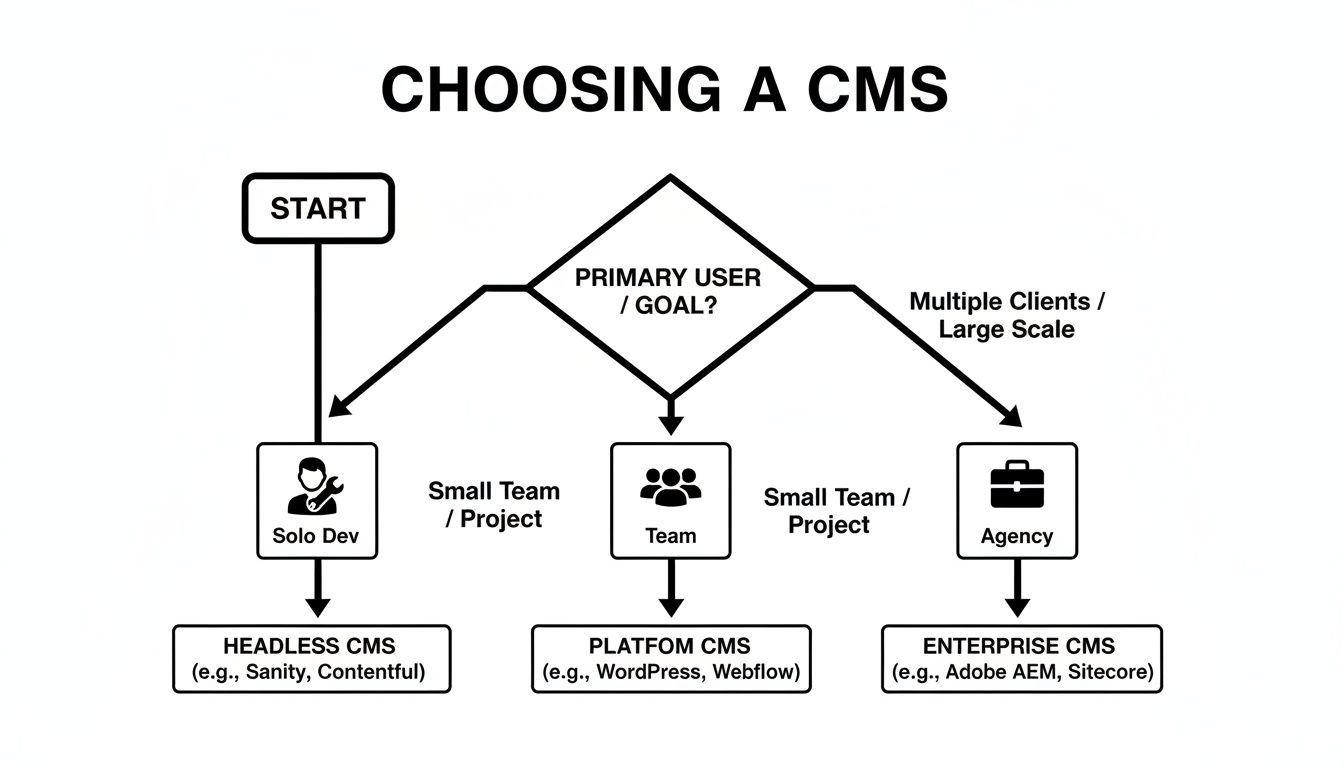
As you can see, the ideal solution often depends on whether you're a solo developer, a small team, or a large agency with complex needs.
Finding the Sweet Spot for Your Team
When you put these answers together, some clear recommendations start to emerge. Choosing a CMS is a strategic decision that has a real impact on your team's productivity.
When your top priorities are simplicity, a direct GitHub integration, and a polished visual editor for your static site, a Git-based solution is the obvious winner. It strips away needless complexity and keeps your entire project—code and content—under one roof.
This is exactly where JekyllPad shines. It's built for developers, bloggers, and small teams who already use GitHub but need a friendly, zero-configuration editing experience for their non-technical collaborators. It embraces the "content-as-code" philosophy without forcing your writers to become Git experts.
Of course, it's important to be realistic. For huge enterprise projects that need to distribute content across a dozen different channels, a powerful Headless CMS like Contentful or Strapi is the right tool for the job. Their strength lies in decoupling content for massive, complex digital ecosystems.
The entire content management software market, projected to hit USD 57,288 million by 2030, is growing because there's a need for both of these specialized approaches. As you can read in these content management market trends, businesses need tools that fit their specific scale and workflow, from lean, developer-centric solutions to massive enterprise platforms.
Ultimately, the best CMS for programmers is the one that fits into your existing process, empowers everyone on the team, and lets you focus on building great things instead of fighting with your tools.
Frequently Asked Questions About Developer CMS
Picking a new CMS is a big deal, and it makes sense that developers have questions about how these newer tools fit into their existing workflows. Moving away from the monoliths like WordPress raises some totally valid concerns about security, usability for non-tech folks, and what it actually takes to get one of these systems running.
Here are some clear, practical answers to the questions I hear most often from programmers checking out a developer-first CMS. The idea is to tackle these topics head-on so you can feel confident choosing the right platform.
Are Git-Based CMS Platforms Secure?
Yes, they are incredibly secure by design. Their entire architecture sidesteps some of the most common web vulnerabilities right from the start. By getting rid of a live database and server-side processing for the content layer, you basically eliminate entire classes of attacks like SQL injection.
With a tool like JekyllPad, your content never even leaves your private GitHub repository. The application runs entirely in your browser and only talks to GitHub's secure, authenticated API.
This client-side approach creates a tiny attack surface. When you combine that with a pre-built static site, you end up with one of the most hardened content environments possible. There’s simply no active CMS backend for bad actors to target.
Can Non-Technical Users Work with a Developer CMS?
Absolutely. In fact, that's one of the main reasons they were created. While the foundation is built for developers—Git, Markdown, and all—a visual CMS for programmers is specifically designed to hide all that complexity from everyone else.
A platform like JekyllPad gives content creators an intuitive WYSIWYG editor and simple forms for managing metadata (what we call front matter). This means a marketer, writer, or client can create and edit content without ever having to learn Git commands, touch a line of code, or figure out the strict syntax of YAML. It effectively builds a bridge between technical and non-technical teams, letting everyone work together on the same content repo using tools that feel familiar.
What Is the Main Difference Between Headless and Git-Based CMS?
The biggest difference comes down to where your content lives and how you get to it. Getting this distinction right is key to choosing the right tool for your project.
A Headless CMS like Contentful or Sanity stores your content in its own database and makes it available through an API. This setup is perfect when you need to push the same content to totally different places, like a website, a native mobile app, and maybe even an IoT device.
A Git-based CMS keeps your content as simple files (usually Markdown) right inside your project's Git repository. This "content-as-code" approach brings everything together under a single version control system. It dramatically simplifies your tech stack and fits perfectly with static site generator workflows.
In short, a headless system decouples content from code, while a Git-based system treats them as one and the same.
How Difficult Is the Setup for a Tool Like JekyllPad?
The setup is designed to be as quick and painless as possible. For JekyllPad, you can get through the whole onboarding process in just a couple of minutes. It’s really just three steps: connect your GitHub account, pick the repository you want to manage, and tell it where your content lives.
There's no backend to install, no database to set up, and no complicated build pipeline to configure just to manage content.
Because it runs completely on the client-side and talks directly to the GitHub API, you're up and running almost instantly. This makes it one of the most friction-free ways for a programmer to add a visual editing layer to a static site without piling on a bunch of new dependencies or infrastructure to worry about.
Ready to stop fighting with your content workflow? JekyllPad provides a seamless, visual CMS that integrates directly with your GitHub repository, empowering both developers and content creators. Try JekyllPad for free and see how simple static site content management can be.