
An open-source headless CMS gives you an API-first backend for all your content, but it intentionally has nothing to do with how that content looks. This decoupled architecture is the key. It lets you create and store content in one central place and then deliver it to literally any channel—a website, a mobile app, an IoT device, you name it.
Because it's open-source, you also get full transparency, a strong community, and you're never locked into a single vendor's ecosystem.
Unpacking the Headless CMS Architecture
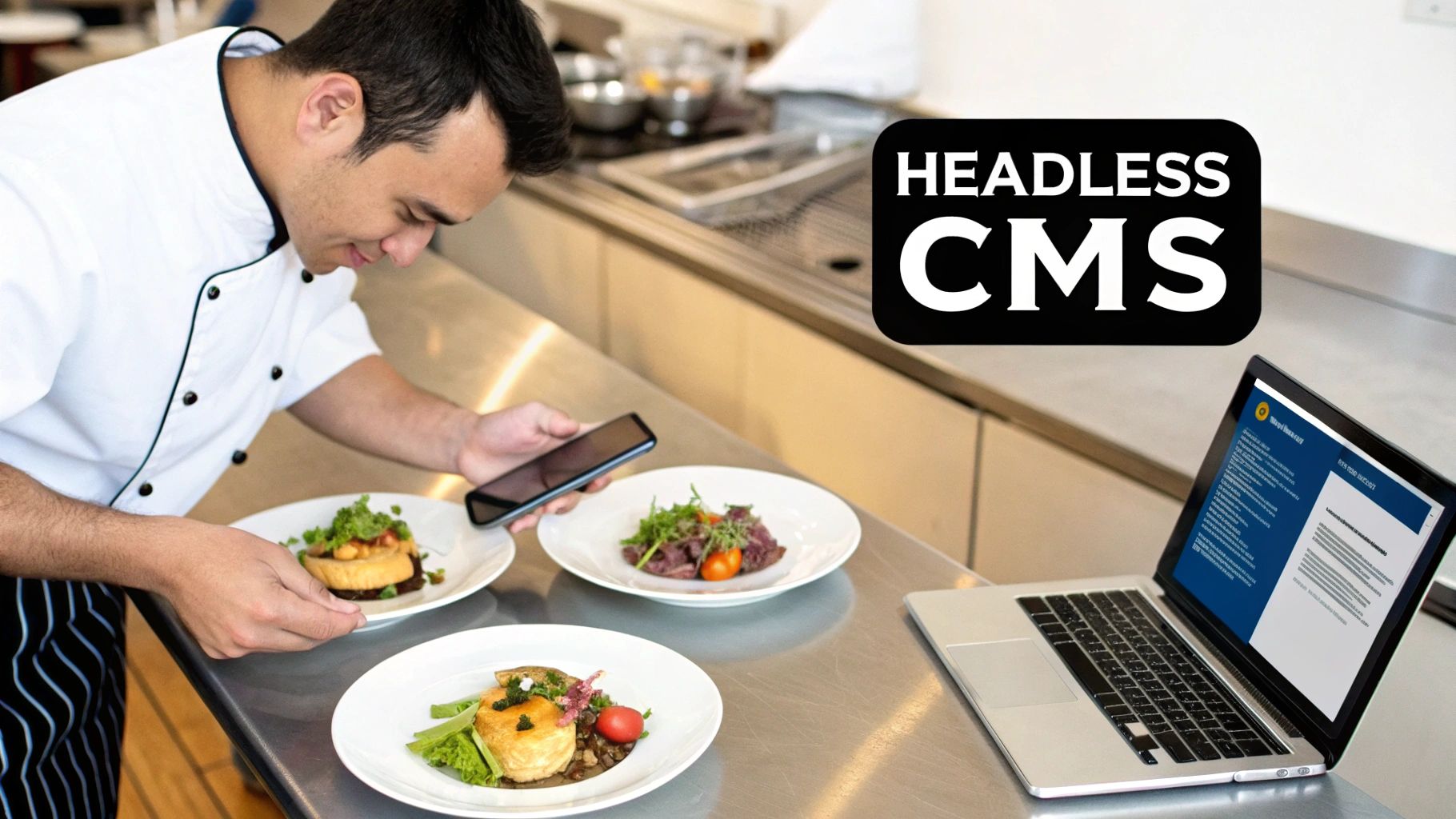
Think of a professional kitchen that can cook anything. Its job is to prepare incredible food (your content) and have it ready for pickup. It doesn't care if that food is served on a fine dining plate, in a food truck's takeout box, or packed for home delivery. The kitchen just makes the food available.
That's the fundamental idea behind a headless CMS. The "head" (the frontend website or app) is completely separate from the "body" (the backend content repository). An API (Application Programming Interface) acts as the waiter, taking orders from any frontend and delivering the exact content it needs. For a deeper dive into the basics, check out our guide on what a headless CMS is.
The Power of Being Decoupled
In a traditional, or monolithic, CMS like WordPress, the backend where you manage content and the frontend that displays it are tightly fused. You write a blog post, hit publish, and it’s immediately pushed into a webpage template. It's straightforward, but it's also incredibly rigid.
An open-source headless CMS shatters that model. It is only concerned with storing and organizing your content. Everything is then made available through a clean API, usually RESTful or GraphQL.
This setup unlocks some serious advantages:
- Frontend Freedom: Your developers are no longer tied to a specific theme or programming language. They can build a lightning-fast website with React or Vue, create native iOS and Android apps, or even send content to a digital kiosk. All from the same backend.
- Future-Proof Content: Your content is stored in a pure, raw format, free from any presentational code like HTML. This makes it instantly ready for any future channel or device that comes along, without forcing you into a massive content migration.
- Improved Security: By separating the content management admin from the public-facing website, you dramatically shrink the attack surface. Your content backend can be tucked safely behind a firewall, accessible only through secure API calls.
To really see the difference, it helps to put the two models side-by-side.
Traditional CMS vs Headless CMS at a Glance
| Feature | Traditional CMS (e.g., WordPress) | Headless CMS |
|---|---|---|
| Architecture | Monolithic (backend and frontend are tightly coupled) | Decoupled (backend and frontend are separate) |
| Content Delivery | Pushes content into a predefined website template | Makes content available via API for any frontend |
| Frontend Flexibility | Limited to themes and plugins within the CMS ecosystem | Unlimited—use any programming language or framework |
| Developer Experience | Often restricted by the platform's templating engine | Freedom to use modern tools and workflows |
| Scalability | Can be difficult to scale backend and frontend independently | Highly scalable; scale frontend and backend separately |
This table shows just how different the philosophies are. One is an all-in-one solution, while the other is a flexible, best-of-breed approach.
Why Open Source Matters
The "open-source" piece of the puzzle is just as important. Unlike proprietary systems where the code is a black box, an open-source headless CMS gives you complete transparency. You can see the code, modify it, and extend it to solve your specific problems.
An open-source model creates a powerful, collaborative environment. A global community of developers works together to find and fix bugs, add new features, and make the software better for everyone. This collective ownership often results in a more stable and secure platform.
This community-driven model also frees you from vendor lock-in. You can host the CMS anywhere you want and customize it without asking for permission, giving you total control over your tech stack and your data. This desire for control and flexibility is why the headless CMS software market, valued at USD 3.263 billion in 2024, is projected to explode to USD 26.66 billion by 2035. You can learn more about these market trends and growth drivers to see where the industry is heading.
Why Go Headless and Open Source?
Choosing an open source headless CMS isn't just a tech upgrade. It’s a fundamental shift in how you build and manage your digital presence, giving you speed, security, and flexibility that traditional systems just can't offer.
At its heart, this move is all about freedom. When you separate your content from your presentation layer—the "decoupling" everyone talks about—you free your developers to use the tools they're best at. Whether that’s React, Vue, Svelte, or another modern framework, they can build blazing-fast, beautiful frontends without being shackled to a clunky, built-in templating system.
This freedom speeds everything up. Your content team can be busy writing articles in the CMS at the same time your developers are perfecting the user interface. They work in parallel and then connect the two with a simple API call. It's a much more efficient way to work.
Supercharge Performance and Lock Down Security
One of the first things you'll notice after going headless is a massive performance boost. Since your frontend is completely separate, it can be built as a static site or a streamlined single-page application. The result? Lightning-fast load times, which makes a huge difference for user experience and SEO.
Faster sites don't just feel better; they get better results. Better speed is directly tied to higher search rankings, lower bounce rates, and improved conversion rates. It’s a clear performance win that impacts the bottom line.
From a security perspective, the decoupled architecture is a total game-changer. By splitting your content management environment from the public-facing website, you dramatically shrink the attack surface. Your content backend is no longer directly exposed to the internet, making it far less vulnerable to common cyber threats.
This separation creates a much more resilient and secure setup, protecting your content and your company's reputation.
Future-Proof Your Content and Lower Your Costs
We live in a world of countless digital channels—websites, mobile apps, smartwatches, voice assistants, you name it. A headless CMS prepares you for all of them. It stores your content in a clean, structured way, completely separate from its design.
This means you can write once and publish everywhere. Your content is ready for the devices we use today and for whatever comes next, all without requiring a painful and expensive migration. This flexibility is also perfect for optimizing your content repurposing workflow and getting more mileage out of every piece you create.
The "open source" component adds another layer of benefits: cost savings and community-driven innovation. You get to skip the expensive licensing fees and avoid being locked into a single vendor's ecosystem. Instead of waiting on one company's product roadmap, you gain access to a global community of developers constantly improving the platform's features, stability, and security.
This model is clearly catching on. Enterprise adoption is through the roof, with 64% of organizations now using a headless approach—that's a 25% jump since 2019. By making the switch, companies have seen operational costs drop by 35% and conversion rates climb by 15%, all thanks to a better user experience.
Comparing the Top Open Source Headless Platforms
When you're picking an open source headless CMS, it's not about finding the "best" one. It's about finding the right one for your team and your project's specific needs. The big three—Strapi, Directus, and Payload—all come at the problem from a different angle, and each one shines in its own way.
Let's break down what makes each platform tick. We'll go beyond a simple checklist of features to look at their core philosophy, so you can see which one truly aligns with your goals.
H3 Strapi: The All-in-One Powerhouse
There's a good reason Strapi has become the go-to name in the open-source headless world. It's a true workhorse, designed to be a comprehensive content hub for just about anything you can dream up, from a basic blog to a sprawling enterprise app. Its magic lies in its balance of a friendly interface for non-technical users and deep customization for developers.
Right out of the box, Strapi gives you a slick, intuitive admin panel where your content team can visually build complex data structures (called "Content Types") without ever needing to ask a developer for help. This makes it a fantastic choice for teams where marketers, writers, and developers all need to work together seamlessly.
Strapi is the undisputed leader in this space, with over 70,000 GitHub stars making it the most popular open-source headless CMS by a wide margin. This huge community has produced the largest plugin marketplace available, letting you bolt on new features with ease. You can see a great analysis of Strapi's market position to get the full picture.
This massive plugin ecosystem is really Strapi's secret weapon. Need advanced SEO fields, a different database connector, or a custom integration? Chances are, someone has already built a plugin for it.
- Best for: Teams who want to get up and running quickly with a polished UI, projects that will lean heavily on plugins for customization, and anyone who values the safety net of a massive, active community.
- Key Feature: Its giant plugin marketplace is the star of the show, allowing for nearly endless extensibility.
Simply put, Strapi is an incredibly flexible and reliable choice for a huge range of projects.
H3 Directus: The Database Mirror
Directus has a brilliantly simple, yet powerful, core idea. Instead of creating its own database and forcing your data into its structure, it does the opposite: it sits on top of your existing SQL database and instantly creates a beautiful CMS and API that perfectly mirrors it.
Think of it as a smart, user-friendly wrapper for your raw data.
This is a complete game-changer if you're working with a legacy database or if your team insists on having direct, unfiltered control over the database schema. There's no middleman. What you see in the Directus admin is a direct reflection of your database tables.
This "database-first" approach has some huge benefits:
- Zero Vendor Lock-In: Your data remains in a standard SQL database. If you decide to stop using Directus, you can just unplug it, and your data is still there, perfectly clean and usable.
- Instant Setup: It uses "introspection" to automatically discover your tables, fields, and relationships. This can save you hours, or even days, of manual configuration.
- Powerful Permissions: Directus offers one of the most granular role-based access control systems out there. You can control who sees and edits what, right down to the individual field level.
Because of this, Directus is an amazing fit for data-intensive applications, internal dashboards, and any project where the database is the absolute source of truth.
H3 Payload: The Developer-First Framework
Payload calls itself a "headless CMS and application framework," and they mean it. This platform is built for developers, through and through. It's unapologetically code-first, written in TypeScript, and designed to feel right at home in a modern JavaScript and React workflow.
With Strapi or Directus, you build your content models in a graphical interface. With Payload, you define everything in code. While that might sound like more work, it gives developers an incredible amount of power and control. Your entire CMS configuration lives in your Git repository, right alongside your application code.
Payload offers an exceptionally clean developer experience. It comes with a powerful local API for writing server-side logic, and its admin panel is built entirely in React. This means you can extend the admin UI using your own custom React components—it's not a black box, it's just another part of your app.
This "config-as-code" philosophy makes your whole setup transparent, repeatable, and easy to manage across development, staging, and production environments.
- Best for: Development teams who live and breathe TypeScript and React, projects that need deep backend customization, and any situation where version-controlling your CMS schema is a must.
- Key Feature: Its code-first approach lets you define your entire backend in TypeScript, giving you maximum flexibility and perfect integration with modern dev tools.
Strapi vs Directus vs Payload
To make it even clearer, here’s a side-by-side look at how these three platforms stack up on some key features.
| Feature | Strapi | Directus | Payload |
|---|---|---|---|
| Primary Philosophy | All-in-one, UI-first content hub | A smart wrapper for your existing SQL database | A code-first application framework for developers |
| Core Language | JavaScript / Node.js | JavaScript / Node.js | TypeScript / Node.js |
| Admin UI | Highly intuitive, visual content model builder | Clean and modern; auto-generated from your database schema | Fully extensible with custom React components |
| Schema Definition | Primarily through the admin UI | Defined directly in your SQL database schema | Defined entirely in TypeScript code (config-as-code) |
| Extensibility | Massive plugin marketplace for features and integrations | A growing collection of extensions; fully open and customizable | Built to be extended with code; powerful local API and React hooks |
| Best For | Mixed teams, rapid development, projects needing many off-the-shelf features | Projects with existing databases, data-heavy apps, no vendor lock-in | Developer-centric teams, projects requiring deep customization, version-controlled setups |
| Learning Curve | Low for content editors, moderate for developers | Low for editors, depends on SQL knowledge for developers | Higher for non-developers, but intuitive for experienced TypeScript/React devs |
Ultimately, your choice comes down to your team's skills and project priorities. Strapi gives you balanced power, Directus offers data purity, and Payload delivers unparalleled control for developers.
Understanding Git-Based CMS: A Leaner Alternative
Beyond the world of dynamic, database-driven headless platforms, a much simpler, leaner architecture has been picking up serious steam. It's the Git-based CMS, an approach that ditches complex databases for the straightforward power of a Git repository.
Think about it: what if your entire library of content—every blog post, product description, and documentation page—was just a folder of simple text files? Instead of a database server, your content lives right inside a GitHub or GitLab repository. This is the heart of a Git-based, or "flat-file," workflow.
This model completely changes the game by treating your content just like developers treat code. Every edit, update, or new article becomes a "commit" logged in your repository's history. This move drastically simplifies your tech stack, completely removing the need for database setup, maintenance, or security updates.
The Core Benefits of a Git-Based Workflow
By building on top of Git, this type of open source headless CMS inherits a whole set of powerful features that are incredibly useful for managing content. It’s not just about keeping things simple; it's about building a more robust, secure, and lightning-fast foundation for your website.
This workflow brings several huge advantages to the table:
- Automatic Version Control: Every single change to your content is tracked. You get a complete, auditable history of who changed what and when. Need to roll back an accidental deletion or see what an article looked like last week? It's all built-in.
- Enhanced Security: By removing a live database connection from the public internet, you eliminate a massive attack vector. Git-based sites are typically served as pre-built static files, making them incredibly tough to compromise.
- Blazing-Fast Performance: Websites built from flat files can be pre-rendered into highly optimized static HTML. This leads to near-instantaneous load times—a huge win for both your users and your SEO rankings.
A Git-based architecture provides an immutable, transparent, and auditable single source of truth for all content. It aligns content operations with proven developer best practices, ensuring that every piece of content is versioned, reviewed, and deployed with the same rigor as application code.
This approach is a perfect fit for projects where performance and security are non-negotiable, like blogs, marketing sites, and technical documentation. For a deeper dive into how this all works, check out our detailed guide on the benefits of a GitHub-based CMS.
How Does a Git-Based CMS Actually Work?
The process is surprisingly straightforward. A non-technical user works in a friendly interface—often a simple Markdown or WYSIWYG editor—to write and edit content. When they hit "save," the CMS doesn't send that data to a database.
Instead, it automatically triggers a series of Git actions behind the scenes. It "commits" the changes to the connected repository with a clear message. That commit then kicks off an automated build process (using a service like GitHub Actions or Netlify) that rebuilds the static website with the new content and deploys it.
This workflow really offers the best of both worlds. The content team gets a simple, intuitive editing experience they love, while the development team gets a secure, version-controlled, and high-performance architecture they can trust. It beautifully bridges the gap between ease of use and technical excellence, making it a compelling alternative to more complex headless systems.
How JekyllPad Modernizes the Git-Based Workflow
Let's be honest: a Git-based workflow is incredible for developers. It offers rock-solid version control, top-tier security, and blistering performance. The problem? For anyone who doesn't live in a code editor, it's a nightmare.
Marketers, writers, and editors often find themselves stuck. The world of pull requests, command lines, and commit messages feels like a foreign language, slowing everything down. This is the exact friction point JekyllPad was designed to eliminate. It works as a friendly, intuitive layer right on top of your GitHub repository, turning content management back into a creative process instead of a technical chore.
Essentially, JekyllPad bridges the gap. It connects the raw power of a Git-based open source headless CMS with the simple, user-friendly experience your whole team deserves, without sacrificing any of the benefits developers love.
From Command Line to Visual Editor
The biggest hurdle for non-technical folks in a Git system is usually the interface—or the lack of one. JekyllPad swaps out the intimidating command line for a clean, visual editor that feels instantly familiar.
It gives your content team the tools they actually want to use:
- A Modern WYSIWYG Editor: Writers can format their content and see exactly how it will look on the page, no HTML or Markdown knowledge required.
- A Powerful Markdown Editor: For those who prefer the speed of Markdown, it offers a beautiful interface with syntax highlighting and a live preview.
- Seamless Media Management: Adding images becomes a simple drag-and-drop. No more wrestling with Git to upload a simple file.
Here's the magic: every time a user hits "save" in JekyllPad, it automatically runs a Git commit to your repository in the background. Your content creators can just focus on creating great content, and all the technical stuff is handled for them.
JekyllPad makes the Git workflow accessible to everyone. By abstracting away the underlying commands, it allows content contributors to operate with the same confidence and efficiency as developers, turning your GitHub repository into a truly collaborative content hub.
The Best of Both Worlds
With this setup, you no longer have to make a tough choice between a developer-friendly static site and an easy-to-use CMS. JekyllPad gives you both, solving the most common frustrations that come with managing content in a tech-first environment.
Your developers get to keep everything they love about their Git-based workflow. They can stick to their favorite tools, run automated builds, and have a complete version history of every single change.
At the same time, your content team is free to work independently and publish content quickly. This creates a much smoother workflow where everyone can move in parallel, dramatically speeding up the time it takes to get from a first draft to a published article. To see this in action, you can learn more about how to sync content with GitHub through a visual interface.
This hybrid approach removes the bottleneck and finally makes content management a team sport.
Choosing the Right Open Source CMS for Your Needs
Picking the right open source headless CMS really comes down to one thing: matching the tool to your project’s goals and your team's comfort zone. The options we've covered aren't just rivals fighting for a "best CMS" crown; they represent different ways of thinking about content, each built to solve a specific set of problems. Let's move from theory to a practical framework that will help you make a smart, confident choice.
First, take a hard look at what your project actually needs to do. Are you building a complex web application with lots of moving parts—think intricate data relationships, different user roles, and a need to plug into various third-party services? If that sounds like you, then you're probably heading toward a full-featured, database-driven headless CMS.
When to Choose a Full-Featured Headless CMS
Platforms like Strapi and Directus are in their element when a project demands serious backend muscle. You should seriously consider this path if your project involves:
- Complex Data Models: You're not just managing blog posts. You need to connect users to products, orders, and reviews, all within a slick admin panel.
- Multiple User Roles: Your team needs fine-grained control. You want editors, admins, and contributors to only see and touch the content they're supposed to.
- Heavy Integrations: Your CMS needs to be the single source of truth, feeding content to a website, a mobile app, and maybe even internal dashboards.
For these kinds of projects, the structured, database-first approach of a CMS like Strapi gives you the power and flexibility to build and grow sophisticated digital experiences.
When your project's content feels more like an application with dynamic, interconnected data, a database-driven headless CMS is the obvious choice. It brings the necessary backend power to manage that complexity while giving your content team a friendly interface to work with.
When to Choose a Git-Based CMS
But what if your priorities are completely different? Maybe your main goal is to launch a blazing-fast and highly secure website—a blog, a set of documentation, or a marketing site. If top-tier performance, bulletproof security, and flawless version control are your dealbreakers, then a Git-based system is hands-down the way to go.
This lean approach cuts out the database entirely, which immediately reduces complexity and shrinks the attack surface for potential threats. Because it's built for static sites, you're guaranteed the fastest possible load times, a huge win for both user experience and SEO.
This leads to the million-dollar question: how do you get a non-technical team to work in such a developer-focused environment? If you crave the performance and security of a Git-based workflow but need a beautiful, intuitive editor for your writers, that's precisely where JekyllPad comes in. It closes that gap by providing a seamless visual editing experience that saves changes directly to GitHub, making the powerful Git workflow easy enough for anyone to use.
Ultimately, your choice hangs on this balance: do you need the power to handle complex data, or the simplicity and speed of a streamlined content workflow?
Frequently Asked Questions
When you start digging into the world of open-source headless CMSs, a few common questions always seem to pop up. Let's tackle them head-on so you can move forward with confidence.
Self-Hosted vs. Cloud SaaS
What's the real trade-off here? It boils down to one thing: control versus convenience.
With a self-hosted solution, like running your own instance of Strapi, you are the captain of the ship. You control the code, the data, the hosting environment—everything. This gives you incredible flexibility but also means you're on the hook for all the maintenance, security patches, and server updates.
A cloud or SaaS platform takes all that infrastructure work off your plate. You can get up and running much faster, but you're giving up some control and might see costs climb as your project grows. It’s a classic choice between total ownership and managed simplicity.
Can Non-Technical Users Contribute Content?
Yes, and this is a huge focus for modern headless systems. While developers handle the initial setup, the content editing experience is specifically built for marketers, writers, and editors who aren't coders.
Tools like JekyllPad are designed to bridge this gap completely. They create a clean, intuitive visual editor that sits on top of a more technical Git-based workflow, making content updates feel as simple as writing in a document. Anyone can do it.
Is a Headless CMS Overkill for a Small Blog?
Honestly, sometimes it can be. If you're looking at a full-blown, database-driven headless CMS and it feels like bringing a tank to a knife fight, you're probably right.
But that's where a Git-based approach shines. It's a much leaner, more secure, and incredibly fast alternative that's perfect for smaller sites. You get a solid content workflow without the headache of managing a database.
This chart can help you think through which path might be the right fit for your specific project.
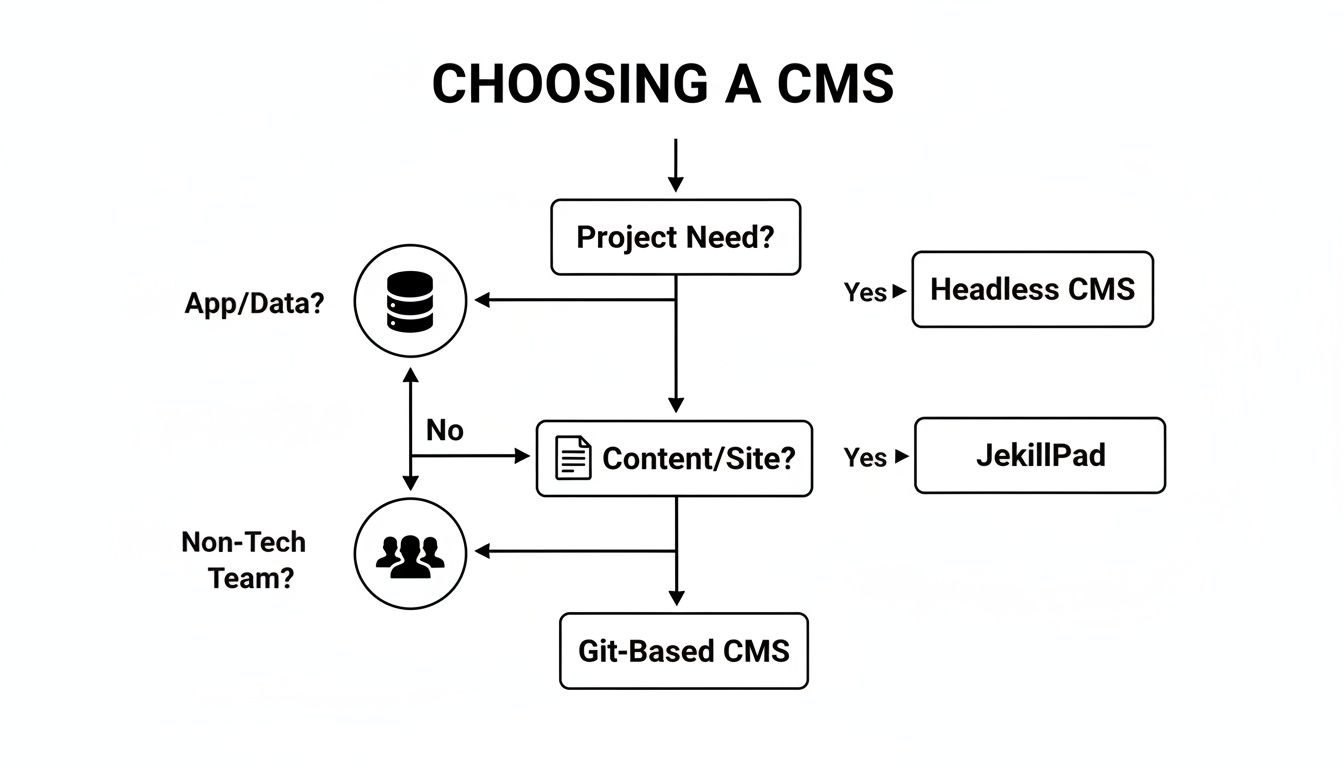
The goal is always to match the tool to the task. You want just enough power to get the job done right, without adding a bunch of complexity you don't actually need.
If the speed and security of a Git-based workflow sound appealing, but you need an interface your whole team can use, JekyllPad is built for you. It syncs with your GitHub repository and provides a beautiful visual editor, empowering everyone to contribute effortlessly. Get started for free on JekyllPad.