
So, what exactly is a cloud-based content management system? In simple terms, it's a platform delivered as a SaaS (Software-as-a-Service) solution. All your content and the tools to manage it live on the provider's servers, and you access everything right through your web browser. This completely removes the need for you to buy, set up, or even think about your own server hardware.
The core idea is a shift in responsibility. Instead of your team wrestling with security, updates, and uptime, the CMS provider takes care of all that heavy lifting.
What Is a Cloud Based Content Management System?
Think about the difference between building a custom home from the ground up versus renting a high-end, fully-serviced apartment. A traditional, self-hosted CMS is like building that house. You’re on the hook for everything—the foundation (server), the plumbing (database), the security system, and every single repair. You get total control, but you also carry total responsibility.
A cloud based content management system, on the other hand, is that serviced apartment. The building management (the provider) handles all the infrastructure, maintenance, security patrols, and server upkeep. Your team just brings its content—the furniture—and gets to work. This frees you up to focus entirely on creating and publishing, not on the messy technical work happening behind the scenes.
This move from self-managed software to a cloud-based service isn't just a trend; it's become the industry standard. Why? Because businesses are desperate for scalability, real-time collaboration, and easy integrations without the headaches of managing their own hardware.
The numbers back this up. In 2025, the global CMS market hit a staggering USD 35.16 billion, with cloud solutions dominating the field at an impressive 58.40% market share. The whole market is projected to climb to USD 79.30 billion by 2033. You can dig deeper into these trends by checking out the full market report.
Core Characteristics of a Cloud CMS
At its heart, a cloud CMS is all about abstracting away the technical grunt work of hosting. Instead of installing software on a server you own or lease, you just log in through a web portal—the same way you'd access Gmail or Slack.
This table provides a quick overview of the essential characteristics that define a modern cloud based content management system.
Cloud CMS Fundamentals
| Characteristic | What It Means for You |
|---|---|
| Vendor-Managed Infrastructure | No more worrying about servers. The provider handles all the hardware, software updates, and network performance. |
| Subscription-Based Pricing | Costs are predictable. You typically pay a monthly or annual fee, turning a huge upfront expense into a simple operational cost. |
| Accessibility From Anywhere | Your team can create, edit, and publish from anywhere in the world, as long as they have an internet connection and a browser. |
| Automatic Updates and Security | The provider manages all software patches and security monitoring, protecting your site from threats without you lifting a finger. |
These characteristics work together to deliver a much more efficient and accessible experience for modern content teams.
This "as-a-service" model really levels the playing field for content management. It gives smaller teams and non-technical users access to enterprise-grade tools, security, and performance that would otherwise be way too expensive or complex to manage on their own.
Ultimately, cloud based content management systems are built for one thing: efficiency. They empower teams to launch digital projects faster and pour their energy into what actually moves the needle—creating great content for their audience. By offloading the technical burden, your business can be far more agile and responsive.
The Core Benefits of Moving to a Cloud CMS
So, you're looking at different CMS options, and everyone keeps mentioning "the cloud." But what does that actually mean for your business? Why make the switch? It's not about jumping on a trend; it's a strategic decision that solves some very real, very common headaches around growth, cost, teamwork, and security.
Let's cut through the jargon and look at the four biggest reasons businesses are moving to a cloud based content management system. We'll explore how this shift can directly improve your day-to-day operations and free you up to do what you do best: create amazing digital experiences.
Effortless and Automatic Scalability
Imagine your new product launch goes viral. Your website traffic suddenly explodes by 1,000%. With a traditional self-hosted website, this dream scenario can quickly turn into a nightmare. The server overloads, the site crashes, and all those potential customers see is an error page.
This is exactly the kind of disaster a cloud CMS is built to prevent. These platforms run on massive, distributed networks designed to be incredibly flexible.
- Automatic Resource Allocation: You don't have to scramble to add more server power. The cloud platform does it for you, instantly, aIlocating more resources to handle the spike.
- High Availability: Your site isn’t stuck on one physical server in a closet somewhere. It’s spread across a network of machines, so if one has an issue, your site stays online and running smoothly.
- Global Performance: Most cloud platforms include a Content Delivery Network (CDN). This means your content is stored on servers all over the world, so visitors from London get the same fast load times as visitors from Los Angeles.
This built-in scalability lets your website grow right alongside your business. Whether it’s a slow burn of new readers or a sudden flood of viral traffic, the system just handles it—no late-night calls to your IT team required.
The real value of cloud scalability is peace of mind. You can launch ambitious campaigns and focus on growth, confident that the underlying technology can handle whatever comes its way. Your success is enabled, not limited, by your infrastructure.
Predictable Costs and Financial Efficiency
Setting up a traditional CMS often means a huge upfront investment. You're buying expensive server hardware, paying for software licenses, and maybe even hiring someone just to keep it all running. These are big, unpredictable capital expenses (CapEx) that can be a major roadblock.
A cloud based content management system completely flips that model. It shifts your spending from a large, one-time CapEx to a predictable operational expense (OpEx).
You simply pay a recurring subscription fee, which brings some major financial wins:
- No Large Upfront Investment: Forget about buying and maintaining your own physical servers.
- Predictable Budgeting: Your costs are the same every month or year, making financial planning a whole lot easier.
- Inclusive Maintenance: That subscription fee almost always covers security, updates, and maintenance, so you’re never hit with a surprise bill for emergency repairs.
This approach makes top-tier technology accessible to everyone, not just large enterprises. You can put your money toward creating great content instead of pouring it into costly hardware.
Enhanced Global Collaboration
These days, teams are spread out everywhere. Writers, editors, designers, and marketers might be working from different cities, time zones, or even continents. A cloud CMS becomes the central hub that brings everyone together.
Since the entire system is accessed through a web browser, team members can log in and contribute from anywhere they have an internet connection. This creates a single source of truth for all your content. No more emailing Word docs back and forth and wondering which version is the final one.
Plus, modern cloud platforms are getting smarter. Many now integrate AI to improve workflows, offering features like AI-powered content curation and automated content suggestions.
Superior Security and Maintenance
For most companies, managing website security is a full-time job they don't have time for. It requires constant monitoring, deep expertise, and a dedicated budget to defend against DDoS attacks, malware, and data breaches.
When you use a cloud CMS, you're essentially outsourcing that entire headache to a team of dedicated experts. Reputable cloud providers have security teams working 24/7 to:
- Monitor for threats and vulnerabilities.
- Apply critical security patches automatically.
- Manage firewalls and intrusion detection systems.
- Ensure the platform meets key industry compliance standards.
This delivers a level of security that’s far stronger and more cost-effective than what most businesses could ever build on their own. By letting the provider handle security and updates, you free up your team to focus on what really matters—running your business.
Comparing Different CMS Hosting Models
Picking a CMS isn't just about features and dashboards; it's a fundamental decision about the architecture that will power your entire content operation. The hosting model you choose directly shapes your team's workflow, your budget, and who's on the hook when things go wrong.
To really get a feel for the differences, let's break down the three main approaches.
Think of a cloud-based CMS as checking into an all-inclusive resort. The staff handles everything—the room, the food, security, and all the maintenance. You just show up and enjoy the amenities, completely free from the complex logistics running in the background.
A self-hosted CMS is more like owning your own house. You have total freedom. You can paint the walls any color, install any security system you want, and renovate as you see fit. But that control comes with the responsibility for every single bit of upkeep, from fixing a leak to securing the doors.
Finally, the static site approach is like building a minimalist, high-tech tiny home. It's purpose-built for efficiency, speed, and security. It operates on a different philosophy altogether, ditching the heavy, database-driven parts of traditional systems for pure performance and simplicity.
The All-Inclusive Resort: Cloud CMS
A cloud-based content management system runs on a Software-as-a-Service (SaaS) model. In simple terms, the provider handles all the technical headaches—hosting, security patches, software updates, and server maintenance. Your team just logs in through a web browser and gets to work on what they do best: creating content.
- Maintenance: The vendor takes care of all updates and security, so your team isn't bogged down with technical tasks. Your platform is always running the latest and most secure version without you lifting a finger.
- Performance: These systems are built on powerful, distributed infrastructure. They almost always include a Content Delivery Network (CDN) to make sure your site loads quickly for visitors anywhere in the world.
- Cost: The financial side is straightforward and predictable, usually a monthly or annual subscription fee. This turns your website into an operational expense (OpEx) and avoids the large upfront capital expense (CapEx) of buying your own hardware.
This image really drives home the core benefits that make the cloud model so attractive.
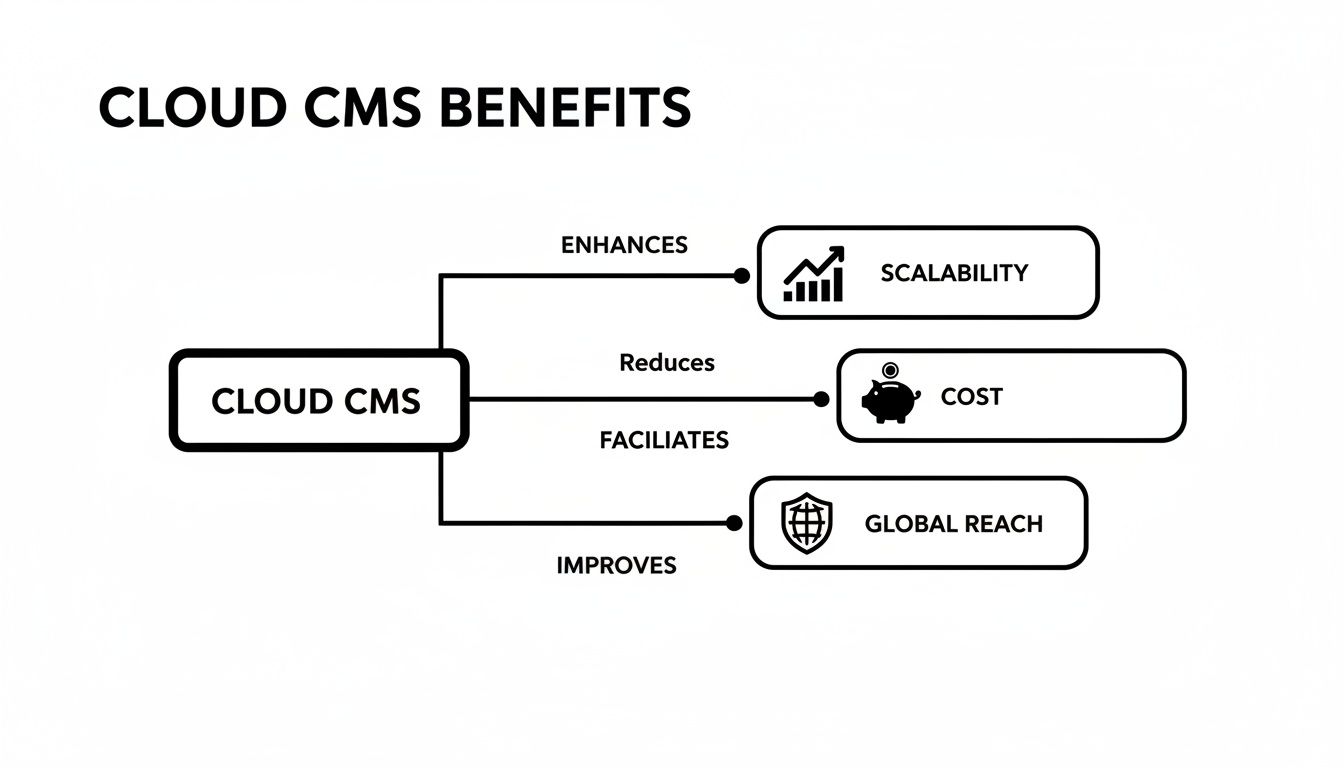
As you can see, it's all about letting the provider manage scalability, security, and global reach so you can focus on your business.
The Homeowner Model: Self-Hosted CMS
Going the self-hosted route gives you the keys to the kingdom. You install open-source software like WordPress or Drupal on a server you own or rent, giving you ultimate control. This path is perfect for organizations that have very specific custom needs and, crucially, have the in-house technical chops to manage the whole setup.
With a self-hosted CMS, you are the master of your domain. Every line of code, every plugin, and every server setting is under your direct control, offering unparalleled flexibility but also demanding significant technical expertise and vigilance.
But with great power comes great responsibility. You’re the one in charge of running software updates, patching security vulnerabilities, handling backups, and optimizing performance. If a sudden traffic spike crashes your site at 3 AM, it's your team that gets the call. This is true for all kinds of self-managed platforms, whether it's a CMS or even self-hosted social media management.
The Tiny Home Model: Static Sites
The third path, a static site architecture, is a modern alternative built for pure speed and security. Instead of a database dynamically generating pages every time someone visits, a static site generator (like Jekyll or Hugo) pre-builds every single page into a set of simple HTML, CSS, and JavaScript files.
Those lightweight files are then distributed across a CDN. The result? Blazing-fast load times and a much smaller attack surface, because there’s no live database or complex server-side code for hackers to exploit. A Git-based CMS like JekyllPad then comes in to provide a friendly interface for your non-technical team members, allowing them to manage content and commit their changes straight to a GitHub repository.
This model gives you the best of both worlds: the rock-solid security and performance of a static site combined with the smooth, collaborative workflow of a cloud tool.
How CMS Hosting Models Stack Up
Choosing the right path boils down to your team's skills, budget, and what you're trying to achieve. The table below offers a side-by-side comparison to help you weigh the trade-offs.
| Factor | Cloud-Based CMS | Self-Hosted CMS | Static Site with Git-Based CMS |
|---|---|---|---|
| Maintenance | Handled entirely by the provider. | Your full responsibility. | Minimal; handled by Git provider and CDN. |
| Performance | Generally high; relies on provider's infrastructure. | Depends entirely on your hosting and optimization. | Extremely high; files are pre-built and served from a CDN. |
| Security | Managed by the provider. | Your full responsibility. | Inherently very high due to no live database. |
| Control | Limited to platform features. | Absolute and total control. | High control over code; content managed via Git. |
| Cost Model | Predictable subscription (OpEx). | Upfront hardware/hosting (CapEx) + ongoing maintenance. | Often low-cost or free hosting; pay for tools. |
| Best For | Teams wanting convenience and reliability. | Organizations with custom needs and technical staff. | Performance-focused projects prioritizing speed and security. |
There's no single "best" answer here. A cloud CMS is about convenience, a self-hosted solution is about control, and a static approach is all about performance. For a deeper look at these architectural choices, check out our comparison of CMS models. By understanding these fundamental differences, you can pick the foundation that will truly help your team build something great.
Understanding Git-Based and Headless Cloud CMS
The world of cloud based content management systems has moved far beyond the one-size-fits-all model. A more modern, developer-centric approach has taken hold, branching into two powerful ideas: headless and Git-based systems. These architectures completely rethink how content gets stored and delivered, unlocking huge wins in speed, security, and flexibility.
Think of a traditional CMS as a combo TV/VCR unit. The content (the tape) and the delivery method (the screen) are stuck together. A headless CMS, on the other hand, is like Netflix. It has a massive library of content but doesn't dictate how you watch it—on a smart TV, your laptop, or a phone. It just serves up the content through an API, giving developers total freedom to build whatever "front-end" they can imagine.
The Power of Decoupling with a Headless CMS
A headless CMS essentially cuts the "head" (the public-facing website) off from the "body" (the content management backend). The backend is a cloud-based interface where your team writes, edits, and organizes everything. When a piece of content is ready, it's served up through an API for developers to use.
This separation brings some incredible benefits to the table:
- Omnichannel Delivery: You can push the exact same content to your website, a mobile app, a digital kiosk, or even a smartwatch, all from one central hub.
- Future-Proof Flexibility: Ready to redesign your website or switch to a new JavaScript framework? No problem. Since the front-end is totally separate, you can make those changes without touching or migrating a single piece of content.
- Enhanced Performance: Developers are free to use modern, speed-optimized tools like React or Vue.js to build blazing-fast user experiences that traditional systems often struggle with.
The core principle here is to treat your content as pure, structured data, ready to be pulled into any application you can dream up. It’s a major shift from older systems that trap your content inside a specific website template.
The Git-Based Revolution
Now, let's take that idea one step further with Git-based systems. A Git-based CMS builds on the headless concept but changes where the content actually lives. Instead of storing it in a proprietary database somewhere in the cloud, it saves everything as simple text files (like Markdown) right inside your own GitHub repository.
Your GitHub repo literally becomes the single source of truth for both your website's code and its content.
This Git-centric model is a game-changer for collaboration and security. Every change—from fixing a typo to publishing a new blog post—is a fully trackable "commit" in your repository. You get a complete version history, the power to roll back any change instantly, and the peace of mind that your content is secure under your control, not locked away in a third-party service.
This approach is incredibly popular with static site generators like Jekyll and Hugo. A cloud based content management system like JekyllPad acts as a user-friendly interface on top of your repository. It gives non-technical creators a simple, visual editor to do their work, but every save automatically creates a clean, version-controlled commit behind the scenes. To see this in action, you can learn more about how a GitHub-based CMS works.
Why This Modern Approach Matters
This isn't just some niche technical trend; it’s a direct response to what modern web development teams need. The market for cloud content management is exploding, expected to grow from an estimated USD 28.0 billion in 2026 to a projected USD 65.0 billion by 2033. This massive growth is being fueled by teams who are demanding better performance and simpler, more reliable workflows. For more on this trend, check out the analysis on the growth of the cloud CMS market.
Git-based and headless models meet these demands by offering the best of both worlds. Developers get the control, performance, and versioning power of a Git workflow they already know and love. At the same time, content creators get a clean, intuitive interface to do their jobs without ever needing to see a line of code. It's a synergy that creates a truly efficient, secure, and scalable way to manage content.
How to Choose the Right Cloud CMS
Picking the right cloud-based content management system isn’t about finding a single “best” platform. It's about finding the right fit for your team and your goals. The market is packed with options, from all-in-one SaaS products to highly flexible Git-based solutions, so you need a clear framework to make a smart decision. This choice is more than just technical—it's a strategic move that will define your content workflow for years.
To zero in on the perfect system, you have to start by looking inward at your team's skills, budget constraints, and long-term vision. Asking the right questions upfront will help you cut through the marketing hype and focus on what really matters.
Assess Your Team's Technical Expertise
First things first: you have to be honest about your team's technical comfort level. A powerful, developer-first headless CMS might offer incredible flexibility, but it’s a total misstep if your content team needs constant help from IT just to publish a post.
- For Non-Technical Teams: If your writers and marketers need a simple, visual experience, you should prioritize systems with intuitive editors, drag-and-drop features, and dead-simple publishing workflows. The goal is to empower them, not frustrate them.
- For Developer-Centric Teams: On the other hand, if your team lives and breathes Git, Markdown, and APIs, a headless or Git-based cloud CMS could be a dream come true. These systems offer the fine-grained control and performance that developers value. We dive deeper into this in our guide to the best CMS options for developers.
- For Hybrid Teams: Many organizations have a mix of technical and non-technical folks. If that’s you, look for a platform that bridges the gap—something like a Git-based CMS that also has a user-friendly visual editor so everyone can work together smoothly.
Define Your Budget and Pricing Model Preference
Cloud CMS pricing is all over the map, so getting a handle on the different models is key to avoiding sticker shock later on. Remember, you're not just buying a piece of software; you're investing in an ongoing service.
Most platforms use one of a few common pricing strategies:
- Tiered Subscriptions: This is the most popular model. You pay a predictable monthly or annual fee based on things like user seats, website traffic, or how much content you have. It makes budgeting a breeze.
- Usage-Based Pricing: Some headless platforms bill you based on API calls or data transfer. This can be a bargain for small sites but can get pricey fast if your traffic suddenly spikes.
- Per-Project or Per-Site Pricing: This approach is popular with agencies and freelancers managing multiple client websites, as it lets them pay for each project separately.
When you're looking at the cost, think beyond the monthly fee. A "cheaper" plan that needs a ton of developer hours to customize might end up costing you more than a slightly pricier, all-inclusive platform your marketing team can run on their own.
Map Out Your Essential Integrations
Your CMS doesn’t operate in a silo. It needs to play nicely with all the other tools you rely on, from marketing automation to e-commerce. A slick website isn’t very useful if it can’t talk to your analytics platform, CRM, or online store.
Before you even book your first demo, make a list of your must-have integrations.
- Marketing Automation: Does it connect with tools like HubSpot or Marketo?
- Analytics: Can you easily plug in Google Analytics or another tracking tool?
- E-commerce: If you sell online, does it work with platforms like Shopify or BigCommerce?
- CRM: How well does it sync customer data with a system like Salesforce?
A cloud CMS with a solid API or a marketplace full of pre-built connectors will make your life infinitely easier. If you overlook this, you risk creating frustrating data silos and manual workarounds—exactly the kind of inefficiency you were trying to escape by moving to the cloud. By thinking through your team, budget, and toolset, you’ll be in a great position to choose a cloud CMS that truly helps your business grow.
Common Questions About Cloud CMS
As you get closer to making a decision, a few key questions always seem to pop up. Moving your content hub to the cloud is a big step, and it's smart to iron out any lingering uncertainties. This final section tackles those common questions head-on, so you can move forward with total confidence.
Let's dig into the details that come up most often when teams are sizing up cloud-based content management systems.
Is a Cloud-Based CMS Less Secure Than an On-Premise One?
This is probably the most common worry we hear, but the reality is usually the exact opposite. For the vast majority of businesses, a reputable cloud CMS is actually far more secure than a self-hosted setup.
Think of it this way: cloud providers are in the security business. They have entire teams of cybersecurity pros working 24/7 to monitor threats, roll out patches, and maintain compliance with tough industry standards. It's what they do all day, every day.
Trying to match that level of dedicated security in-house is not just incredibly expensive; it requires a kind of specialized expertise that most companies simply don't have on staff.
- Proactive Threat Monitoring: These providers use sophisticated systems to spot and neutralize threats long before they can ever affect your site.
- Automatic Patching: When a new vulnerability is found, they patch it across their entire network instantly. You don't have to lift a finger.
- DDoS Mitigation: Top-tier providers have massive defenses against Distributed Denial-of-Service attacks that could easily knock a self-hosted site offline for hours.
Of course, security is a partnership. While the provider handles the infrastructure, your team still needs to do its part by using strong passwords, managing user permissions carefully, and following common-sense security practices.
What Is the Difference Between a Cloud CMS and a Headless CMS?
Great question. These two terms get thrown around together so often that it’s easy to get them mixed up. The trick is to remember they describe two completely different things: one is about hosting, and the other is about architecture.
A cloud CMS simply tells you how the system is delivered—it’s a service you access over the internet, a true Software-as-a-Service (SaaS) product where the provider manages all the servers.
A headless CMS, on the other hand, describes how the system is built. It separates, or "decouples," the content management backend (the "body") from the presentation layer or front-end (the "head").
The easiest way to think about it is that many headless systems are cloud-based, but not all cloud-based systems are headless. A traditional cloud CMS like Wix or Squarespace is often "coupled," meaning it controls both your content and how that content is displayed. A headless cloud CMS just worries about the content, delivering it via an API to any front-end you can dream up.
Can I Migrate My Existing Website to a Cloud-Based CMS?
Yes, absolutely. Migrating an existing site is almost always possible, though the difficulty really depends on what you’re starting with. The process generally moves through a few key stages, from planning and auditing to the final launch.
The complexity can vary quite a bit:
- From a Popular Platform: Moving from a well-known system like WordPress is a well-trodden path. There are plenty of tools and proven workflows for exporting your content and importing it into a new cloud platform.
- From a Custom or Legacy System: This is where things get more hands-on. Migrating from an old, custom-built website will likely mean writing some custom scripts to pull your content out and reshape it for the new CMS's structure.
- For Static Sites: This is often the smoothest migration of all. If you're moving to a Git-based cloud CMS and your content is already in Markdown files, the process can be as simple as connecting the new tool to your existing GitHub repository.
No matter where you're coming from, a good migration always starts with a content audit—deciding what's worth keeping—and a small test migration to work out the kinks before you make the big move.
Are Cloud-Based Content Management Systems Good for SEO?
They are, and in many cases, modern cloud platforms give you a significant SEO leg up over older, self-hosted systems. Their entire architecture is built to support the technical factors that search engines care about today.
Performance is a huge ranking factor, and this is where cloud platforms shine. They deliver faster load times and better uptime because they run on globally distributed, highly optimized infrastructure.
On top of that, most leading cloud CMS solutions come with built-in SEO tools that make life easier for your marketing team:
- Easy management of meta titles and descriptions.
- Clean, SEO-friendly URL structures.
- Automatic sitemap generation.
This is especially true for headless and Git-based cloud systems. When you pair them with a static site generator, you get a website that is blindingly fast, secure, and mobile-friendly right out of the box—a trifecta that search engines love because it creates a superior user experience.
Ready to experience the speed and simplicity of a modern, Git-based workflow? JekyllPad offers a visual editor for your static site, combining an intuitive interface with the power of GitHub. Give your content team the tools they need to publish confidently without ever leaving their browser. Start for free on JekyllPad.