
At its heart, the difference between client-side and server-side comes down to location. Client-side processes happen right there in your web browser, on your own device. Server-side processes, on the other hand, take place on a powerful, remote computer somewhere else in the world.
Think of it like ordering at a restaurant. You, the diner, are the client. You make a request from your table. The kitchen, hidden away in the back, is the server. It takes your order, prepares the food, and sends it back out to you. This simple back-and-forth is the foundation of almost everything we do online.
The Digital Handshake: Your Browser and the Server
Every single time you click a link, fill out a form, or simply load a new page, you're kicking off a conversation. This dialogue is often called the request-response cycle, and it's the invisible engine that makes the internet work. It’s a simple but incredibly powerful process that defines how the client-side and server-side of the web talk to each other.
Your web browser—whether it's Chrome, Safari, or Firefox—is the client in this relationship. Its main job is to ask for things. The server is a specialized computer that holds all the website's files, runs its logic, and patiently waits for those requests to come in.
How the Conversation Unfolds
This whole exchange happens in the blink of an eye, but it follows a clear set of steps. Getting a feel for this flow is the first real step to understanding how modern websites are built.
- You Make a Request: It all starts when you type a URL into your browser and hit Enter. That simple action sends an HTTP (Hypertext Transfer Protocol) request flying across the internet, aimed at the specific server where the website is hosted.
- The Server Gets to Work: The server catches the request and figures out what you need. Is it a simple webpage? Or does it need to dig into a database to find your user profile or process a payment? This is where the heavy lifting happens.
- The Server Sends a Response: Once the server has everything ready, it bundles it all up into an HTTP response and sends it right back to your browser.
- Your Browser Builds the Page: Your browser receives the package—usually a mix of HTML, CSS, and JavaScript files—and uses them like a blueprint to construct the visual, interactive webpage you see on your screen.
This entire client-server model is foundational. It cleanly separates the user-facing presentation (the client) from all the behind-the-scenes data crunching and logic (the server). This creates a structured and remarkably efficient system for delivering web experiences.
Why This Distinction Matters
This separation is far more than just a technical detail; it has huge consequences for performance, security, and the overall user experience.
Any logic handled on the server is kept safe and can tap into immense computing power. Meanwhile, tasks performed on the client can feel snappy and instantaneous because they're happening right on your device. To really get a handle on these architectural components, you can explore this detailed guide on Front End Back End Development. Grasping this is essential as we dive into the different ways to build websites today.
How Web Pages Are Built: Comparing Rendering Models
Knowing that a client and server talk to each other is the first piece of the puzzle. The next is understanding how that conversation actually builds the webpage you see on your screen. This assembly process, known as rendering, is all about where and when the website’s code gets turned into a visual, interactive page.
Where this rendering happens—on the server or in your browser—changes everything. It affects initial load times, how search engines see your site, and even security. Let's break down the three main ways modern websites are built: Server-Side Rendering (SSR), Client-Side Rendering (CSR), and Static Site Generation (SSG).
Server-Side Rendering (SSR): The Traditional Approach
With Server-Side Rendering (SSR), the server does all the heavy lifting upfront. When you click a link to visit a page, the server gets the request, pulls all the necessary data, builds the complete HTML file, and then sends that fully-formed page over to your browser.
Think of it like ordering a pre-made meal from a restaurant. It arrives at your table ready to eat. This means your browser can display the content almost instantly, making the initial load feel very fast. It's also fantastic for SEO because search engine bots get a complete, content-rich document they can easily understand and index.
Client-Side Rendering (CSR): The Modern App Experience
Client-Side Rendering (CSR) flips that model on its head. In this case, the server sends over a very basic, almost empty HTML file along with a big bundle of JavaScript. Your browser (the client) is responsible for running all that JavaScript, which then fetches data and builds the page right there on your device.
This is more like getting a meal kit with all the ingredients and a recipe card. There’s an initial delay while you download the "kit" (the JavaScript), but once it's there, navigating to other parts of the site feels incredibly smooth and fast, almost like a native desktop app, because you don't have to wait for a full page reload every time you click something.
Static Site Generation (SSG): The Best of Both Worlds
Static Site Generation (SSG) offers a powerful compromise. Instead of building the page when a user requests it, SSG pre-builds every single page of the site ahead of time, during a "build" step. The result is a folder full of plain, lightweight HTML files that are ready to go.
When you visit the site, the server's only job is to find the right file and send it to you. It's the ultimate in prepared food—a gourmet meal, packaged and ready to serve the moment you ask for it. This approach delivers the fastest possible load times and incredible security, since there's no complex server-side processing happening for each visitor. You can learn more about this in our deep dive into what an SSG is and how it works.
No matter which method is used, the fundamental conversation between the client and server remains the same.
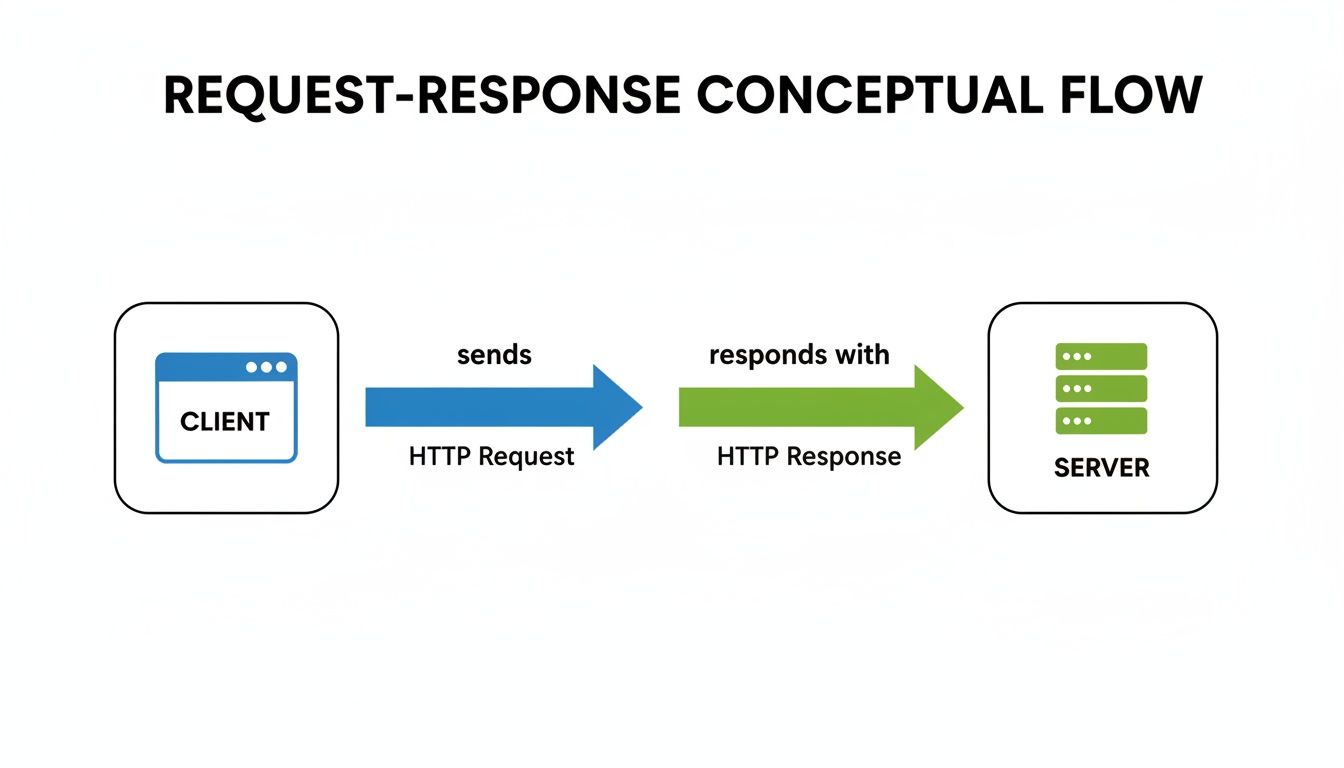
This diagram shows that simple, core interaction: the client always asks, and the server always answers. What changes is the content of that answer and who does the work to render it.
To help you see the differences at a glance, here’s a breakdown of how these three models stack up against each other.
Comparison of Web Rendering Models
| Attribute | Server-Side Rendering (SSR) | Client-Side Rendering (CSR) | Static Site Generation (SSG) |
|---|---|---|---|
| Initial Load | Fast | Slow | Fastest |
| SEO Friendliness | Excellent | Good (and improving) | Excellent |
| Typical Use Case | E-commerce, news sites | Dashboards, web apps | Blogs, docs, marketing sites |
| Complexity | High (needs a live server) | Medium (complex JS) | Low (simple file hosting) |
As you can see, each approach has its own strengths. The "best" choice really depends on what you're trying to build.
Performance, Security, and SEO: The Key Tradeoffs

Choosing between client-side and server-side isn't just a technical footnote; it's a strategic decision that ripples through your entire project. This choice directly shapes your site's performance, how secure it is, and how well it shows up in search results.
There's no single "best" answer. Each approach comes with its own set of pros and cons, and understanding them is the key to building something that actually works for your users and your goals. A decision that makes your site feel lightning-fast might open a security hole, while a choice made for SEO could make the user experience clunky.
The Balancing Act of Web Performance
Performance is all about how fast your site loads and responds. Both client-side and server-side approaches have their moments to shine, just at different points in a user's visit.
- Server-Side Speed: Server-rendered pages are the champs of the initial page load. The server does all the heavy lifting and sends a fully-formed HTML file to the browser, so content appears almost instantly. This is absolutely critical for making a good first impression.
- Client-Side Speed: Client-rendered apps feel incredibly snappy after that initial load. Once the core JavaScript is downloaded, moving between pages is seamless because you’re not waiting for the server to rebuild everything from scratch.
Of course, there’s a flip side. A server bogged down with complex logic can be slow to send that first page. On the other hand, a massive client-side app can feel sluggish on older phones or weak connections while it downloads and gets itself running. To get a real grip on how these decisions affect your site, it’s worth getting familiar with key web application performance metrics.
Fortifying Your Application Security
When it comes to security, think of your server as a fortress. Anything sensitive—user data, secret keys, business logic—belongs there, far away from the prying eyes of the user's browser.
Client-side code runs in a completely uncontrolled environment. Anyone can open their browser's developer tools to view, poke at, and even reverse-engineer your code. This makes it a terrible place for anything confidential.
By keeping critical operations on the server, you create a powerful security barrier. The client only ever sees the results of what happens on the server, not the sensitive code or data itself. This dramatically shrinks the area where an attacker could try to break in. It's also why a purely client-side tool like JekyllPad can be so secure—by design, it keeps your data flowing directly between your browser and your private GitHub repository, with no server in the middle to attack.
Navigating the Nuances of SEO
Historically, search engine crawlers loved server-rendered and static websites. They could easily read the clean, complete HTML file sent by the server and understand exactly what the page was about. Simple and reliable.
Client-side rendered sites used to be a real headache for crawlers, which often saw nothing but a blank page because they couldn't run the necessary JavaScript. While Google has gotten much smarter, asking its crawlers to perfectly render your complex app can still lead to delays or missed content.
For guaranteed SEO performance, server-side rendering or static site generation is still the safest bet. We dive deeper into this in our guide on how to improve your static site SEO. This ongoing push-and-pull is reflected in the industry itself; while the serverless market is projected to hit $70.84 billion by 2032, simple client-side tools are booming for projects where avoiding server complexity is a huge win.
The Rise of JAMstack and Serverless
The old debate between client side and server side isn't as black and white as it used to be. Today, the smartest web architectures are actually a blend of both, giving us websites that are faster, more secure, and easier to scale. At the forefront of this shift are two key ideas: JAMstack and serverless computing.
JAMstack is more of a philosophy than a specific tool. It stands for JavaScript, APIs, and Markup. The core idea is to lean into the strengths of the client side by pre-building as much of the site as possible into static files (the Markup). This makes for blazing-fast load times and a much smaller attack surface, since there's no server running complex code for every single visitor.
But what about dynamic features? That's where the APIs come in. Instead of a traditional backend, JAMstack sites connect to reusable APIs for things like processing a contact form or logging a user in. These APIs are called by the browser using JavaScript, creating a powerful and flexible hybrid approach.
What is Serverless Computing, Really?
This is where the serverless architecture fits in so perfectly. The name is a little confusing—of course, there are still servers involved! The key difference is that you, the developer, don't have to manage them anymore.
Instead of keeping a server running 24/7, serverless platforms provide "functions-as-a-service" (FaaS). Think of these as tiny, self-contained pieces of code that only run when they're needed—like when an API call comes in from a JAMstack site. It’s an incredibly efficient way to build, since you only pay for the exact moment your code is running. This approach gives a static front end all the power of a backend, without the usual headaches. You can see how modern tools put this into practice in our guide to building with Astro JS.
The Big Shift: JAMstack and serverless are part of a massive movement toward abstracting away infrastructure. By separating the front-end presentation from on-demand server functions, creators can stop worrying about servers and focus completely on building a great user experience.
The Serverless Boom
The growth numbers for serverless computing tell the story. This isn't just a niche trend; it's a fundamental change in how we build for the web.
The global serverless market hit USD 14.22 billion in 2024 and is projected to skyrocket to USD 124.52 billion by 2034. That's a compound annual growth rate of 24.23%. The report from MarketsandMarkets shows North America leading the charge with a 45% market share, thanks to its concentration of tech companies and massive data centers.
This explosion on the server side shows a clear demand for more flexible backends. At the same time, it puts the innovation happening on the client side into perspective, where fully browser-based applications can often remove the need for a backend entirely.
When to Choose a Client-Side Approach

While client-side and server-side architectures both have their place, some projects are just a natural fit for a purely client-side strategy. This isn't about making a compromise; it’s a deliberate choice that puts simplicity, security, and user control first. If your main goal is to deliver fast, content-driven experiences without the headaches of backend infrastructure, this is the way to go.
Think about projects like blogs, documentation sites, and marketing pages. Tools like Jekyll or Hugo are perfect for these because the sites don't need a complex server to handle user data or run business logic on the fly. Their job is simply to serve up pre-built content as quickly and reliably as possible.
The Power of a Serverless Workflow
Going all-in on a client-side tool fundamentally changes how you work—it cuts out the middleman entirely. A great example of this is a 100% client-side CMS like JekyllPad, which operates completely within your browser. It hooks directly into your GitHub repository, effectively turning it into a powerful, version-controlled content management system.
This approach brings some serious benefits to the table:
- Near-Impenetrable Security: When there's no server to attack, you wipe out an entire category of common web vulnerabilities. Your content and code are basically as secure as your GitHub account.
- Enhanced Privacy: Your data never touches a third-party server. It travels directly between your browser and your private repository, giving you total ownership and control.
- Zero Backend Maintenance: Forget about server updates, database administration, or security patching. This frees you up to focus on what actually matters: creating great content.
This model is a huge win for agencies and individual creators. Sure, the server-side infrastructure that runs the web is massive—the global servers market was valued at USD 136.69 billion in 2024 and is expected to hit USD 237 billion by 2032. But all that hardware comes with maintenance nightmares and privacy concerns. A pure client-side tool sidesteps that mess completely, letting you edit and publish with incredible speed, right from your browser. You can dig into the growing servers market data from Fortune Business Insights.
Modern Client-Side Tools in Action
A tool like JekyllPad provides a full-blown CMS experience without a traditional backend. It offers a visual WYSIWYG editor and live previews, hiding the complexities of Git and YAML so non-technical users can contribute easily. Every save is just a direct commit to your repository.
By running entirely in the browser, client-side tools prove that you can have a powerful, intuitive content management system without the cost and complexity of servers. For many static-site scenarios, this isn't just a viable option—it's the smartest one.
Got Questions? We've Got Answers
Diving into the world of client-side and server-side development can definitely feel like learning a new language. You're bound to have questions. Getting a handle on these concepts is the key to making the right call for your project, whether you're launching a personal blog or a full-blown web app.
Let's clear up some of the most common questions we hear.
Is Client-Side or Server-Side Better for SEO?
This one comes up a lot. For a long time, server-side rendering (SSR) and static site generation (SSG) were the undisputed kings of SEO. Why? Because they hand-deliver a complete, ready-to-read HTML file to search engine crawlers. There’s no guesswork involved, so Google can index your content instantly and accurately.
Now, things are getting more interesting. Modern search engines, especially Google's, have gotten much better at processing JavaScript. This means client-side rendered (CSR) apps aren't automatically left in the dust anymore. However, it still takes more work for the crawler to render the page, which can sometimes lead to slower indexing or missed content.
Bottom line: If you want guaranteed, top-tier SEO performance from day one, server-rendered or static sites are still your safest bet. They give search engines exactly what they’re looking for, no strings attached.
Can a Website Be Both Client-Side and Server-Side?
Yes, and most modern web apps are! This hybrid approach is incredibly powerful because it lets you take the best of both worlds to create a fantastic user experience.
Here’s a common strategy: the server renders the very first page a user visits. This is great for two reasons: the user sees content almost immediately (great for performance), and search engines get that fully-baked HTML file (great for SEO).
After that initial load, the site can switch gears and operate like a zippy client-side app. Clicking around feels instantaneous, almost like using a desktop application. Frameworks like Next.js (for React) and Nuxt.js (for Vue) are brilliant at this, making it easier to build these sophisticated hybrid sites.
Is Client-Side More Secure?
Definitely not. The server is always going to be the more secure environment for sensitive tasks. A core principle of web security is to never trust the client. Think about it: any code running in a user's browser (the client) is out in the open. Anyone with basic developer tools can poke around, see how it works, and even try to manipulate it.
That’s why all the really important stuff must happen on a server you control.
- Database Queries: You never want to connect to your database directly from the client.
- Payment Processing: All financial details must be handled on a secure, trusted server.
- User Authentication: Checking passwords and managing logins has to happen in a secure, private environment.
Your server is like a secure vault for your data and business rules, keeping them safe from prying eyes.
What are Some Examples of Client-Side and Server-Side Languages?
Different programming languages are built for different jobs, and the line between client-side and server-side is pretty clear.
Client-Side Languages (These run in the user's browser):
- HTML: The skeleton of every webpage, giving it structure.
- CSS: The designer, adding all the style and visual flair.
- JavaScript: The brains of the operation, making the page interactive and dynamic.
Server-Side Languages (These run on your web server):
- Python: A fan favorite for its clean code and powerful data libraries.
- PHP: One of the original workhorses of the web, still powering a huge number of sites.
- Node.js: A game-changer that lets developers use JavaScript on the server, not just in the browser.
- Ruby: Famous for its elegant Ruby on Rails framework.
- Java: A rock-solid choice for big, enterprise-level applications.
Ready to enjoy the simplicity, security, and raw speed of a 100% client-side workflow? With JekyllPad, you can edit and manage your static site content visually, with everything saving directly to your GitHub repository. No servers, no databases, no hassle.