
When we talk about SEO for static sites, we're really talking about playing to your strengths. Unlike a dynamic site that has to build a page on the fly every time someone visits, a static site is already built. It’s pure, pre-rendered HTML, which gives it some incredible built-in advantages in the eyes of search engines: blazing-fast speed, tighter security, and a beautifully simple architecture.
Your Unfair Advantage in Modern SEO

The core principles of good SEO are universal, but with a static site, you're starting the race with a serious head start.
Think of it this way: a dynamic website is like a pit crew that has to assemble a car from a pile of parts every single time a visitor shows up. It needs to query a database, run scripts, and piece everything together before the page can even load. A static site? It’s a pre-built race car, tuned to perfection and sitting right at the starting line, engine humming.
That fundamental difference—serving ready-made HTML files instead of building them on demand—is where the magic happens. It cuts out all the server-side thinking time, leading to load speeds that are practically instant. And in the world of SEO, both users and search engines love that kind of speed.
To quickly see how these two approaches stack up, here’s a simple breakdown.
Static vs Dynamic Sites SEO At a Glance
| SEO Factor | Static Sites (e.g., Jekyll, Hugo) | Dynamic Sites (e.g., WordPress) |
|---|---|---|
| Performance (Speed) | Excellent. Pages are pre-built, loading almost instantly. Easily passes Core Web Vitals. | Variable. Speed depends on hosting, plugins, caching, and database performance. Often struggles with Core Web Vitals. |
| Security | High. No database or server-side processing means a much smaller attack surface. | Lower. Databases and plugins create multiple vulnerabilities that require constant maintenance and security measures. |
| Crawler Accessibility | Excellent. Clean HTML and simple architecture make it incredibly easy for search engine bots to crawl and index. | Good, but can be complex. Plugins, URL parameters, and database-driven content can sometimes create crawling challenges. |
| Content Management | Requires more technical setup. Often managed via Markdown files, Git, and a headless CMS. Not always user-friendly for non-devs. | Very user-friendly. Platforms like WordPress offer intuitive WYSIWYG editors perfect for non-technical users. |
| Scalability | Extremely scalable. Simple files can be easily distributed across a global CDN for massive traffic loads with low cost. | Scales, but can be costly. Requires powerful servers, database optimization, and load balancing to handle high traffic. |
While dynamic sites offer easier content management out of the box, static sites provide a rock-solid, high-performance foundation that search engines are increasingly rewarding.
Why Speed and Simplicity Dominate Search
In today's SEO game, performance isn't just a nice-to-have; it's a non-negotiable. Google has been very clear that page speed and Core Web Vitals are direct ranking signals. The sobering reality is that only about 33% of websites actually pass these critical checks.
For mobile users, the impact is even more dramatic. A tiny one-second delay in page load can torpedo your conversion rates by up to 20%. This is exactly where the static approach pulls away from the pack.
By getting rid of database calls and complex server-side rendering, static sites make it almost effortless to hit the performance targets that dynamic platforms often fight to achieve. This inherent speed directly boosts user experience, which in turn lowers bounce rates and sends all the right quality signals to Google. You can dig into more of the numbers in these latest SEO statistics.
A Stronger Foundation for SEO Success
It’s not just about speed, though. The sheer simplicity of a static site’s architecture brings other powerful SEO perks to the table. With no complex backend or database to worry about, the potential for security breaches shrinks dramatically. That kind of stability and reliability is a huge trust signal for search engines.
On top of that, a static setup naturally encourages a clean, logical site structure. That makes it a breeze for search crawlers to navigate your site, understand its hierarchy, and index everything efficiently.
This powerful trio—performance, security, and clarity—gives you an incredibly strong foundation to build your SEO strategy on. And thanks to modern tools, you no longer have to be a command-line wizard to manage it all:
- Static Site Generators (SSGs): Tools like Jekyll, Hugo, and Astro are the engines that take your content and automatically build it into a hyper-optimized HTML site.
- Headless CMS Platforms: These systems decouple your content from your website's front-end. This gives your content team a friendly interface to write and edit, without ever having to touch the code.
- Visual Editors: Services like JekyllPad go a step further, integrating directly with your site's code repository. This provides a simple, browser-based editor that lets non-technical folks contribute content without needing to know Git.
By bringing these technologies together, you get the best of both worlds: a website that’s incredibly fast and perfectly optimized for search, but is also genuinely easy for your whole team to manage.
Mastering On-Page SEO in a Static Workflow

The raw speed of a static site gives you a fantastic head start in SEO, but mastering the on-page fundamentals is what will really push you ahead of the pack. Unlike dynamic platforms where SEO settings are often buried in clunky dashboards or require a pile of plugins, static sites put these elements front and center, right inside your content files.
This direct approach gives you an incredible amount of control, allowing for a level of precision that’s tough to replicate elsewhere. You're not just tacking on SEO as an afterthought; you're building it right into your workflow from the ground up.
Managing Metadata with Front Matter
The heart of on-page SEO for any static site is something called front matter. It’s just a small block of YAML, TOML, or JSON that sits at the very top of your Markdown files, and it’s where you define all the metadata for that specific page. Think of it as the instruction manual you hand to search engines and social media platforms.
Here, you can set crucial elements like the page title and meta description—the first things anyone sees in the search results. Keeping this data right with the content ensures everything stays consistent and makes future updates a breeze.
For instance, in a blog post for a site built with Jekyll or Hugo, your front matter would look something like this:
title: "A Guide to Static Site SEO" description: "Learn how to optimize your static site for search engines with practical tips on metadata, structured data, and performance." slug: "static-site-seo-guide"
This clean, code-based method means every article or page is a self-contained unit with its own SEO directives. Tools like JekyllPad make this even more accessible by providing a simple visual interface to manage these fields, so even non-technical team members can handle on-page SEO without ever having to touch the raw code.
Implementing Structured Data for Rich Results
If you want to gain a serious competitive edge, you need to move beyond basic metadata and start implementing structured data (also known as schema markup). This is a special vocabulary that helps search engines truly understand the context of your content, making your pages eligible for eye-catching rich results like star ratings, FAQs, and event details right in the search listings.
In a static workflow, you can add structured data cleanly using JSON-LD. The best part? Instead of cluttering up individual posts with code, you can create a single script in your layout templates that dynamically pulls information from each page's front matter.
"Only about 5–6% of pages reach the top 10 within a year, making technical excellence a requirement."
That statistic really drives home why every advantage matters. With mobile zero-click search rates hitting as high as 77%, earning a featured snippet through well-implemented schema isn't just a bonus anymore—it's essential for visibility. These rich results can pull in click-through rates up to ~43%, capturing traffic that might have otherwise never landed on your page. You can discover more insights about zero-click searches and their impact on SEO.
Crafting a Strong On-Page Foundation
Beyond metadata and schema, a few other on-page factors are critical for static site SEO, and thankfully, they are incredibly easy to manage in this kind of architecture.
- Clean and Descriptive URLs: Static Site Generators automatically create clean, readable URLs from your file names or a
slugfield in the front matter. A URL like/guides/static-site-seo/is infinitely better than a messy, parameter-filled link from a complex CMS. - Logical Heading Structure: Writing content in Markdown naturally encourages you to use a proper heading hierarchy (H1, H2, H3). This simple structure is a roadmap for both users and crawlers, helping them follow the flow of your content and understand its most important topics.
- Effective Internal Linking: Since you’re working directly with the content files, adding internal links is completely straightforward. A solid internal linking strategy is key for distributing authority across your site and guiding users to other relevant pages, which keeps them engaged longer.
By weaving these on-page SEO practices directly into your content creation process, you build a powerful, optimized foundation from day one. This hands-on control is one of the biggest strengths of the static approach, turning technical SEO from a chore into an accessible part of your daily workflow.
Getting Search Engines to See Your Site Correctly
Once your on-page content is in good shape, the next challenge is making sure search engines can actually find and understand it all. Think of a search engine crawler like a librarian trying to catalog a brand-new library. You have to give them a clear floor plan (your sitemap) and a set of rules (robots.txt) to help them do their job right.
The good news? A static site makes this process incredibly simple. You’re serving up plain HTML files, so there are no messy URL parameters or complex database queries to confuse the bots. This clean structure is a huge built-in advantage for getting every important page indexed properly.
Laying Down the Welcome Mat with Robots.txt
The robots.txt file is the very first stop for most search engine crawlers visiting your site. It's just a simple text file sitting in your site's root directory, acting as a bouncer of sorts. It tells bots which parts of your site are open for visiting and which areas are off-limits.
For most static sites, you don't need anything fancy. The main goal is just to grant access to all your important content and assets while blocking anything you don't want indexed, like a staging subdomain or private folders. Most modern Static Site Generators create one for you, but it’s still smart to know how it works.
A typical robots.txt for a static site is beautifully simple:
User-agent: * Allow: / Sitemap: https://www.yourdomain.com/sitemap.xml
This little file does two things perfectly: it tells all bots (User-agent: *) they have full access (Allow: /) and then points them straight to your sitemap—the next critical piece of the puzzle.
Creating a Flawless Map with XML Sitemaps
If robots.txt provides the rules of entry, the XML sitemap provides the map itself. It’s a complete list of every single URL on your website that you want search engines to find and index. A well-built sitemap ensures that even pages buried deep within your site architecture get discovered.
Thankfully, you almost never have to build these by hand anymore. Pretty much every modern SSG, from Hugo to Astro, has a plugin or built-in feature that automatically generates a perfect sitemap.xml file every time you build your site. This is a massive time-saver and eliminates the chance of typos or forgotten pages.
By automating sitemap generation, you’re basically guaranteeing that every new blog post or page is immediately handed over to search engines. This can dramatically speed up how quickly your new content gets indexed and starts to rank.
Preventing Content Confusion with Canonical Tags
One of the sneakiest SEO problems is duplicate content. This happens when the same (or nearly the same) content shows up on multiple URLs, which can dilute your ranking power. To fix this, we use the canonical tag (rel="canonical").
This small snippet of HTML in your page's <head> tells search engines, "Hey, out of all the versions of this page that might exist, this is the one true master copy." By adding a self-referencing canonical tag into your base layout or header template, you make it a default for every page. It’s a simple move that stops duplicate content issues before they can even start, focusing all your SEO juice on a single, authoritative URL.
Of course, this all ties into the broader strategy of effective web content organization, which is foundational for both users and search engines.
Guiding a Global Audience with Hreflang Tags
Does your site serve content in different languages or for different countries? If so, hreflang tags are non-negotiable. These HTML attributes tell search engines which language and region a specific page is for, making sure users get the version that’s right for them.
Getting hreflang right helps you:
- Serve the right content: Someone in Germany sees the German version, while a visitor from Mexico sees the Spanish one.
- Avoid duplicate content issues: It tells Google that these aren't copies, but rather alternate versions for different audiences.
- Boost user experience: People are far more likely to stick around when the content is in their native language.
On a static site, you can manage these tags directly in your page templates. It’s easy to set them up to dynamically generate the correct hreflang links based on the available translations for any given page, giving your global SEO a rock-solid technical base.
7. Turning Raw Speed into Higher Search Rankings
Speed isn't just a feature of a static site; it's your single greatest SEO weapon. While dynamic sites are often stuck grappling with slow database queries and on-the-fly server rendering, static sites serve up simple, pre-built HTML files. This gives them a massive head start in the race for user attention and, just as importantly, Google’s approval.
This raw velocity directly feeds into better Core Web Vitals, which are a major factor in Google's ranking algorithm. Because your files are already built and ready to go, you dramatically improve your Time to First Byte (TTFB). This metric simply measures how quickly your server responds to a request. For a static site, that response is almost instant—no processing needed.
Of course, the inherent speed of a static site can be amplified or kneecapped by your hosting. To really make the most of your site's performance, it pays to understand how your hosting service affects website speed and, by extension, your search rankings.
Excelling at Core Web Vitals
Google’s Core Web Vitals aren't just technical jargon; they’re a set of metrics designed to measure the real-world experience a visitor has on your page. They boil down to loading speed, interactivity, and visual stability, and a static architecture gives you a natural leg up on all three.
Largest Contentful Paint (LCP): This is all about perceived load speed—how long it takes for the biggest, most important piece of content (like a hero image or a big block of text) to show up. Since static pages don't have server-side delays, your main content appears much faster, leading to fantastic LCP scores right out of the box.
Interaction to Next Paint (INP): Replacing the older FID metric, INP measures how responsive your page is to user clicks and taps. Static sites shine here because they typically run minimal client-side JavaScript, meaning the browser isn't bogged down and can react instantly.
Cumulative Layout Shift (CLS): We've all been there: you go to tap a button, and an ad loads, pushing the button down the page. CLS tracks this kind of annoying visual instability. With their pre-rendered structure, static sites are usually rock-solid, resulting in near-zero CLS scores.
By their very nature, static sites are engineered to pass Core Web Vitals. This isn't some extra optimization you bolt on later; it's a fundamental benefit of the architecture. You get a direct line to satisfying one of Google's most important ranking signals from day one.
To help you stay on top of these metrics, here's a quick checklist tailored for static sites.
Core Web Vitals Checklist for Static Sites
This table breaks down each Core Web Vital and provides actionable tactics you can implement within your static site's build process to ensure you're acing the test.
| Core Web Vital | What It Measures | Static Site Optimization Tactic |
|---|---|---|
| LCP | Perceived loading speed of the main content | Preload key assets like hero images. Optimize images with modern formats (AVIF/WebP) and use a CDN to serve them quickly. |
| INP | Overall responsiveness to user interactions | Minimize and defer non-critical JavaScript. Use an SSG that ships zero or minimal client-side JS by default, like Astro. |
| CLS | Visual stability of the page during loading | Specify dimensions (width and height) for all images and video elements. Avoid inserting content above existing content dynamically. |
Following these guidelines will help ensure your site feels fast and fluid to both users and search engines.
Amplifying Speed with Modern Tools and Techniques
Your static site's built-in speed is a great foundation, but it's just the starting point. The real magic happens during the build process, where you can automate powerful optimizations to turn a fast site into a ridiculously fast one.
A Content Delivery Network (CDN) is non-negotiable for a high-performance static site. A CDN works by caching copies of your website's files on servers all over the world. When someone visits your site, they get the files from the server that's physically closest to them, which slashes latency and makes load times feel instantaneous, no matter where they are.
This diagram helps visualize how you can guide search engine crawlers through your optimized site, from access rules to the final page version.
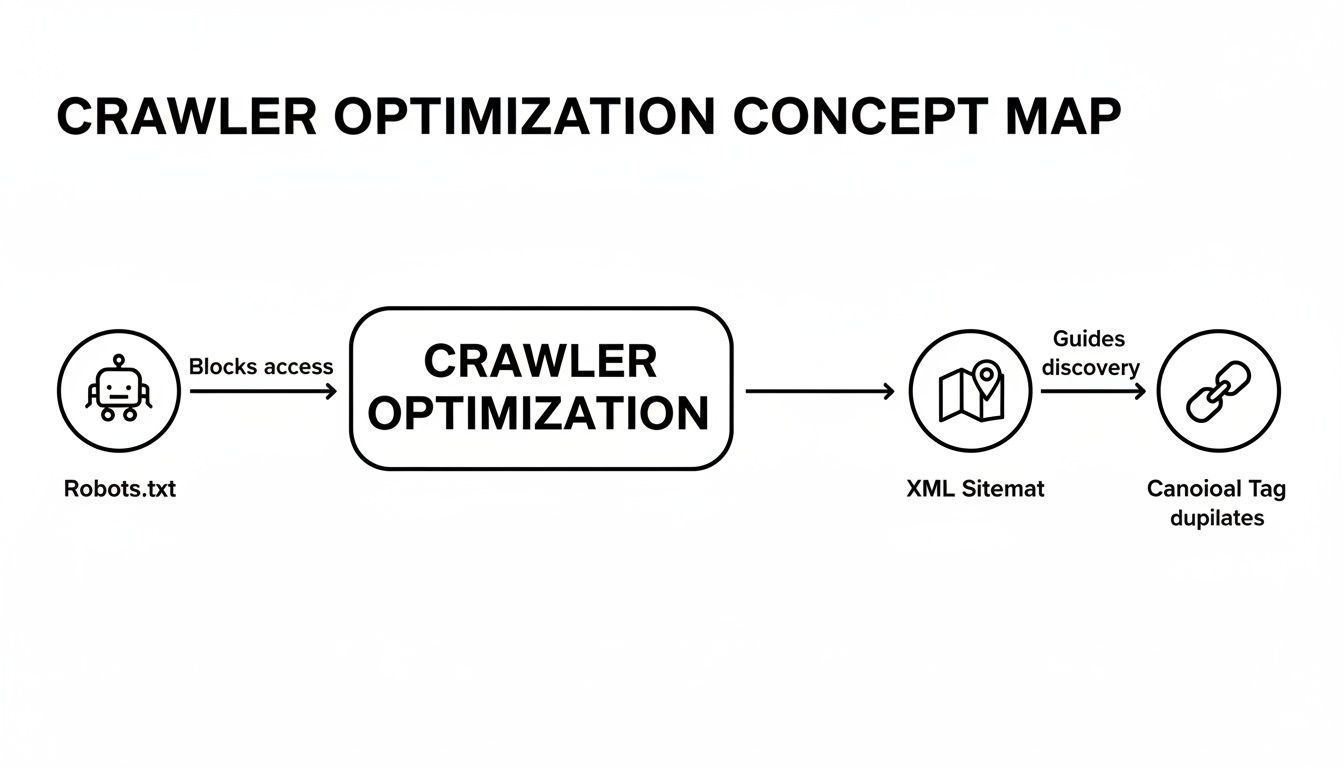
It shows how robots.txt sets the ground rules, your sitemap provides a clear road map, and canonical tags make sure crawlers always find the right page to index.
Practical Steps for Peak Performance
Beyond a CDN, your build process is the perfect time to layer in other critical performance tweaks. The best part? Modern static site generators can handle most of this for you automatically.
- Image Optimization: Many SSGs can automatically convert your images to next-gen formats like WebP or AVIF. These offer much better compression than old-school JPEGs, dramatically shrinking your page weight without sacrificing quality.
- Asset Minification: During the build, your CSS and JavaScript files can be minified. This process strips out all the unnecessary characters—like spaces, comments, and line breaks—to make the files as small and fast to download as possible.
- Lazy Loading: Implementing lazy loading for images and iframes is a game-changer. It tells the browser to only load these assets when they're about to scroll into view, massively speeding up the initial page load, especially for long, media-rich articles.
Many modern frameworks have these features baked right in, as we explore in our guide to getting started with Astro.js. By combining the natural speed of static architecture with these automated build-time optimizations, you create a far better user experience that leads directly to lower bounce rates, longer visits, and ultimately, higher search rankings.
Choosing Your Hosting and Deployment Strategy
So you've built a blazing-fast static site. That's a huge win. But to truly impress search engines, that speed and clean architecture need the right home. Think of your hosting and deployment strategy as the final, critical piece of the puzzle that takes your project from a local folder to a high-performance website that Google loves.
Modern hosting platforms built specifically for static sites—you'll often hear them called Jamstack platforms—are so much more than just a place to dump your HTML files. They are sophisticated pipelines that automate the entire process. The moment you commit a change to your code, they spring into action, building and deploying your site across the globe.
This automated workflow is a secret weapon for static site SEO. It means your site is always up-to-date, secure, and lightning-fast, without the headaches and potential for human error that come with old-school manual deployments.
The Power of Modern Jamstack Hosting
Platforms like Netlify, Vercel, and Cloudflare Pages have completely changed the game. By connecting directly to your Git repository (like GitHub or GitLab), they kick off a new build and deploy every single time you push an update. This is what we call continuous deployment.
The magic doesn't stop there. These services come with a globally distributed Content Delivery Network (CDN) right out of the box. A CDN is a network of servers spread across the planet that stores copies of your website. When someone visits your site, the CDN serves it from the server closest to them, slashing load times. This is absolutely fundamental for nailing those top-tier Core Web Vitals scores.
A few standout features you'll find on these platforms are:
- Atomic Deploys: The entire site updates in one single, instantaneous swap. This eliminates any chance of a visitor catching the site in a broken, half-updated state.
- Instant Cache Invalidation: The moment your new site goes live, the CDN is purged globally. Every visitor, everywhere, sees the latest version immediately.
- Automated Previews: Most platforms will generate a unique preview link for every single pull request, letting you and your team see exactly how changes look on a live URL before you merge them.
Comparing Popular Hosting Options
So, which one should you choose? Honestly, it often boils down to your project's needs and which ecosystem you're most comfortable with. They all share the same core benefits, but each has its own unique strengths.
| Platform | Best For | Key SEO Advantage |
|---|---|---|
| Netlify | Developers who want an all-in-one platform with powerful serverless functions, form handling, and a rich feature set. | Fantastic for building complex Jamstack sites with dynamic elements without sacrificing the performance of a static core. |
| Vercel | Anyone building with Next.js. It's made by the same team, so the integration for static and SSR builds is flawless. | Unbeatable performance tuning for Next.js, including world-class image optimization and incremental static regeneration. |
| GitHub Pages | Simple projects, personal blogs, or documentation sites that just need a free, no-fuss hosting solution. | The path of least resistance. You can get a simple, fast site online with almost zero configuration, right from your repo. |
| Cloudflare Pages | Teams laser-focused on performance who want to tap into Cloudflare's massive global network for best-in-class speed. | Its edge network is one of the fastest on the planet, giving you an immediate advantage in TTFB and global load times. |
The whole idea behind this modern workflow is that your Git repository is your single source of truth. Every update is just a commit, and every commit triggers a perfectly optimized, automated deployment. It’s simple, powerful, and reliable.
When to Prerender or Use Server-Side Rendering
While a purely static build is the perfect fit for most content-heavy sites, some applications need a bit more dynamic power. This is where you'll hear about strategies like Incremental Static Regeneration (ISR) and Server-Side Rendering (SSR).
ISR is a clever hybrid approach that lets you update static pages after the initial build, which is a lifesaver for sites with thousands of pages or content that changes frequently. SSR, on the other hand, builds the page on the server the moment a user requests it, which is ideal for highly personalized content.
Your choice of static site generator plays a huge role here. Our guide on the best static site generators breaks down which tools excel at these different rendering methods, helping you pick the right one for the job.
Your Actionable Static Site SEO Checklist
Theory is one thing, but getting your hands dirty is what really moves the needle in SEO. Let's pull everything we've covered into a practical checklist you can actually use. Think of this as your go-to roadmap for auditing a new static site or giving an existing one a serious boost.
This isn't a one-and-done list. It's a reusable guide to help you nail the technical details every single time.
On-Page Foundations
First things first, let's focus on the core content and metadata. This is the stuff search engines read to figure out what your pages are all about. If you get this right, you’ve built a strong foundation for everything else.
- Confirm Unique Metadata: Go through your most important pages. Is every single one rocking a unique, compelling
<title>and<meta description>in its front matter? No duplicates allowed. - Implement Structured Data: Look for places where you can use Schema markup. Is it a blog post (
Article), a Q&A page (FAQ), or a product (Product)? Add the appropriate JSON-LD script to your layout templates to help your pages stand out with rich results. - Audit Heading Structure: Check that every page has one—and only one—
<h1>tag. From there, use<h2>,<h3>, and<h4>to break up the content into a logical, easy-to-scan hierarchy. - Check Internal Links: Read through your content. Are there natural opportunities to link to other relevant pages on your own site? Make sure you use descriptive anchor text that tells both users and crawlers what they're about to click on.
A classic rookie mistake is leaving placeholder metadata in place. It's tempting to skip, but taking a few extra minutes to write unique titles and descriptions for each page pays off big time in your click-through rates from search results.
Technical Health and Crawlability
Next up, we need to make sure search engine bots can find, crawl, and index your site without running into any dead ends. This is where the technical precision of a static site really gives you an edge.
- Verify Your
robots.txtFile: Double-check that you aren't accidentally blocking crawlers from accessing important resources like your CSS, JavaScript, or image folders. It should also point directly to your XML sitemap. - Automate Sitemap Generation: Your build script or SSG configuration should automatically generate a fresh
sitemap.xmlwith every deployment. Don't just trust it's working—pop the file open and give it a quick spot-check to ensure it’s accurate. - Implement Canonical Tags: This one's a lifesaver. Add a self-referencing
rel="canonical"tag to your global header template. It’s a simple line of code that prevents a world of duplicate content headaches down the road. - Set Up Hreflang Tags (If Applicable): If your site serves content in multiple languages or to different regions, you'll need
hreflangtags to signal which version is right for which audience.
Performance and User Experience
Okay, now for the fun part: leveraging the raw speed of your static site. This phase is all about optimizing your assets and infrastructure to create that lightning-fast experience that both users and Google love.
- Run a Core Web Vitals Audit: Fire up Google's PageSpeed Insights and test your key landing pages. Pay close attention to your LCP, INP, and CLS scores and follow the specific recommendations it gives you.
- Enable a Content Delivery Network (CDN): Your choice of hosting is critical here. If you're deploying on a platform like GitHub Pages, which is fantastic for its simplicity, make sure your setup is taking full advantage of a CDN. You can find more details in our guide on how to use GitHub Pages for your projects.
- Optimize All Images: Your build process should handle this automatically. Configure it to compress images and convert them to modern, lightweight formats like WebP or AVIF.
- Minify CSS and JavaScript: Set up your SSG to minify all CSS and JS files during the build. Smaller files mean faster downloads and a snappier site.
- Implement Lazy Loading: For images and iframes that appear "below the fold," add the
loading="lazy"attribute. This simple trick tells the browser to wait to load those assets until the user actually scrolls down to them, making the initial page load much faster.
Got Questions About Static Site SEO?
Even after laying out the basics, you're probably still wrestling with a few specific questions. That's completely normal. Let's tackle some of the most common things people ask when they're getting started with SEO for static sites.
Can a Static Site Really Outrank a Dynamic One?
Not only can it, but it happens all the time. Think about what Google really cares about: speed, security, and a great mobile experience. Static sites are practically built to win on all three fronts.
Because they serve up simple, pre-built HTML files, they smoke most dynamic sites when it comes to Core Web Vitals—a known ranking factor. There's no slow database or clunky backend to get in the way. Search engine bots love this simplicity, too; it makes their job of crawling and indexing your content a breeze.
A lot of people hear "static" and think "basic" or "limited." The reality is a static architecture gives you a rock-solid technical foundation. Your great content gets to shine without being dragged down by performance issues.
What About E-commerce? Is Static a Good Fit?
Absolutely, particularly for stores with a focused product catalog. The modern "Jamstack" approach is the perfect solution here. You get a blazing-fast static frontend with all the dynamic functionality—like the shopping cart and checkout—handled by APIs. It's truly the best of both worlds.
- Insanely fast product pages: When users can zip between categories and products instantly, they stick around longer and buy more. Google notices this.
- Tighter security: By separating your storefront from your backend systems, you shrink the surface area for potential attacks.
- Effortless scaling: During a big sale, your site won't crumble under the pressure. Static files are cheap and easy to serve up from a CDN, meaning you can handle huge traffic spikes without breaking a sweat.
If you're managing a sprawling catalog with tens of thousands of products, a traditional dynamic system might be easier to wrangle. But for many online stores, the performance boost from going static is a massive competitive advantage in the search results.
Is a Headless CMS Really Necessary for SEO?
Strictly necessary? No. A really, really good idea? Yes. A headless CMS is a game-changer for any team that's serious about their content. It basically unplugs your content from your code, giving your marketing and writing folks a friendly place to work without having to bother a developer.
This is a huge win for static site SEO. It means the people closest to the content can easily update crucial on-page elements like metadata, image alt text, and internal links. It puts the power to improve SEO directly in their hands, making your whole process faster and more effective.
Tired of the technical headache that comes with updating your static site content? JekyllPad gives you a clean, visual editor that syncs right up with your GitHub repository. It’s the simplest way for your whole team to manage content. Get started for free at JekyllPad.