
So, what exactly is a cloud-based content management system? In simple terms, it's software that lives entirely online, letting you create and manage your website's content right from your web browser.
Think of it less like a program you install on a computer and more like a service you subscribe to. All the technical headaches—like server maintenance, software updates, and security patches—are handled for you by the provider. This model is commonly known as Software as a Service (SaaS), and it has made powerful content management tools accessible to everyone.
Understanding the Cloud CMS Model
To really get a feel for what a cloud CMS is, it helps to use an analogy. Think about the difference between owning a huge physical DVD collection and just using a streaming service like Netflix.
In the old days, managing a website was a lot like curating that DVD collection. You had to buy and maintain physical servers (your DVD player and shelves), install the complex CMS software (the DVDs), and constantly worry about security, updates, and performance. This is what we call an on-premise or self-hosted solution.
A cloud CMS completely flips that script. It’s the Netflix of content management.
Instead of owning and maintaining all the infrastructure, you just log in through your browser and get straight to work on a powerful, ready-to-use platform. The provider handles all the messy backend stuff so you can focus on what actually matters: creating great content.
This shift has been a game-changer for web publishing. It empowers everyone from solo bloggers to massive enterprise teams to manage their digital presence without needing an in-house IT department to keep the lights on.
The Rise of Cloud-Based Solutions
The move to the cloud isn't just a passing trend; it's a fundamental change in how businesses operate online. The numbers tell the story. Cloud deployments are expected to capture a dominant 58.4% market share of the CMS sector in 2025.
And that growth isn't slowing down. The cloud CMS market is projected to expand at a 19.1% CAGR through 2031, largely because it allows businesses to slash IT overhead by as much as 50%. You can learn more about the evolving CMS market and what's driving this incredible growth.
This approach is fundamentally different from traditional methods in a few key ways:
- Accessibility: You can create, edit, and publish content from anywhere, on any device with an internet connection. This is a huge win for remote teams and collaboration.
- Maintenance-Free: The provider handles all the technical updates and security protocols automatically. Your team is freed up to focus on more strategic work.
- Predictable Costs: Instead of a massive upfront investment in hardware, you pay a simple, predictable monthly or annual subscription fee.
Cloud CMS vs Traditional On-Premise CMS at a Glance
To make the distinction crystal clear, here’s a quick table breaking down the core differences between a modern cloud-based CMS and a traditional, self-hosted system.
| Attribute | Cloud-Based CMS | Traditional On-Premise CMS |
|---|---|---|
| Hosting & Infrastructure | Managed entirely by the provider. | You purchase, set up, and maintain your own servers. |
| Initial Cost | Low; typically a monthly/annual subscription. | High; requires large upfront capital for hardware. |
| Maintenance & Updates | Automatic; handled by the provider. | Manual; requires your IT team to manage all updates. |
| Accessibility | Access from any device with an internet connection. | Typically limited to your internal network or a VPN. |
| Scalability | Easy to scale up or down as your needs change. | Difficult and expensive; requires new hardware. |
| Security | Managed by expert teams at the provider level. | Your responsibility; requires dedicated security staff. |
As you can see, the cloud model offloads the vast majority of the technical and operational burden, allowing you to focus on your content strategy rather than on managing infrastructure.
What Are the Real Advantages of Using a Cloud CMS?
Choosing a cloud-based content management system is more than just a tech upgrade—it's a strategic shift that can fundamentally change how your business operates. When you stop worrying about managing servers and infrastructure, you free up incredible amounts of time and energy to focus on what actually matters: creating great content and engaging with your customers. The positive effects are felt everywhere, from the marketing team to the finance department.
So, what are the big wins that make a cloud CMS such a compelling choice for so many businesses today? Let's break down the four core benefits.
Effortless Scalability and Performance
Picture this: your new marketing campaign goes viral overnight. It’s a massive success! But with a traditional, self-hosted CMS, that sudden traffic spike could easily crash your server. Your moment of triumph quickly becomes a customer-facing disaster as you scramble to find more hardware just to get the site back online.
A cloud CMS is built to prevent this exact scenario. These platforms run on massive, distributed networks designed to handle huge fluctuations in demand without breaking a sweat.
Think of it like the electrical grid. You don't build a private power plant for your house; you just plug into the grid and draw as much power as you need. A cloud CMS works the same way for your website, giving you all the resources you need, whether you have ten visitors or ten million.
This elastic scaling ensures your site stays fast and responsive, no matter how popular it gets. That’s a huge plus for both user experience and your SEO rankings.
Cost Efficiency and Predictable Spending
Let’s be honest, running your own servers is a money pit. First, you have the huge upfront cost of the hardware itself. Then comes the never-ending stream of expenses for maintenance, software licenses, electricity, cooling, and the specialized IT staff needed to keep it all running. It’s an unpredictable financial headache.
A cloud CMS trades that chaos for a simple, predictable subscription fee. This SaaS (Software as a Service) model flips the script on your finances.
- No Huge Upfront Costs: You get to skip the massive capital investment in physical servers.
- Predictable Budgeting: A straightforward monthly or annual fee makes financial planning easy.
- Lower IT Overhead: You no longer need to pay for dedicated server maintenance or specialized staff to manage it.
This approach effectively puts powerful, enterprise-level technology within reach for businesses of any size, completely leveling the playing field.
Enhanced Security and Reliability
For most companies, cybersecurity isn't their main business. Managing server security, constantly applying patches, and monitoring for threats is a full-time, high-stakes job. Miss one critical update, and you could be leaving the door wide open for an attack that puts your entire business at risk.
When you use a cloud CMS, you hand over security to a dedicated team of experts. Their only job is to protect the platform. They handle everything:
- 24/7 Threat Monitoring: They're constantly watching for suspicious activity and neutralizing threats before they can cause damage.
- Automatic Security Patches: Your system is always kept up-to-date with the latest security fixes, with no effort on your part.
- Enterprise-Grade Defenses: They use advanced security tools and infrastructure that would be far too expensive for most individual businesses to implement themselves.
This "fortress" approach gives you incredible peace of mind and lets your team get back to their actual jobs instead of worrying about security.
Global Accessibility and Collaboration
Finally, a cloud CMS is the perfect fit for the way modern teams work. Since the entire platform is accessed through a web browser, your writers, editors, and developers can log in and get to work from literally anywhere in the world.
There’s no need to mess with clunky VPNs or complicated network setups. This frictionless access makes the entire content workflow faster and more collaborative, even across different departments and time zones. Your team can publish breaking news or update a product page from a home office, a coffee shop, or a conference on the other side of the planet.
Understanding Modern CMS Architectures
To really nail down the right cloud-based content management system, you have to look past the "cloud" label and get a feel for the architecture underneath. How a CMS is built from the ground up dictates its flexibility, how fast it runs, and what you can ultimately create with it.
Think of it like picking a place to eat. You wouldn't go to a fancy sit-down restaurant for a quick slice of pizza, right? The "best" choice depends entirely on what you're after.
The Traditional CMS: A Full-Service Restaurant
A traditional, or monolithic CMS, is your classic full-service restaurant. Think of a self-hosted WordPress site. The kitchen where the food is made (your backend content editor) and the dining room where it's served (the public-facing website) are all part of the same building.
This all-in-one setup is what most people are used to. You log in, write a post, click "Publish," and it shows up on your website. It’s a straightforward, self-contained system that works perfectly for standard websites and blogs. The catch? Because everything is so tightly connected, it's tough to serve your content anywhere else, like a mobile app or a smart display.
The Headless CMS: A Delivery-Only Kitchen
Now, let's look at a headless CMS. This is more like one of those modern, delivery-only "ghost kitchens." Their entire focus is on one thing: making great food (your content). There's no dining room attached.
So how do people get the food? A fleet of delivery drivers—in this case, an Application Programming Interface (API)—sends the finished meals out to any destination imaginable. That "dining room" could be a website, a mobile app, a smartwatch, or even a digital sign in a storefront. This approach gives you incredible flexibility. A great example of this API-first model in action is Payload CMS, a truly robust headless option. For a deeper dive, check out our guide on what a headless CMS is and how it works.
By separating the content (the "head") from its presentation layer, a headless CMS allows you to write your content once and deliver it anywhere. This is essential for businesses that need to maintain a consistent presence across many different digital channels.
The Static Site Generator: A Meal-Prep Service
Finally, we have the Static Site Generator (SSG). This approach is like a high-end meal-prep service. Instead of cooking every meal to order when a customer walks in, the SSG pre-builds every single page of your website ahead of time. When someone visits your site, the server doesn't have to scramble to pull data from a database and assemble a page; it just hands over the finished, pre-packaged file instantly.
The results are blazing speed and rock-solid security. With no active server-side code or database to hack, the attack surface shrinks dramatically. The trade-off is that building dynamic, real-time features can be more complex and often requires a bit more technical know-how.
How to Choose the Right Cloud CMS for You
Picking a cloud-based content management system isn’t about finding some mythical "best" platform out there. It’s all about finding the right fit for your team’s skills, your project’s demands, and where you want your business to go.
What works perfectly for a developer-heavy team building a blazing-fast documentation site is probably going to be a terrible choice for a marketing team that needs to spin up new landing pages yesterday. The right choice starts with asking the right questions.
Before you even look at a single feature list, ask yourself: who is going to be in this thing day in and day out? Are they content writers who need a super simple, visual editor? Or are they developers who are perfectly happy working with APIs and code? Just answering that one question will cut your list of options in half.
Define Your Core Requirements
Before you get dazzled by all the cool features and add-ons, you need to lock down your absolute must-haves. These are your dealbreakers. Any CMS you consider has to check these boxes before you waste another minute on it.
Think about these key areas:
- Technical Skill Level: Who’s driving this thing? Do they need a no-code, drag-and-drop experience, or are they comfortable with Markdown and Git-based workflows?
- Performance and Security: What are your baselines for site speed and security? A personal blog has very different requirements than an e-commerce site that handles customer payment information.
- Content Complexity: Are you just dealing with blog posts and images? Or do you need to manage complex, structured data that feeds into an application?
- Scalability Needs: Do you expect your content library and site traffic to grow dramatically? Your CMS should be able to scale with you, not force you into a painful migration down the road.
As you think about the backend of your CMS, you’ll also need to consider the hosting environment. Understanding the pros and cons of different server setups is critical. For a helpful breakdown, check out this guide on Cloud Hosting Vs VPS Hosting.
Match the Tool to the Job
Once you’ve got your core needs nailed down, you can start matching them to the right kind of CMS architecture. It's not as complicated as it sounds. This decision tree can help you visualize how different project goals point you toward different solutions.
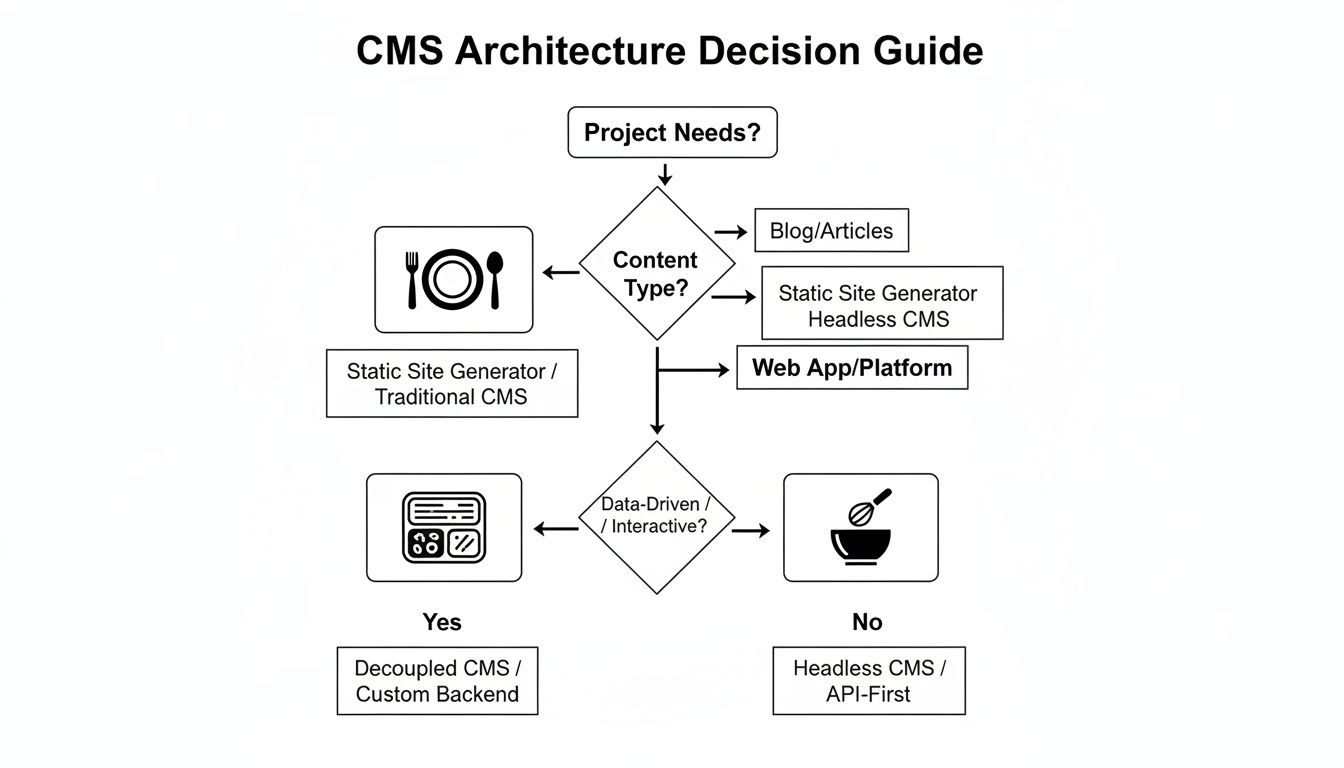
As the flowchart illustrates, the best architecture really depends on what you're trying to accomplish. Whether it's a simple blog, a complex application, or a site where speed is everything, there's a tool designed for that job. For a more detailed look, you can dive into our complete comparison of CMS architectures.
The most common mistake is choosing a CMS based on hype rather than fit. A powerful, feature-rich platform is useless if it creates friction for your content team and slows down your workflow.
If you start with your team and your goals, you'll be in a much better position to pick a cloud CMS that actually helps you get work done, rather than one that just gets in the way.
A Modern Twist on Static Site Content Management
Static site generators are famous for their blazing-fast speed and rock-solid security. The catch? They’ve always been a bit developer-centric, often requiring comfort with command-line tools that can leave content teams feeling stuck on the sidelines. But that’s changing. A modern workflow has emerged that finally bridges this gap, giving you the raw power of a static site with the friendly feel of a cloud based content management system.
The result is a smooth, no-maintenance content pipeline that actually works for everyone.
Think about it: what if you could get that top-tier performance without forcing your marketing team to learn how to use Git? That’s exactly what this new approach delivers. By using browser-based visual editors that connect directly with GitHub, your writers can work in an interface that feels natural, not like they’re trying to hack into the Matrix.
This Git-based workflow completely sidesteps the need for a traditional backend server, which is often a major headache—it's a common point of failure and a prime target for security breaches. Instead, your content lives safely inside your own Git repository, giving you full ownership and a perfect audit trail of every single change.
Giving Content Creators the Best of Both Worlds
This whole setup is designed to eliminate friction. It gives content teams the tools they need to just work, without compromising the technical benefits that developers love about static sites. It’s a true win-win that solves that age-old disconnect between the people who build the site and the people who create the content for it.
Here’s what makes it work so well:
- Intuitive Visual Editors: Instead of wrestling with code, content teams get a familiar WYSIWYG (What You See Is What You Get) interface to write and format their work. No need to memorize Markdown or YAML syntax.
- Live Previews: Writers can see exactly how their content will look on the site before it goes live. This simple feature cuts down on mistakes and makes the review process a breeze.
- Direct GitHub Integration: Every time someone hits "save," it automatically creates a commit in your repository. Publishing becomes a simple one-click affair—no command line needed.
This is what that modern workflow looks like in action—a clean, browser-based editor tied directly to a GitHub repository.
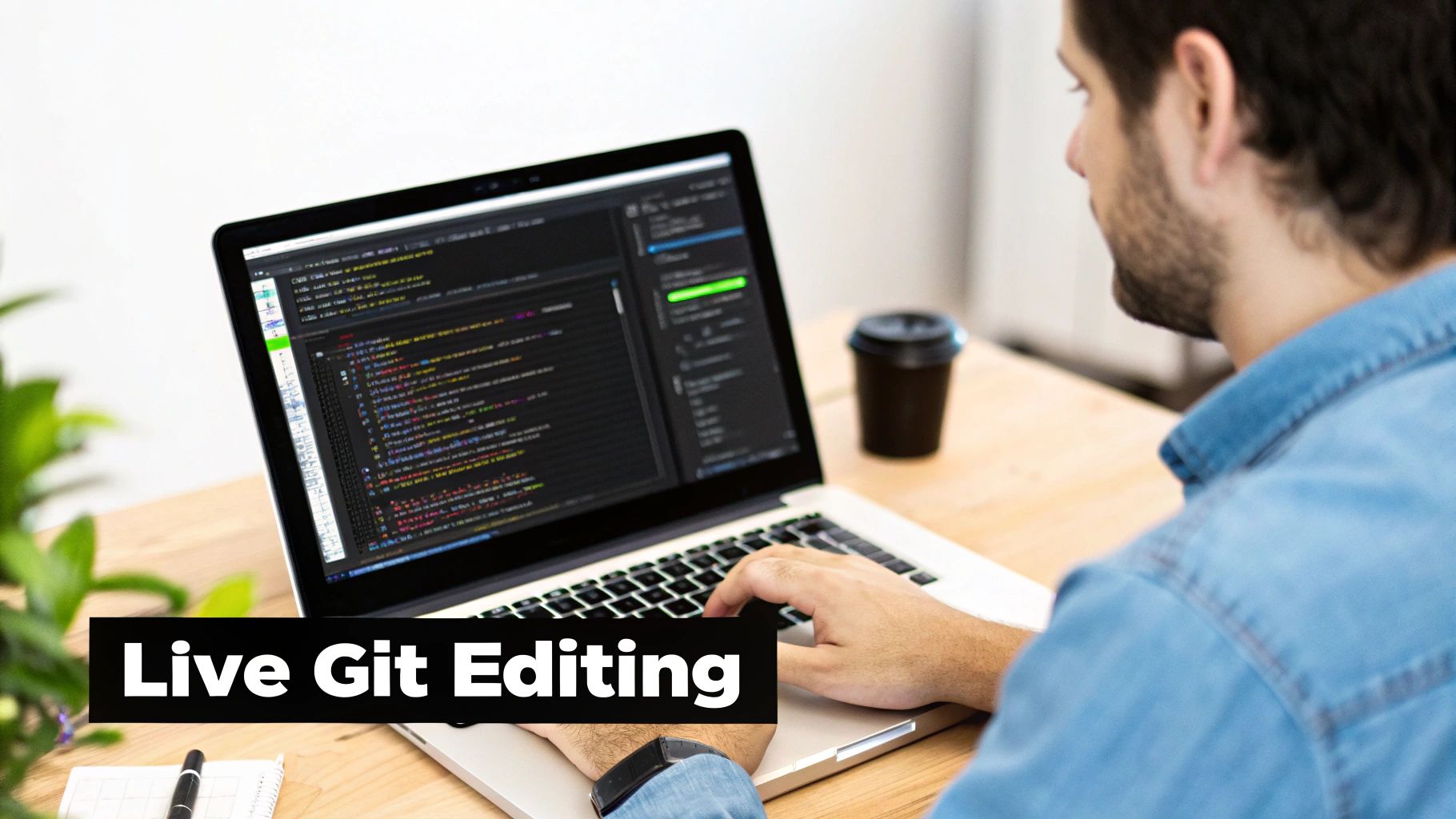
The interface is powerful enough for developers, with easy access to front-matter fields, but simple enough that a writer can jump right in. It effectively opens up static site content management to everyone.
Unlocking a Serverless and Secure Workflow
When you connect a user-friendly editor straight to a Git repository, you’re essentially creating a serverless content management system. This brings some serious advantages over traditional and even many headless CMS platforms.
Because the content management tool runs entirely in your browser and communicates directly with GitHub's API, there is no intermediate database or backend application to maintain, update, or secure. Your content is as secure as your Git repository itself.
This architecture drastically cuts down on complexity and the day-to-day operational grind. You can forget about server patches, database upkeep, or worrying about whether your backend can handle a traffic spike. The entire system is simpler, more resilient, and inherently more secure.
If this sounds like a good fit, you can learn more about how a GitHub-based CMS works and see how it can sharpen both your development and content cycles. It’s a genuine step forward that makes the awesome benefits of static sites available to a much wider audience.
A Few Common Questions About Cloud CMS
As you start digging into cloud content management, you'll probably run into some recurring questions. Let's tackle the most common ones head-on so you can get a clearer picture of how it all works.
Is a Cloud-Based Content Management System Secure?
In short, yes. A cloud-based content management system is usually incredibly secure. Think about it: top providers pour massive resources into enterprise-grade security, managing everything from firewalls to crucial software updates for you. This often makes them a much safer bet than a self-hosted setup where a missed security patch can leave you wide open.
Git-based workflows take this a step further. When you remove a traditional backend server from the equation, you shrink the potential attack surface dramatically. All your content stays safely tucked away and version-controlled in your own repository.
What’s the Difference Between a Cloud CMS and a Headless CMS?
This is a classic point of confusion, but it's simple once you break it down. "Cloud" tells you where your CMS lives, and "headless" tells you how it delivers content.
- Cloud CMS: This is all about the hosting. The software is managed for you by a provider and you access it over the internet. No servers for you to maintain.
- Headless CMS: This describes the architecture. The backend (where you manage content) is completely separate from the front-end (what your visitors see). Content is sent out to any website or app via an API.
Many headless platforms are also cloud-based, but you can have a traditional, all-in-one CMS that's also hosted in the cloud. They aren't mutually exclusive terms; they just describe different aspects of the system.
Can I Move My Existing Website to a Cloud CMS?
You absolutely can. How you do it will depend on your current setup and the cloud CMS you're eyeing. Most providers have import tools, plugins, or step-by-step guides to make the transition as smooth as possible.
If you’re moving to a workflow based on a static site generator, the process usually involves converting your content into a simple format like Markdown and organizing it in a Git repository. It takes a bit of planning upfront, but the payoff in better performance and less maintenance makes it a worthwhile move for a lot of people.
Do I Lose Control Over My Data with a Cloud CMS?
That's a fair question, but with most modern systems, you're still in the driver's seat. You own your data and can almost always export it if you decide to leave. You’re not getting locked into a system you can’t escape.
Git-based cloud workflows give you the ultimate control. Since your content lives in your own GitHub repository, you have a complete history of every single change. More importantly, you have total freedom to take your content and move to another service anytime you want. You're never stuck with one platform.
Ready to manage your static site content without the friction? JekyllPad offers a seamless, browser-based visual editor that connects directly to your GitHub repository. Focus on creating great content and let us handle the rest. Try it for free today at https://www.jekyllpad.com.