
A custom domain name is your unique, branded address on the internet—think yourbrand.com. Instead of using a generic URL assigned by a platform, a custom domain gives you a professional identity that you own and control, making it much easier for people to find and remember you online.
Your Digital Address: What Is a Custom Domain Name?

Imagine the internet is a massive, sprawling city, and every website is a building. To find a specific building, you need its street address. Without a custom domain, your website's address is often long and clunky, something like "123-unnamed-street-unit-B-apartment-4C." Sure, it gets you there, but it’s a mouthful and doesn’t exactly inspire confidence.
A custom domain name, on the other hand, is like owning a prime piece of real estate at "The Brand Building on Main Street." It's a clean, professional, and memorable label that points visitors straight to your website's technical location (its IP address).
From Technical to Trustworthy
This one simple change can completely transform your online presence from feeling temporary to looking permanent and established. Instead of just renting space on someone else's platform (like yourname.github.io), you're claiming your own digital real estate. That sense of ownership is crucial for building a brand, whether you’re a blogger using JekyllPad or a business launching a new product.
Credibility is a huge piece of the puzzle. In fact, 46% of businesses feel a custom domain significantly boosts their credibility. And it's not just businesses that think so; mobile users, who account for over 60% of web traffic, are reportedly twice as likely to trust a branded domain over a generic subdomain.
A custom domain isn't just a URL; it’s the foundation of your online identity. It tells visitors you are serious, professional, and here to stay.
More Than Just a Web Address
The benefits of a custom domain extend well beyond your website. It’s also the key to creating professional email addresses like [email protected]. This consistency across all your communication channels reinforces your brand and builds trust with every single email you send.
It’s a small detail that makes a world of difference in how customers and collaborators perceive you. To dig a bit deeper, it's worth understanding what a domain for email is and why it matters.
Why a Custom Domain Is a Non-Negotiable Asset

Moving away from a generic subdomain isn't just a cosmetic change—it's one of the smartest investments you can make in your online presence. A custom domain is a powerful tool for building a memorable brand, signaling professionalism, and securing your spot in search engine rankings for the long haul.
It's the foundation of your digital identity. Just think about the difference in perception: yourname.github.io feels like a temporary side project, while yourbrand.com sends a clear message that you’re here to stay. That small shift instantly builds trust and makes your website far easier for people to remember and find.
Solidify Your Brand and Build Trust
A custom domain puts you in the driver's seat of your brand's story. It’s short, unique, and all yours. This exclusivity prevents confusion and ensures that when someone searches for your name, they find you, not a competitor or a similarly named project. It's about more than just looking good; it's about claiming your digital territory.
This authority isn't just a feeling—it has a real impact. Short, branded domains are easier to recall and lead to more direct traffic. The classic .com is still the gold standard, with over 157 million registrations and a massive 43.7% market share. It's no surprise that over 90% of startups choose it; the trust it carries is universal.
Boost Your SEO Momentum
From an SEO standpoint, a custom domain is your permanent home on the web. Every backlink you earn, every article you publish, and all the credibility you build are tied directly to that domain. This accumulated value, often called domain authority, grows over time and is a major factor in how high your site ranks in search results.
If you're using a free subdomain, you're essentially building up the value of another platform (like GitHub or Blogger). By switching to your own domain, you start building equity for yourself. You're creating a digital asset that becomes more valuable with every piece of content you add. For more on this, check out our guide on static site SEO.
Elevate Professional Communication
A custom domain also unlocks one of the most important tools for business: professional email addresses. An email coming from [email protected] carries infinitely more weight than [email protected]. It shows consistency and tells potential clients, partners, and customers that you are an established and trustworthy professional.
Using a custom domain for your email is a must for anyone serious about their professional image. It reinforces your brand with every single interaction and builds a cohesive, trustworthy presence.
This consistency between your website and your email makes your brand feel polished and reliable—something that's absolutely crucial for making a great first impression and building lasting relationships.
How Domain Names Work: A Simple DNS Primer
So, how does typing yourbrand.com into a browser actually pull up your website? The magic behind this is the Domain Name System, or DNS.
Think of DNS as the internet's phonebook. It’s a massive, distributed directory that translates the human-friendly domain names we all use into the computer-friendly IP addresses that servers need to find each other. Without it, we'd be stuck memorizing long strings of numbers just to check our email. When you set up a custom domain, you're basically adding your own entry into this global phonebook.
The Most Important DNS Records
You don't need to be a network engineer to get this done. For most static sites, you'll only ever touch two types of DNS records. Getting these right is 90% of the battle.
An A Record (which stands for Address) is the most straightforward. It points your domain directly to a server's numeric IP address. It’s like saying, "The address for
yourbrand.comis 192.0.2.1." Simple and direct.A CNAME Record (or Canonical Name) is a bit different. Instead of pointing to an IP address, it points to another domain name. This is like creating an alias. You're telling the internet, "To find
blog.yourbrand.com, just go find whateverusername.github.iois pointing to."
These two records are the workhorses for connecting your domain to hosting platforms. For a deeper dive, you can see exactly how GitHub Pages uses these records to get your site online with a custom URL.
Root Domains vs. Subdomains
When you start setting up those records, you’ll immediately run into two terms: root domains and subdomains. The difference is crucial.
Your root domain is the main address you register, like yourbrand.com. It's the foundation of your online identity.
A subdomain is just a prefix you add to create a separate section, like blog.yourbrand.com or shop.yourbrand.com. Think of it as an extension to your main house. Each subdomain can point to a completely different server or service.
This is where the real power lies. You could point your root domain (
yourbrand.com) to your main company website using an A record, while having a subdomain likedocs.yourbrand.compoint to a totally separate documentation platform using a CNAME record.
This setup gives you incredible flexibility. Your main site might be a complex app, but your blog could be a simple, fast static site you manage with JekyllPad—all while living under one consistent, professional brand. Getting a handle on this basic structure is the first big step to taking control of your online presence.
Securing and Setting Up Your Custom Domain
Once you've nailed down the idea for your website, one of the most exciting first steps is grabbing the perfect custom domain name. The whole process boils down to a few key actions: picking a registrar, officially registering your name, and then pointing it to where your website lives online.
The world of domain registrars is massive, with big names like GoDaddy managing over 84 million domains and Namecheap holding strong with 23 million. With an average of 33,000 new domains being snapped up every single day, it pays to act fast and claim a memorable name before someone else does. Once you've got your domain, the next step is to get it online, and this guide on how to connect your domain to your website is a great place to start.
Pointing Your Domain with DNS Records
So, you've registered your domain. Now what? The next piece of the puzzle is setting up your DNS records. This is how you tell the internet where to find your website's files.
Think of it like this: your domain name (like www.mycoolsite.com) is the street address, but the DNS record is the specific instruction that tells the mail carrier exactly which house on that street is yours. You’re simply creating a digital signpost that points your domain to your hosting provider's servers.
This might sound technical, but modern hosting platforms have made it incredibly simple. For instance, if you're using GitHub Pages to host your site, you'll just need to add a couple of specific A records or a CNAME record in your registrar's settings. It’s usually a copy-and-paste job.
This diagram shows how a user's browser asks the DNS system for directions and gets pointed to the right server IP address to load your site.
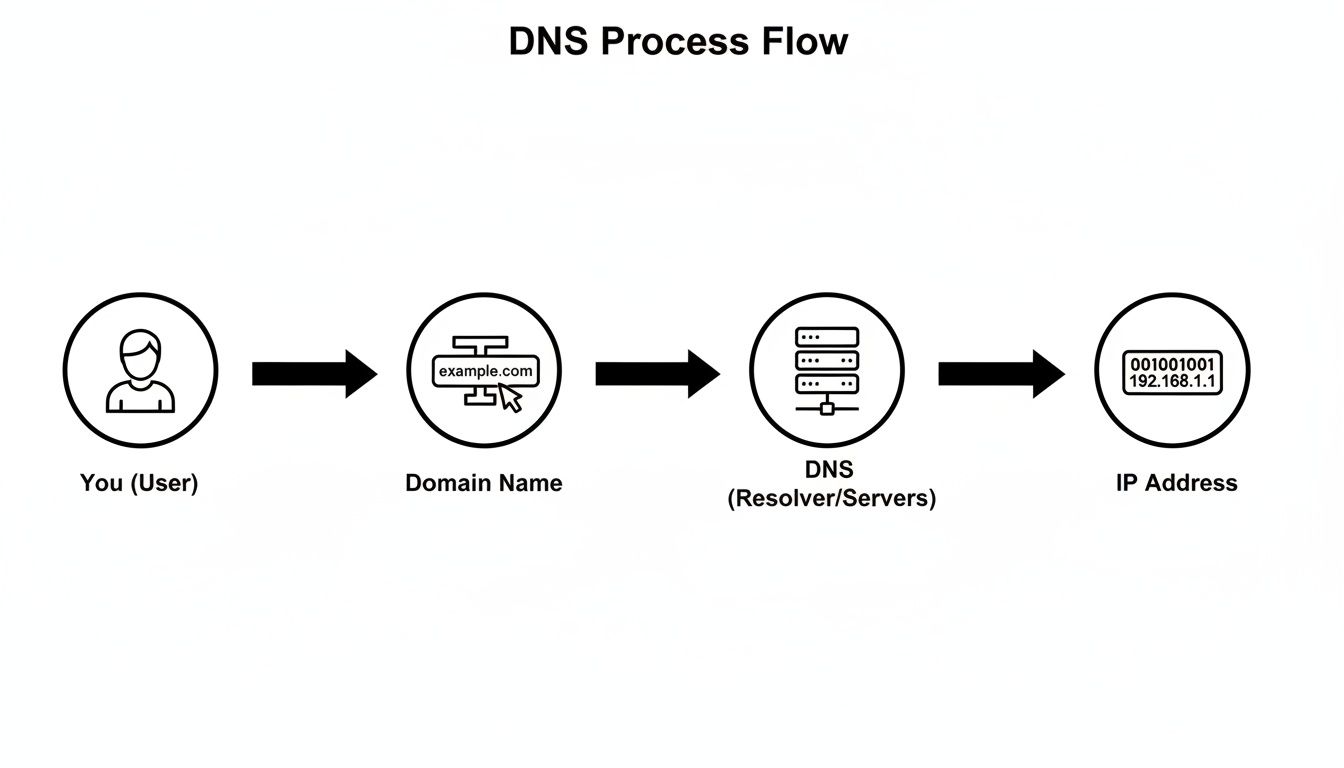
This simple lookup is what makes the whole system work. If you're using JekyllPad, this setup is even smoother because it integrates directly with your GitHub repository. You can find a complete walkthrough in our guide that explains how to use GitHub Pages and hook up a custom domain.
Enabling HTTPS for Security and Trust
The final, and absolutely critical, step is to enable HTTPS. This encrypts the connection between your visitors' browsers and your server, protecting their data and signaling that your site is trustworthy. It's also a big deal for SEO, as search engines like Google heavily favor secure sites.
Without HTTPS, browsers will slap a "Not Secure" warning on your site. Nothing screams "don't trust this website" louder than that. Enabling it is non-negotiable for any modern site.
Thankfully, the days of paying for expensive security certificates are mostly behind us. Most quality hosts, including GitHub Pages, offer free SSL certificates that you can turn on with just a click.
Here’s a quick rundown of the whole process:
- Buy Your Domain: Pick a registrar and register the name you want.
- Configure DNS: Log in to your registrar, find the DNS settings, and add the records provided by your web host.
- Flip the HTTPS Switch: Head over to your hosting dashboard and look for an option to "enforce HTTPS" or enable your SSL certificate.
That’s it! You’ve just transformed your project from a bunch of files on your computer into a live, secure website that anyone in the world can visit. These steps build a professional, trustworthy foundation for your entire online presence.
Troubleshooting Common Custom Domain Issues
Setting up a custom domain is usually pretty smooth sailing, but sometimes things just don't click right away. If you've pointed your domain and are still staring at an error page, don't worry. It happens to everyone, and the fix is almost always simple.
The biggest culprit by far is something called DNS propagation. You can think of it like the internet's postal service updating its address books all over the world. When you make a change, it doesn't happen instantly. It can take anywhere from a few minutes to a full 48 hours for that update to reach every corner of the globe.
The Waiting Game Is Normal Seriously, the best first step is often to just wait. If you keep tweaking your settings while the changes are propagating, you might just reset the clock and make the wait even longer.
So, before you start pulling your hair out, grab a coffee and give it some time. This delay is a built-in feature of the internet, ensuring everything stays stable.
Checking Your DNS Records
Okay, so you've waited a day or two and still nothing? Now it’s time to play detective and check your DNS records. You'd be surprised how often a tiny typo is the root of the problem.
When you go back to your domain registrar, look very closely at these three things:
- A Records: Did you copy the IP addresses from your host exactly? No extra spaces, no missing numbers. It has to be perfect.
- CNAME Records: For any subdomains, double-check the spelling. Make sure your "www" or "blog" points to the precise target, like
username.github.io. - No Extra Records: Get rid of any old, conflicting A or CNAME records pointing to a previous service. They can confuse the system and cause your domain to resolve incorrectly.
These little details are everything. A single wrong character is all it takes to break the connection, so a careful review is your most powerful troubleshooting tool.
Solving SSL and Security Errors
That gut-wrenching "Your connection is not private" error is another classic hurdle. If you see this, your first thought should be: SSL certificate.
This usually pops up after you've pointed your domain, but before your hosting provider has issued and installed the certificate. For services like GitHub Pages or JekyllPad, you often have to go into your project settings and flip a switch to "Enforce HTTPS."
Once you do that, it can still take a few minutes for the certificate to be generated and activated. So again, a little patience goes a long way. Getting HTTPS working properly is a non-negotiable part of understanding what is a custom domain name and running a professional-looking site.
Frequently Asked Questions About Custom Domains
Diving into the world of custom domains can feel a bit overwhelming at first, with a whole new set of terms and concepts to learn. Let's walk through some of the most common questions people have. We'll break them down with simple, straightforward answers to get you on the right track.
How Much Does a Custom Domain Name Cost?
There's no single price tag on a domain name. The cost really depends on a few key things, like who you buy it from and what kind of extension you want (the part after the dot, like .com or .io).
For a standard .com domain, you can generally expect to pay somewhere between $10 to $20 per year. Be on the lookout for super-low introductory offers—they're great for the first year, but always check the renewal rate, which is often quite a bit higher.
Here’s a quick rundown of what shapes the final price:
- Top-Level Domain (TLD): The classics like
.com,.net, and.orgare usually the most affordable. Newer or more specialized TLDs, such as.appor.dev, can sometimes cost a little more. - Registrar Pricing: Companies like GoDaddy, Namecheap, or Google Domains all have their own pricing and sales, so it pays to shop around.
- Renewal Fees: This is what you'll pay each year to keep your domain after the first year. It's the most important number to check before you commit.
- Privacy Protection: Most registrars offer a service to hide your personal contact details from public records. This usually adds a few extra dollars to your annual bill but is often worth it.
What Is the Difference Between a Domain Registrar and a Web Host?
This is a really common point of confusion, but an analogy makes it crystal clear. Think of it like setting up a physical shop.
A domain registrar is like the city office where you go to officially register your business name and address (yourbrand.com). You're essentially buying the exclusive right to use that address for a certain period.
A web host, on the other hand, is the company that owns the physical building and land you rent to run your shop. They provide the actual server space where your website's files live, so people can come and visit.
Key Takeaway: You buy the name from a registrar and rent the online space from a host. Some companies bundle these services together, but they're still two distinct functions. When you use GitHub Pages for a static site, GitHub is acting as your web host, completely for free.
Should I Choose a .com Domain or Something Else?
Let's be honest: .com is still the king. It's the extension everyone knows and trusts, and it's what most people will automatically type into their browser. If the .com version of your name is available and in your budget, it's almost always your best bet.
But the internet is a crowded place. With over 157.9 million .com domains already registered, finding a good one can be tough. That’s why we’ve seen a huge boom in alternative TLDs. Newer options like .tech, .ai, or .blog have soared to 37.8 million registrations, growing by 13.5% year-over-year. If you're curious about the numbers, you can discover more insights on domain name statistics.
So, when does it make sense to look beyond .com?
- When your first choice is taken: If
yourbrand.comis gone, a name likeyourbrand.iooryourbrand.techcan be a fantastic, modern-looking alternative, especially for tech-focused projects. - To highlight your niche: A
.blogTLD immediately tells people what your site is all about. In the same way,.photois perfect for a photographer’s portfolio. - For local targeting: If your audience is in a specific country, a country-code TLD (ccTLD) like
.cafor Canada or.defor Germany can give you a small boost in local search results.
At the end of the day, a memorable name beats the perfect extension. It's better to have a creative, easy-to-remember name with a .io than a long and clunky .com that no one can spell.
Ready to take control of your content and build a stunning static site with your new custom domain? With JekyllPad, you get a powerful visual editor that integrates directly with GitHub, making it effortless to write, edit, and publish. Start for free on JekyllPad.com and focus on what you do best—creating.