
Static site generators, or SSGs, are a fascinating breed of tool. At their core, they do one thing incredibly well: they build your entire website before anyone even visits it.
Imagine the difference between a chef who cooks a meal fresh for every single customer and one who pre-packages thousands of identical, perfect meals, ready to be served instantly. The SSG is the pre-packaging chef. It takes your content, applies your design templates, and spits out a complete set of simple HTML, CSS, and JavaScript files. This "pre-building" is what makes SSG-powered websites unbelievably fast and secure.
What Are Static Site Generators and Why Should You Care?
So, what's all the fuss about? The big idea is to move away from how traditional websites work. Think about a classic system like WordPress. When you visit a page, the server has to wake up, talk to a database to grab the content, mash it together with a theme, and then build the final HTML page just for you. This happens for every visitor, every single time. It's a lot of work.
An SSG gets rid of all that repetitive, on-the-fly work. It runs a "build step" just once, creating every page ahead of time. When a visitor arrives, the server's only job is to hand over a finished file. Simple.
The Pre-Building Advantage
This pre-building philosophy is the secret sauce behind the rise of SSGs. It completely changes the game. Instead of a complex, multi-step dance for every page view, the server just delivers what's already there. The benefits are real and you feel them immediately.
"Every visitor will see the same pages, and all that data is baked into the code that your static site generator puts out. In the vast majority of cases, static websites will load much faster than their dynamic counterparts."
Let's quickly compare the two approaches.
Static vs Dynamic Websites: A Quick Comparison
This table breaks down the fundamental differences between a site built with a static site generator and one running on a traditional dynamic content management system (CMS).
| Attribute | Static Site (SSG) | Dynamic Site (CMS) |
|---|---|---|
| Performance | Extremely fast; pre-built HTML files served from a CDN. | Slower; pages are generated on-demand for each request. |
| Security | Highly secure; no database or server-side processing to attack. | More vulnerable; requires constant security updates for server, database, and plugins. |
| Scalability | Scales effortlessly to handle massive traffic spikes. | Scaling is complex and expensive, requiring more server resources. |
| Hosting Costs | Very low; static file hosting is cheap or even free. | Higher; requires a server capable of running software and a database. |
| Complexity | Simpler architecture, but often requires developer skills to manage. | Easier for non-technical users to manage content via a GUI. |
The key takeaway is that the static approach trades some backend user-friendliness for massive gains in performance, security, and scalability. This leads to some compelling advantages:
- Blazing-Fast Performance: Pages are just simple files, often served from a Content Delivery Network (CDN) close to the user. They load in a flash.
- Rock-Solid Security: With no live database and no server-side code to exploit, the attack surface for hackers practically disappears.
- Effortless Scalability: A static site can handle a sudden flood of visitors without breaking a sweat. Serving a file is easy.
- Lower Hosting Costs: You don't need a powerful, expensive server. In many cases, hosting static files is incredibly cheap, sometimes even free.
Understanding the Modern Web Ecosystem
Don't let the word "static" fool you into thinking these sites are stuck in the 90s. Modern static sites are a cornerstone of the Jamstack architecture (JavaScript, APIs, and Markup), which is all about building powerful, dynamic experiences in the browser. They slot perfectly into a modern developer workflow using tools like Git for version control and automated deployment pipelines. If you're curious to learn more, our guide on what an SSG is digs deeper into the mechanics.
While still a niche, static site generators are definitely gaining traction, now powering about 0.5% of all websites. For those who adopt them, the savings can be huge—slashing hosting costs by up to 90% compared to a typical dynamic setup.
SSGs are fantastic tools, but they're just one piece of the puzzle. For a broader look at how they fit into the modern creative workflow, it's worth checking out collections of comprehensive tools for creators to see the bigger picture.
How Static Site Generators Actually Work
The magic behind static site generators isn't really magic at all. It's more like a super-efficient assembly line for websites. Instead of forcing a server to build a webpage from scratch every single time someone visits, an SSG pre-builds everything ahead of time. The result is a finished product, ready to be delivered instantly.
You can think of the whole thing as a four-stage process. Each step takes raw materials—your text, your design rules—and transforms them into a complete, high-performance website. Let's walk through how all those pieces come together.
Stage 1: Content Creation
Everything begins with your content. In the world of SSGs, you typically write in simple, plain-text files using a lightweight markup language like Markdown. This is a huge win because it separates your writing from its presentation, letting you focus purely on the words without getting bogged down in code.
You'll create individual files for each blog post, product page, or article. Each file contains the body text and, just as importantly, some metadata at the very top called front matter. This is where you define key details like the title, author, publication date, and tags, usually in a straightforward format like YAML.
This whole approach keeps your content clean and easy to manage with version control tools like Git. Best of all, there's no complex database in sight.
Stage 2: Templating and Layouts
Once your content is ready, you need to decide how it should look. That's where templating comes in. Templates are simply reusable layout files that define the structure and design of your pages. You might have one template for a blog post, another for the homepage, and a third for your contact page.
These templates are often written in languages like Liquid, Nunjucks, or even JSX, depending on which SSG you're using. They're mostly standard HTML but with special placeholders that tell the SSG where to inject your content. For example, a little snippet like {{ title }} in a template gets replaced with the actual title from your Markdown file's front matter during the build.
By combining raw content with a set of design blueprints (templates), static site generators can consistently produce perfectly structured pages without manual repetition. It's an automated assembly line for your website's architecture.
Stage 3: The Build Process
Here's where the real action happens. The build process is the moment the generator acts like a factory, taking all your raw materials and assembling the final website. You kick this off with a single command in your terminal, something like hugo or npx @11ty/eleventy.
During the build, the SSG gets to work:
- It reads every one of your Markdown content files and their front matter.
- It grabs your templates and layouts.
- It methodically combines them, plugging the content into the right spots within the templates.
- It also processes assets like images or SASS files, often optimizing them for the web along the way.
The output is a simple folder—usually named something like _site, public, or dist—containing nothing but static HTML, CSS, and JavaScript files. Your entire website is now just a collection of pre-built, ready-to-serve files.
Stage 4: Deployment to a Host or CDN
The final step is getting your site online, and with a static site, this is refreshingly straightforward. Since you just have a folder of basic files, you don't need a complex server running a database. You simply upload this folder to a static hosting provider or a Content Delivery Network (CDN).
This diagram perfectly illustrates the streamlined delivery path of a static site compared to a dynamic one.
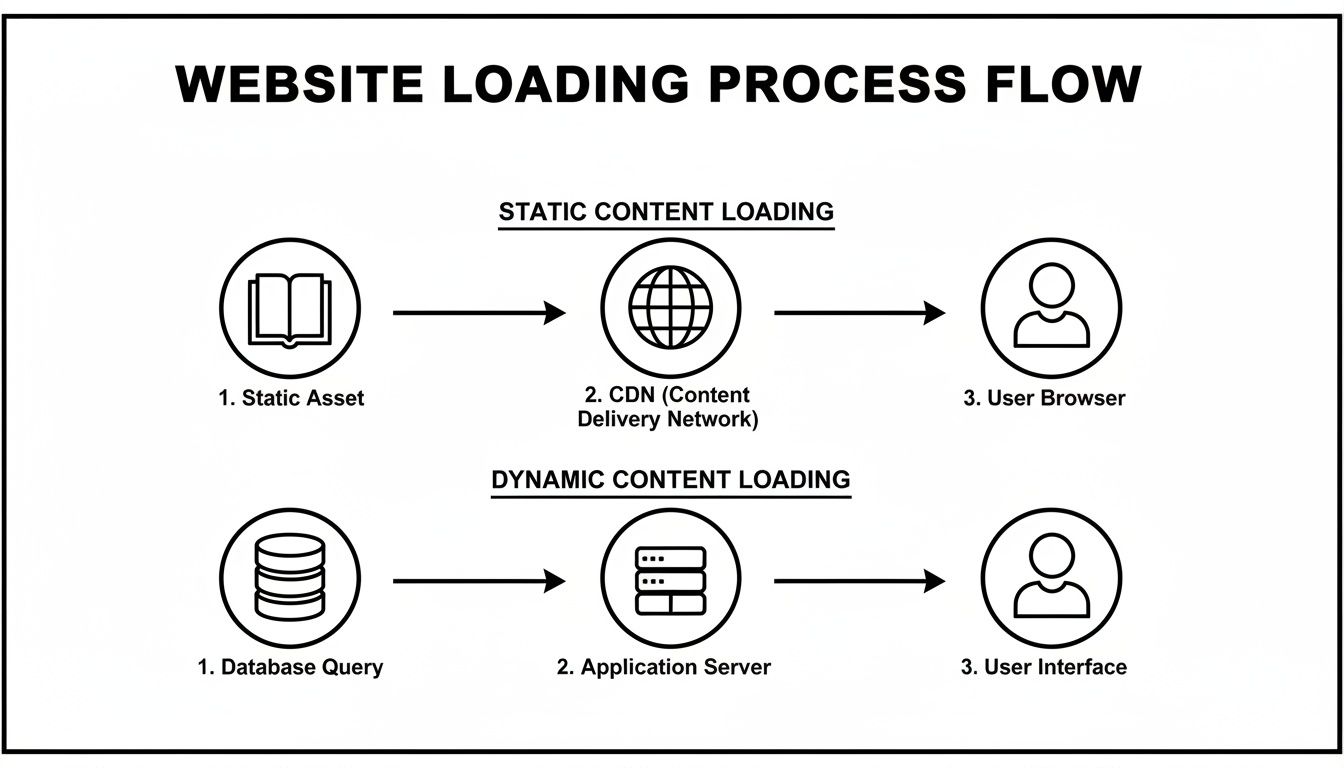
As you can see, static assets are delivered directly from a CDN to the user. This path completely bypasses the server-side processing and database queries that slow down dynamic sites. It’s this direct route that makes static websites incredibly fast and resilient.
Exploring the Top Static Site Generators
The world of static site generators is huge and growing every day, with hundreds of options to choose from. All that choice is great, but it can also feel overwhelming when you’re trying to pick just one. The secret isn't to compare every single feature, but to understand that each tool was built with a different philosophy and for a different kind of user.
A better approach is to look at them based on the technology they're built with. This lets you quickly zero in on the options that fit your team's skills and the specific needs of your project.
The JavaScript Ecosystem Powerhouses
It's no surprise that the JavaScript community has created some of the most popular and flexible SSGs out there. If you're a front-end developer comfortable with Node.js, React, or Vue, you’ll feel right at home with these tools. They're fantastic for building anything from a simple blog to a complex, interactive web app.
Lately, one tool has been getting a lot of attention: Astro. Its rise has been nothing short of meteoric, thanks to its unique "islands architecture." This approach focuses on shipping as little JavaScript to the browser as possible by default, which makes for incredibly fast websites.
In fact, Astro has shot to the front of the pack, now holding 43.23% of the SSG market share among a sample of nearly a thousand tracked sites. This signals a clear shift in the industry toward performance-first frameworks. For a closer look at the numbers, check out the latest static site generator market share data.
Other major players in the JavaScript space include:
- Next.js: Best known for its powerful hybrid rendering, Next.js also has a top-tier static export feature. It's the go-to for many teams building enterprise-level applications with React.
- Eleventy (11ty): Praised for its simplicity and "get out of your way" philosophy, Eleventy is incredibly flexible. It works with many different templating languages and is perfect for developers who want full control without a heavy framework.
Speed and Simplicity with Go
If your main concern is raw speed, then generators built with compiled languages like Go are what you need. For websites with tens of thousands of pages, the performance difference isn't just noticeable—it's a complete game-changer.
The undisputed king in this category is Hugo. It can build a massive site in seconds, a task that might take a JavaScript-based generator several minutes. This makes for a lightning-fast development cycle.
Because of its incredible build times, Hugo is often the first choice for large documentation sites, content-heavy blogs, and any project where waiting for builds is a major bottleneck.
The Classic Ruby Contender
You can't talk about SSGs without mentioning Jekyll. As one of the original pioneers, this Ruby-based generator powers GitHub Pages and has a massive, mature community behind it. That means you'll find a ton of themes, plugins, and tutorials to help you get started.
Jekyll is exceptionally blogger-friendly and praised for its straightforward approach. If you’re looking to launch a personal blog or a simple project site, especially with free hosting, Jekyll is still a fantastic and reliable choice. For a detailed guide, check out our post on how to use GitHub Pages.
Top Static Site Generator Comparison
To help you visualize the differences, here's a quick rundown of the top contenders. This isn't an exhaustive list, but it covers the main players and what makes each one stand out.
| Generator | Primary Language | Key Strength | Best For |
|---|---|---|---|
| Astro | JavaScript | Performance (Zero-JS by default) | Content-heavy sites, marketing pages |
| Next.js | JavaScript (React) | Hybrid rendering, enterprise features | Complex web apps, React-based projects |
| Eleventy (11ty) | JavaScript | Simplicity and flexibility | Developers who want maximum control |
| Hugo | Go | Blazing-fast build speeds | Large blogs, documentation portals |
| Jekyll | Ruby | Simplicity and community support | Personal blogs, simple project sites |
Ultimately, choosing the right SSG comes down to matching the tool's strengths to your project's needs. A React developer building an interactive marketing site will likely lean toward Next.js, while a team managing a 50,000-page documentation portal would find Hugo's speed essential. By understanding these core philosophies, you can pick a generator that will be a solid foundation for your project's success.
The Real Benefits and Tradeoffs of Using an SSG

Switching to a static site generator can feel like a game-changer, but it’s smart to look at the whole picture before you leap. The benefits are compelling and solve some of the oldest headaches in web development. At the same time, they introduce new workflows and limitations that might not fit every project or team.
To make the right call, you need to weigh the incredible upsides against the practical drawbacks. Let's start with the advantages to see what makes this approach so popular.
The Unmistakable Advantages of Going Static
The core appeal of using an SSG boils down to three huge wins: speed, security, and scalability. These aren't just small tweaks; they're foundational improvements to how a website performs and operates.
1. Blazing-Fast Performance
A static site is just a folder of ready-to-go HTML files. When someone visits a page, there's no database to query or server-side code to run. The server just grabs the finished file and sends it, often from a Content Delivery Network (CDN) close to the user.
This simple, direct delivery means pages load almost instantly. That’s a huge plus for user experience and a major ranking factor for SEO.
2. Rock-Solid Security
Think about all the moving parts of a traditional website: the server, the database, plugins, and extensions. Each one is a potential entry point for an attack. An SSG gets rid of almost all of them.
With no live database to breach and no server-side scripts to exploit, the attack surface shrinks dramatically. This simple, hardened structure means less time worrying about security patches and more time focusing on what matters.
By removing the dynamic, server-side components that are common targets for malicious attacks, static sites create a hardened front that is exceptionally difficult to compromise. This "security by subtraction" is one of the most compelling reasons to choose an SSG.
3. Effortless Scalability and Lower Costs
Serving plain HTML files is incredibly light on resources. A static site can handle a massive, unexpected traffic spike—from a viral post or a product launch—without skipping a beat.
On top of that, hosting static files is dirt cheap, with many services offering generous free plans. This powerful combination of resilience and low cost makes SSGs a financially smart choice for projects of any size.
Navigating the Practical Tradeoffs
While the benefits are clear, the static approach isn't a silver bullet. It comes with its own set of challenges and workflow changes that your team needs to be ready for. Understanding these tradeoffs ahead of time will save you a lot of frustration.
Take one of the most dominant static site generators, Next.js, as an example. It's used on over 412,000 websites, giving it a staggering market share of 61.9% among SSG technologies. It achieves this by blending static generation with dynamic capabilities, which helps it overcome some of these classic limitations on a massive scale. You can dig into more SSG market trends on Wappalyzer to see how it compares.
Here are the main things to keep in mind:
- The Build Step: Any change to the content, big or small, requires the entire site to be rebuilt before it goes live. For a huge site with thousands of pages, this build process can take several minutes. This creates a lag between hitting "save" and seeing the update published, something that doesn't happen with a traditional CMS.
- The Learning Curve: For non-technical team members like marketers or writers, the typical SSG workflow—using Markdown files, Git for version control, and the command line—can feel pretty foreign and intimidating. While tools like headless CMSs can create a friendlier interface, they add another moving part to the initial setup.
- Handling Dynamic Features: Static sites can't handle things like user comments, contact forms, or e-commerce checkouts on their own. To add these, you have to rely on client-side JavaScript and third-party APIs (this is the "A" in Jamstack). This often requires more development work to piece everything together and manage those services.
How to Choose the Right Static Site Generator for Your Project
Picking the perfect static site generator is a big decision. It’s a choice that shapes how you'll build and manage your project for years to come. With hundreds of options out there, it’s easy to get overwhelmed. But here’s the secret: you’re not looking for the one "best" tool, you’re looking for the best tool for your project.
Instead of getting bogged down comparing feature lists, start by asking a few key questions about your project and your team. This simple gut-check will help you filter out the noise and find a generator that feels like a natural extension of your workflow.
Evaluate Your Project Requirements
First things first, what are you actually building? The needs of a simple personal blog are worlds away from a sprawling e-commerce store or a massive documentation portal. Getting crystal clear on your goals is the most important step you can take.
Think through these aspects of your project:
- Content Complexity: Are we talking about a handful of pages or tens of thousands of articles? For huge sites, build speed is everything. A generator like Hugo, which is built on Go, can spit out thousands of pages in just a few seconds.
- Dynamic Functionality: Do you need things like a search bar, contact forms, or user accounts? While static sites typically handle these with third-party APIs, some generators have a much tighter integration for building interactive experiences. Next.js, for example, makes this a core part of its offering.
- Future Growth: Try to picture what your site might look like in two years. Picking a tool with a flexible foundation and an active community means it can scale with you, saving you from a painful migration down the line.
Assess Your Team's Technical Skills
A static site generator should feel like a superpower for your team, not a roadblock. The fanciest tool in the world is worthless if nobody on your team can use it confidently. This is why matching the tool to your team's existing programming language skills is such a smart move.
If your team lives and breathes JavaScript and React, then exploring options like Next.js or Astro just makes sense. They’ll be able to hit the ground running. On the other hand, if you have Ruby developers on staff, Jekyll is still a rock-solid and familiar choice.
Choosing an SSG that aligns with your team's current skillset drastically reduces the learning curve and accelerates development. It allows developers to be productive from day one by working in an environment they already understand and enjoy.
Analyze the Ecosystem and Community
Look beyond the core features and check the pulse of the generator’s community. A healthy, vibrant ecosystem means you'll find great documentation, a ton of plugins, and plenty of tutorials to help you solve problems when you get stuck. When evaluating potential static site generators, the benefits and challenges of the surrounding software are crucial; you can find more insights into these considerations for self-hosted open-source solutions.
A big plugin library can save you hundreds of hours. Need an SEO plugin, an image optimizer, or an RSS feed generator? With a popular SSG, chances are someone has already built it. This support network is priceless, especially when you run into a weird bug at 2 AM.
Bridging the Gap with a Headless CMS

While developers get excited about the speed and security of static sites, there's often a major catch for everyone else. The standard workflow—writing in Markdown files, using Git to commit changes, and running terminal commands—is a foreign language to most marketers, writers, and content managers.
This developer-first process almost always creates a bottleneck. A simple typo fix or a last-minute content update suddenly requires a developer's help. This not only slows everything down but also leaves content creators feeling frustrated and powerless.
The Problem with the Traditional Workflow
Let's be honest, the old-school static site workflow forces the entire team to think like a programmer. For someone on the marketing team who just wants to draft and schedule a new blog post, this is a clunky and intimidating process.
- Reliance on Git: Tying content updates to a version control system is great for code, but it's a steep learning curve for non-technical users.
- Markdown and Code Editors: Content creation happens in plain text or code editors, which lack the rich, visual editing tools people are used to.
- Manual Build Triggers: To see a preview or publish an update, someone has to manually trigger a site rebuild—a concept that’s completely alien to most content teams.
This friction often makes adopting static site generators a tough sell for the wider organization, despite all the clear technical benefits.
Enter the Headless CMS
This is where a headless CMS completely changes the game. Think of it as the missing link—a user-friendly bridge that connects your content team to the powerful static site generator running in the background. It works by separating the content management "body" from the website's front-end "head."
A headless CMS offers a familiar web-based interface, a lot like WordPress, where your team can easily write, edit, and organize all the site's content. When they're done, that content is simply made available through an API.
When it's time to update the site, your static site generator just calls that API, pulls in the latest content, and builds the fresh HTML pages automatically.
A headless CMS gives you the best of both worlds. It empowers your content team with an intuitive editing experience while allowing developers to retain the performance, security, and scalability benefits of a static site architecture.
This combination smooths out the entire workflow. Marketers can launch campaigns, writers can draft articles, and editors can make changes on the fly, all without ever needing to open a terminal or ask a developer for help. Tools that follow this model can radically simplify content management; you can learn more about how a GitHub-based CMS can provide this modern workflow. By decoupling your content from your code, you finally unlock the full potential of static sites for everyone on the team.
Have Questions About Static Site Generators? We Have Answers.
As you start exploring the world of static sites, you're bound to have a few questions. This way of building websites is a bit different from the dynamic CMS most people are used to, so let's tackle some of the most common things people ask.
Getting these cleared up will help you see how a modern static site can be just as interactive and useful as a dynamic one, without giving up its core advantages in speed and security.
Can Static Sites Really Have Features Like Contact Forms?
Yes, absolutely. This is one of the biggest misconceptions out there. While the core pages are static HTML files, you can layer in all sorts of dynamic features using client-side JavaScript and specialized third-party services. This is a key part of the Jamstack philosophy.
You can plug in services for just about anything you can think of:
- Contact Forms: Tools like Netlify Forms or Formspree can handle form submissions without needing a server.
- Comments: You can embed a full-featured comment section using a service like Disqus.
- Search: For lightning-fast, powerful search, you can integrate a service like Algolia.
This "best of both worlds" approach lets you keep your site incredibly fast and secure while still giving your visitors a rich, interactive experience.
Are Static Site Generators Only for Developers?
Not anymore. While it's true that SSGs started out as a developer-centric tool, the game has completely changed with the rise of headless CMS platforms and visual editors.
These new tools give non-technical team members—like content creators and marketers—a friendly, web-based interface to manage website content. They can write articles, update pages, and manage data without ever needing to look at a line of code. That content then gets pulled into the static site generator when the site is rebuilt.
The magic here is the separation of content from code. It makes static site generators a powerful tool for the entire team, empowering writers and marketers to work on their own schedule without a developer bottleneck.
How Do Static Sites Handle SEO?
In a word: brilliantly. Static sites are fantastic for SEO and often have a natural advantage over traditional platforms like WordPress. Their biggest edge is pure, unadulterated speed, which is a massive ranking factor for Google.
Because static sites serve pre-built HTML files straight from a CDN, they load almost instantly. This translates to amazing Core Web Vitals scores and a great user experience—two things search engines love to reward. Plus, the improved security means you're far less likely to get hit with malware or a hack that could tank your search rankings. While WordPress has some great SEO plugins, a site built with one of the top static site generators gives you a much stronger foundation for SEO right out of the box.
Ready to manage your static site content without the technical headaches? JekyllPad provides a visual, browser-based CMS that integrates directly with GitHub. Edit, preview, and publish with ease. Get started for free at JekyllPad.