
So, you’ve built a fast, secure static website. That’s a fantastic start, but it's not a golden ticket to the top of Google's search results. To turn your site's technical advantages into real ranking power, you need a deliberate SEO strategy. Think of it as the bridge between creating something great and ensuring people can actually find it.
Why SEO for Your Static Website Matters More Than Ever

It's a common trap to think that the built-in perks of a static site—lightning speed and robust security—are enough to win you search visibility. While Google absolutely loves these qualities, they're only pieces of a much larger puzzle. Without a focused SEO plan, even the most technically perfect website can get lost in the digital noise.
The competition out there is fierce. Here’s a sobering fact: a staggering 96.55% of all web pages indexed by Google get zero organic search traffic. That statistic from Ahrefs really drives home a tough reality: just building and launching a site isn't nearly enough to get noticed.
Turning Technical Strengths into Ranking Signals
This is where the real opportunity is. Instead of treating SEO as a separate, tedious chore, you should see it as a way to amplify what already makes your static site so good. Search engines are actively looking to reward the very things your site excels at.
- Blazing Speed: Fast load times are a cornerstone of Google's Core Web Vitals, a critical ranking factor, especially on mobile.
- Rock-Solid Security: An HTTPS-first site with no vulnerable server-side code or databases sends powerful trust signals to search crawlers.
- Clean Codebase: The simple, predictable HTML that static site generators produce is a dream for search engines to crawl and index efficiently.
The whole game is about connecting these technical benefits to tangible ranking improvements. When you layer on-page best practices, structured data, and high-quality content, you’re explicitly telling search engines why your fast, secure site deserves a top spot.
Your static site's performance is your foundational advantage. Effective SEO is the framework you build on top of it to attract, engage, and convert your ideal audience. It’s not about tricking algorithms; it’s about clearly communicating your value.
Modern Tools Eliminate the Guesswork
The good news is you don't have to juggle all of this manually. Modern tools are built to handle the heavy lifting. For instance, platforms like JekyllPad bake SEO workflows directly into your content creation process. You can manage metadata right in the front-matter, see your changes in a real-time preview, and even automate sitemap generation without ever leaving the editor. This approach turns SEO for a static website from a complex technical hurdle into a simple, repeatable part of your publishing routine.
Nailing Your Content and On-Page SEO

Quality content is the heart of any good SEO strategy, but without the right on-page structure, even the best writing can get lost in the noise. For static sites, this means being intentional about SEO from the moment you start a new file. It's not an afterthought; it's part of the creation process.
This all starts with figuring out what people are actually typing into Google. Don't just guess what your audience wants. Do the keyword research to find those valuable long-tail keywords—the longer, more specific phrases people use when they're closer to making a decision. These queries usually have less competition and are perfect for targeted articles or documentation pages.
Once you have your keywords, it's time to build a logical structure for your content. This isn’t just about making it easy for people to read; it’s a huge signal to search engines.
How to Structure Content for Search Engines
A well-structured page uses a clean hierarchy of headings (H1, H2, H3, etc.) to break down information. Think of it as an outline for Google. The page title should always be your one and only H1 tag. From there, use H2s for your main sections and H3s for subsections within them.
This clear, logical flow helps crawlers understand what your page is about and how the different pieces of information relate to each other. A common mistake I see is skipping heading levels, like jumping from an H1 straight to an H4. This breaks the hierarchy and can confuse search bots, so always keep it sequential. Understanding the various benefits of On-Page SEO is a game-changer for static sites, as it's how you directly influence rankings and grab your audience's attention.
Using Front-Matter to Control Your Metadata
With a static site, all the critical metadata for a page lives in the front-matter—that little block of YAML or TOML at the very top of your Markdown file. This is your command center for on-page SEO.
- Meta Title: This is what people see and click on in the search results. Make it unique, compelling, and get your primary keyword in there, preferably near the front.
- Meta Description: This is the short summary that appears under the title in search results. It doesn't directly impact rankings, but a good one convinces people to click your link instead of someone else's.
- Image Alt Text: Every single image needs descriptive alt text. It's crucial for accessibility and helps your images show up in Google Images. For more tips, check out our guide on how to manage media files efficiently.
This workflow makes managing the core SEO elements for every page incredibly simple. You set it all up right in the file, and you know nothing important has been missed.
The real power here is in creating a repeatable process. When you use front-matter templates, you ensure every new blog post or page has perfectly structured metadata from the start. What used to be a tedious checklist becomes an automatic, consistent part of your workflow.
Let's not forget why this matters. Organic search is responsible for 53.3% of all website traffic, and with 68% of online experiences beginning with a search engine, you simply can't afford to ignore it. Consistent, thoughtful on-page optimization is how you turn a simple static site into a powerful asset that consistently brings in traffic.
Mastering Technical SEO for Your Static Site
While the blazing-fast load times of static sites give you a massive head start, it's the technical details under the hood that really make a difference in the search results. Think of it this way: overlooking technical SEO for a static website is like building a race car but forgetting to tell Google where the track is. You have the speed, but without direction, it's wasted.
Let's start by giving search engine crawlers a clear roadmap.
The first piece of that map is your sitemap.xml file. It's essentially a list of every important page on your site you want Google to find and index. Fortunately, most modern static site generators like Hugo or Eleventy can create this for you automatically or with a simple plugin. It's a "set it and forget it" task that pays dividends.
Next, you need to tell crawlers where to find this map. You do that by adding a quick one-liner to your robots.txt file. This tiny file is the gatekeeper for search bots, telling them which pages to visit and which to stay away from. It's a small but mighty tool for guiding crawl budget efficiently.
Using Structured Data to Stand Out
Basic crawling instructions are great, but you can give search engines a much richer, more detailed understanding of your content with structured data. This is the code, usually using Schema.org vocabulary, that powers those eye-catching "rich snippets" in search results—things like star ratings, event details, and FAQ dropdowns.
Adding it to a static site is refreshingly simple. You can drop a JSON-LD script block right into your page templates. For a blog, you could create a template that automatically fills out the Article schema using data straight from your front-matter, like the title, author, and publication date. This one small addition can make a huge impact on your visibility and click-through rates.
Here's a statistic that should grab your attention: a staggering 90.63% of pages get zero organic traffic from Google. Meanwhile, the #1 spot pulls in a 27.6% CTR. But here’s the kicker: optimizing for featured snippets can push that to 42.9%, and rich results can hit an incredible 58%. These website SEO stats from 2025 really highlight where the opportunity lies.
Wiping Out Duplicate Content with Canonical URLs
Duplicate content is a silent killer for SEO, and it’s a surprisingly common issue on static sites. Think about it—is your page accessible with and without www? With and without a trailing slash? If so, you're splitting your SEO value across multiple URLs, which confuses search engines.
The fix is the rel="canonical" tag. It's a simple piece of HTML that points to the one "master" version of a page you want Google to index. By building this tag into the <head> of your page templates, you consolidate all your ranking power into a single, authoritative URL. If you're curious about how different site architectures affect these signals, our article on server-side vs. client-side rendering is a great read.
Before we move on, here’s a quick-reference checklist to keep these technical elements straight.
Essential Technical SEO Checklist for Static Websites
This table breaks down the core technical tasks you'll want to manage for any static website, outlining what they do and how to get them done.
| SEO Element | Purpose | Implementation Tip for Static Sites |
|---|---|---|
sitemap.xml |
Provides a list of all your important URLs for search engines to crawl. | Use a plugin for your static site generator (e.g., jekyll-sitemap) to auto-generate it on every build. |
robots.txt |
Instructs search engine bots which files or directories they should or should not crawl. | Create a robots.txt file in your root directory and add a line pointing to your sitemap: Sitemap: https://www.yourdomain.com/sitemap.xml. |
| Structured Data (Schema) | Helps search engines understand the context of your content, enabling rich snippets. | Embed JSON-LD scripts in your <head> or body. Use templates to populate the data from your front-matter dynamically. |
| Canonical Tags | Specifies the "preferred" version of a URL to prevent duplicate content issues. | Add a <link rel="canonical" href="..."> tag in the <head> of your templates, ensuring it points to the absolute, final URL. |
| HTTPS | Secures the connection between a user's browser and your website, a confirmed ranking factor. | Your hosting provider (like Netlify, Vercel, or Cloudflare Pages) should offer free SSL certificates. Make sure it's enabled. |
| Redirects (301) | Permanently forwards users and search engines from an old URL to a new one, passing link equity. | Configure redirects in your hosting provider's settings. For example, Netlify uses a _redirects file. |
Mastering these technical fundamentals—sitemaps, structured data, and canonicals—builds a rock-solid foundation. It provides the clarity that search engines need to properly reward your site's incredible speed and security with the high rankings they deserve.
Turning Site Speed into a Competitive Advantage
Performance isn't just a "nice-to-have" feature anymore; it’s a direct ranking signal and, frankly, the inherent superpower of your static website. Google has been very clear about this with its Core Web Vitals—a fast, responsive user experience is non-negotiable, especially since they prioritize mobile-first indexing. A slow site doesn't just annoy visitors; it actively sinks your search visibility.
The good news? Static sites are built for speed. Without a database to query or server-side code to execute, they serve pre-built HTML files in the blink of an eye. This gives you a massive head start over traditional, dynamic websites. The trick is to protect that advantage by being smart about your performance optimizations.
Optimizing Every Asset for Maximum Speed
Even the leanest static site can get bogged down by heavy, unoptimized assets. Every single image, CSS file, and JavaScript snippet adds to the total page weight and load time. Nailing this is a core part of effective SEO for a static website.
Images are usually the biggest culprits.
- Compress Aggressively: Use tools like TinyPNG or ImageOptim to shrink file sizes without a noticeable drop in quality. It's a quick win.
- Serve Modern Formats: Switch to formats like WebP or AVIF. They offer much better compression than old-school JPEGs and PNGs. Most static site build tools can even automate this conversion for you.
- Implement Responsive Images: Use the
<picture>element orsrcsetattribute. This lets you serve different image sizes based on the user's screen, preventing a tiny phone from downloading a massive desktop-sized hero image.
Next, look at your code. Minifying your CSS and JavaScript strips out all the unnecessary characters (think spaces and comments), making the files smaller and quicker to download. Most static site generators have plugins or built-in features for this, so you can just set it and forget it in your build process.
A one-second delay in page load time can lead to a 7% reduction in conversions. For a site earning $100,000 per day, that one second costs $2.5 million in lost sales per year. Every millisecond really does count.
Leveraging Caching and Modern Hosting
Where you host your site plays a huge role in its performance. Modern platforms built specifically for static sites—like Netlify, Vercel, or Cloudflare Pages—come with a Content Delivery Network (CDN) built right in.
This means your site's files are copied onto servers all over the world. When someone visits your site, the files are delivered from the server physically closest to them, which drastically cuts down on latency.
These platforms also handle browser caching automatically by setting the right HTTP headers. This tells a visitor's browser to save local copies of your assets, making repeat visits feel almost instantaneous. To really dig in and squeeze out every last drop of performance, check out these actionable strategies on How to Improve Website Speed and Boost SEO.
When you combine smart asset optimization with a modern hosting stack, you turn your static site’s natural speed into a powerful, sustainable competitive advantage that both search engines and users will reward.
Building a Frictionless SEO Workflow
Even the most brilliant SEO strategy for a static website will fall flat if it’s a pain to implement. When optimization feels like a chore, it’s the first thing that gets skipped. The real secret is building a process so simple and baked-in that good SEO becomes a natural part of creating content, not some separate, dreaded checklist.
This is where the architecture of a static site gives you a massive advantage. By weaving SEO directly into your workflow, you remove all the friction. It’s all about making the right way the easy way.
One of the most powerful moves you can make is to rely on front-matter templates. Instead of trying to remember to add a meta title, description, and canonical URL to every new post, you create a content template with these fields as required placeholders. This tiny step standardizes your metadata and makes it almost impossible to forget the essentials.
Bridging the Gap Between Content and Code
Think about this real-world scenario: a marketing team member, who isn't a developer, needs to tweak a blog post's SEO title to chase a new keyword. In a typical static site setup, this could mean asking a developer to pull the repo, find and edit the right Markdown file, and push the changes. The whole process is slow, clunky, and intimidating for non-coders.
A modern workflow completely flips that script. With a tool like JekyllPad, that same marketer can just log in, open the post in a user-friendly editor, and update the front-matter fields. They see a live preview instantly, which is a game-changer. They can immediately spot if the new title breaks the layout or runs too long.
The goal is to democratize SEO. When anyone on your team can confidently make an SEO-related update without needing to understand Git or open a terminal, you create a more agile and effective content engine. This workflow closes the gap between content strategy and technical deployment.
This flowchart gives a high-level look at the optimization process that’s working behind the scenes to create a fast, SEO-friendly site.
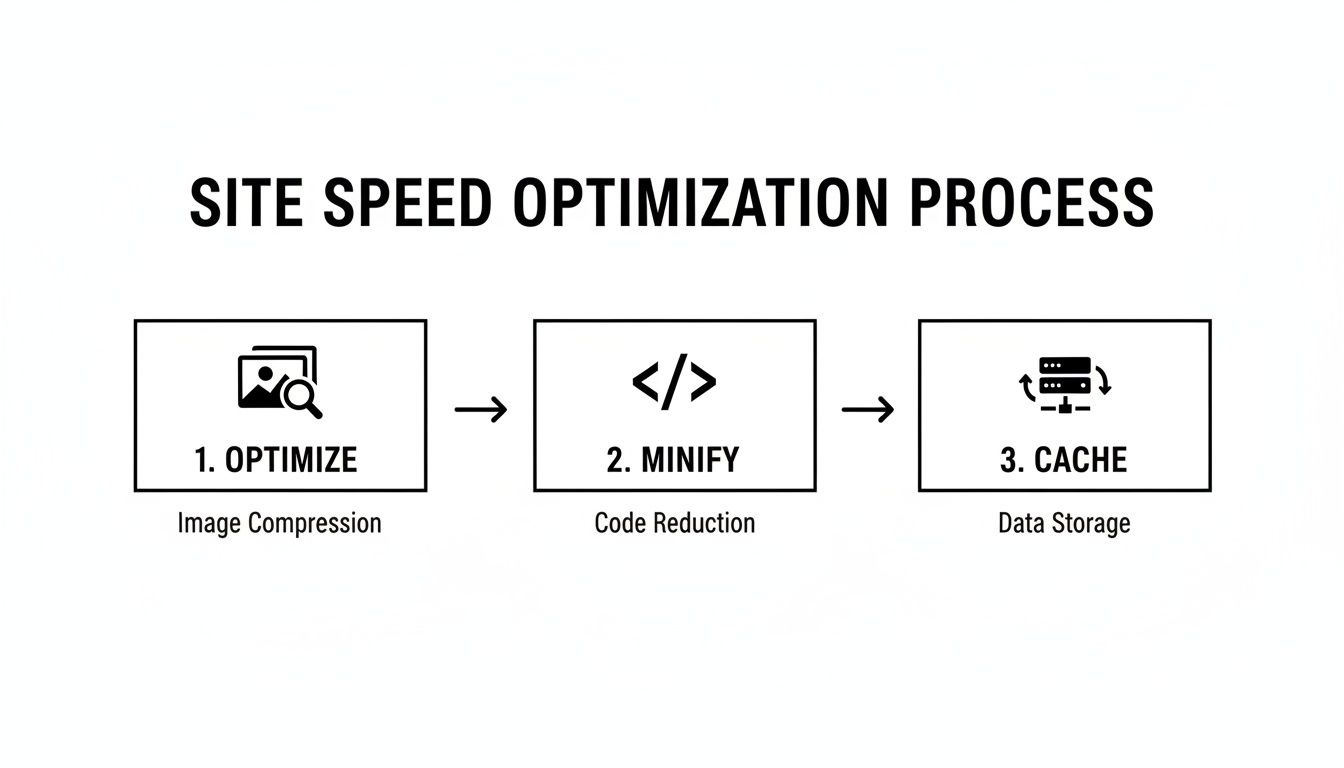
Each of those steps—optimizing images, minifying code, and caching files—helps build the high-performance foundation that makes all your other SEO efforts hit harder.
Automating the Technical Details
The final piece of the puzzle is tying these content updates directly to your deployment pipeline. By integrating your editor with your Git repository, every change is automatically committed. This not only gives you a complete version history but also makes publishing as simple as hitting "save" or merging a pull request.
To get a better sense of how this works in practice, you can learn more about how to sync your content directly with GitHub.
This seamless connection transforms static site SEO from a technical bottleneck into a collaborative, efficient process. It empowers your entire team to play a role in boosting your search visibility.
Common Questions About Static Site SEO
When you're moving to a static site generator or just getting started with one, it’s natural to have a few questions about how SEO fits into the picture. The underlying tech is different from a big CMS like WordPress, so it's smart to ask how the old rules apply. Let's tackle some of the things I hear most often.
Are Static Sites Just Automatically Better for SEO?
This is probably the number one question people have. The short answer is no, but they give you a massive head start. Think of it this way: the raw speed and tight security of a static site are huge pluses in Google's eyes. You're starting with a foundation that search engines already love.
But that's all it is—a foundation. If the on-page content is weak, your metadata is missing, or the technical signals are a mess, that initial advantage evaporates pretty quickly.
A static site gives you a technically superior vehicle for SEO. But you still have to drive it correctly by implementing a sound content and keyword strategy. Speed gets you to the starting line faster, but content quality wins the race.
How Do You Handle Technical SEO Without a Backend?
Another thing that trips people up is how to manage tasks that usually happen on a server. Redirects are a perfect example. How do you pull off a 301 redirect when you can't just pop open a .htaccess file?
Thankfully, modern hosting platforms have this figured out. Services like Netlify or Vercel let you manage redirects with a simple text file that lives right inside your project.
For instance, with Netlify, you just create a file named _redirects and add a rule like this:
/old-page /new-page 301
It’s surprisingly simple and powerful. Your redirects are now part of your site's version history, just like your content. This is a clean, effective way to preserve your link equity when pages move or get renamed.
Do I Still Need to Worry About Traditional SEO?
Yes, absolutely. At the end of the day, Google's crawler is just reading the final HTML that gets served to a browser. It doesn't really care how that HTML was generated.
All the core principles of good SEO are still in play.
- Structured Data: You should definitely be using it. Adding JSON-LD schema into your page templates is a fantastic way to give search engines more context about your content, which can help you earn those coveted rich snippets in search results.
- A CMS is Not Required: You don’t need a traditional CMS to do great SEO. Tools like JekyllPad give you a friendly interface to manage all your front-matter—meta titles, descriptions, you name it—and your content, letting you achieve the same results but with way better performance.
- Dynamic vs. Static: A search crawler sees the end product. As long as that product is well-structured, loads fast, and is packed with valuable information, you're giving yourself the best possible chance to rank well.
The fundamentals of SEO for a static website don't change. You still need great content presented in a technically sound package. The only real difference is in the how—the methods you use to implement the technical details are often more direct and a lot less complicated.
Ready to streamline your static site's content and SEO management? JekyllPad provides a visual, browser-based editor that integrates directly with GitHub, making it effortless to update metadata, craft content, and publish without touching a line of code. Try it for free at https://www.jekyllpad.com.