
An online Markdown editor is basically a word processor that lives right in your web browser. Instead of clicking buttons in a toolbar, you use simple text symbols—like a # to create a heading or * for italics. The result is a clean, focused space for writing that's built for the web.
What Is an Online Markdown Editor Anyway?
Picture this: you’re writing an article and never once have to lift your hands from the keyboard to format something. Want to make a word bold? Just wrap it in two asterisks, like **this**. That’s the simple, powerful idea behind Markdown, and an online editor brings that experience straight to your browser.
It does away with the bloated, distracting interfaces found in a lot of traditional software. The whole point is to put the focus back where it belongs: on your words. This helps writers, developers, and really anyone creating content to just get the job done faster.
A Focus on Pure Content
The real magic of this approach is how portable it is. Markdown is just plain text, which means you're not locked into a proprietary file format like .docx. Your content stays clean, lightweight, and looks exactly the same no matter where you open it.
That simplicity is why it has become so popular. The market for text editors, which includes these handy browser-based tools, was already valued at USD 3.1 billion and is expected to hit USD 5.2 billion by 2033. That growth shows just how much people need tools that fit modern workflows, especially for developers and bloggers who rely on static site generators. You can dig into more data on the text editor market to see the full picture.
At its heart, an online Markdown editor is a tool that separates the act of writing from the act of formatting. It frees you to structure your thoughts with simple syntax, knowing the final presentation will be perfect.
The Power of Real-Time Previews
One of the best features is the live preview. Most online editors give you a split-screen view: you type your Markdown on the left, and on the right, you see a perfectly rendered preview of how it will look. This instant feedback gets rid of all the guesswork.
It’s a huge step up from the old way of doing things, where you’d have to save a file and then open it in another program just to see if your formatting was right. That immediate visual confirmation helps you write with confidence and seriously speeds up the process, whether you're working on a blog post or technical documentation. If you're curious about other editor styles, our guide on what a WYSIWYG editor is offers a great comparison.
To make the distinction clearer, here’s a quick breakdown of how these tools stack up against the software most of us grew up with.
Key Differences: Traditional Word Processor vs. Online Markdown Editor
| Feature | Traditional Word Processor (e.g., MS Word) | Online Markdown Editor |
|---|---|---|
| Interface | Complex, with toolbars, ribbons, and menus | Minimalist and distraction-free |
| Formatting | Visual, click-based (WYSIWYG) | Syntax-based (plain text commands) |
| File Format | Proprietary (.docx, .pages) |
Plain text (.md, .txt) |
| Portability | Can be difficult; formatting often breaks | Excellent; universally compatible |
| Output | Primarily for print and digital documents | Optimized for clean, web-ready HTML |
| Workflow | Jumps between writing and formatting | Continuous flow, no context switching |
This table really highlights the core trade-off: traditional word processors give you intricate visual control, while Markdown editors give you speed, simplicity, and portability. For web-centric content, the choice is often a no-brainer.
What Makes a Great Markdown Editor?
Look, not all online Markdown editors are created equal. You can find dozens of simple text boxes that will technically work, but a powerful editor is something else entirely. It's packed with features that make writing faster, more intuitive, and just plain better. These aren't just fancy add-ons; they’re the tools that fundamentally change how you write and publish.
The absolute must-have feature is a live, split-screen preview. This is non-negotiable. It shows your raw Markdown text on one side and a real-time, rendered version on the other. This instant feedback loop means you're never guessing what your formatting will look like. It saves a ton of time and prevents those nasty "oops, that's not right" moments after you've already published.
Tools That Actually Help You Write
Beyond the preview, syntax highlighting is a lifesaver, especially if you're working with documents that include code snippets. It colors your Markdown syntax and code blocks, making everything easier to scan and understand. This simple visual cue helps you catch mistakes—like a forgotten asterisk or an unclosed code fence—before they become a problem.
Some editors also offer a hybrid or WYSIWYG mode. This is a fantastic middle ground between raw text and a traditional word processor. You see the formatting applied directly as you type, which is a huge help for people who are new to Markdown or just prefer a more visual experience. You get the clean, portable output of Markdown without sacrificing the familiar interface of a visual editor.
Think of it like this: the live preview is your sharpest kitchen knife, syntax highlighting is the perfectly organized spice rack, and hybrid modes are the modern gadgets that make complex recipes a breeze. Each tool makes the whole process smoother and more enjoyable.
Plugging Your Editor Into Your Workflow
For developers and content teams, the real magic happens when an editor integrates with your existing tools. When your editor can talk directly to your publishing pipeline, it can automate all the tedious, manual steps.
Here are a couple of key integrations to look for:
- Direct GitHub Integration: This feature lets you open, edit, and save files straight to a GitHub repository without ever leaving the editor. It completely eliminates the friction of cloning repos, manually pushing commits, and wrestling with the command line.
- Front-Matter Editing: Static site generators like Jekyll and Hugo use YAML front-matter—that block of metadata at the top of a file—to handle titles, dates, and layouts. A good editor gives you a simple form to edit this data, making it easy for even non-technical writers to manage.
These are the features that elevate an online Markdown editor from a simple tool to the command center of your content operation. Tools like JekyllPad are designed around this very idea, blending a clean, user-friendly editor with deep GitHub integration. It allows anyone on the team to contribute to a static site without having to become a Git wizard, transforming a complex developer workflow into a straightforward publishing process.
How Markdown Editors Power Static Site Generators
This is where an online Markdown editor really shines. It's the perfect bridge between writing simple text in your browser and launching a fast, modern website. Tools like Jekyll, Hugo, and Eleventy are known as static site generators (SSGs), and they use basic Markdown files as blueprints to build entire websites.
It helps to think of it like this: your Markdown file is the recipe, and the SSG is the chef. The editor is simply the clean, organized kitchen where you write that recipe down. The SSG just follows your instructions—the headings, lists, links, and text—and automatically bakes a complete HTML website from them.
A Real-World Git-Based Workflow
Let’s walk through a common scenario. A content writer needs to draft a new blog post. Instead of wrestling with a clunky, slow content management system, they just open a browser-based editor like JekyllPad. They write their post, drag in a few images, and use a simple form to fill out the front-matter for SEO, like the page title and meta description.
When they’re done, they click a single button. That’s it.
Behind the scenes, the editor commits this new Markdown file directly to a GitHub repository. This action automatically triggers a service like GitHub Pages or Netlify, which runs the SSG, builds a new version of the website, and deploys it live. The whole thing takes just a few seconds.
This process is called a Git-based workflow, and it turns content creation and publishing into one seamless motion. The editor handles all the technical heavy lifting, which makes this incredibly powerful workflow accessible to everyone, not just developers.
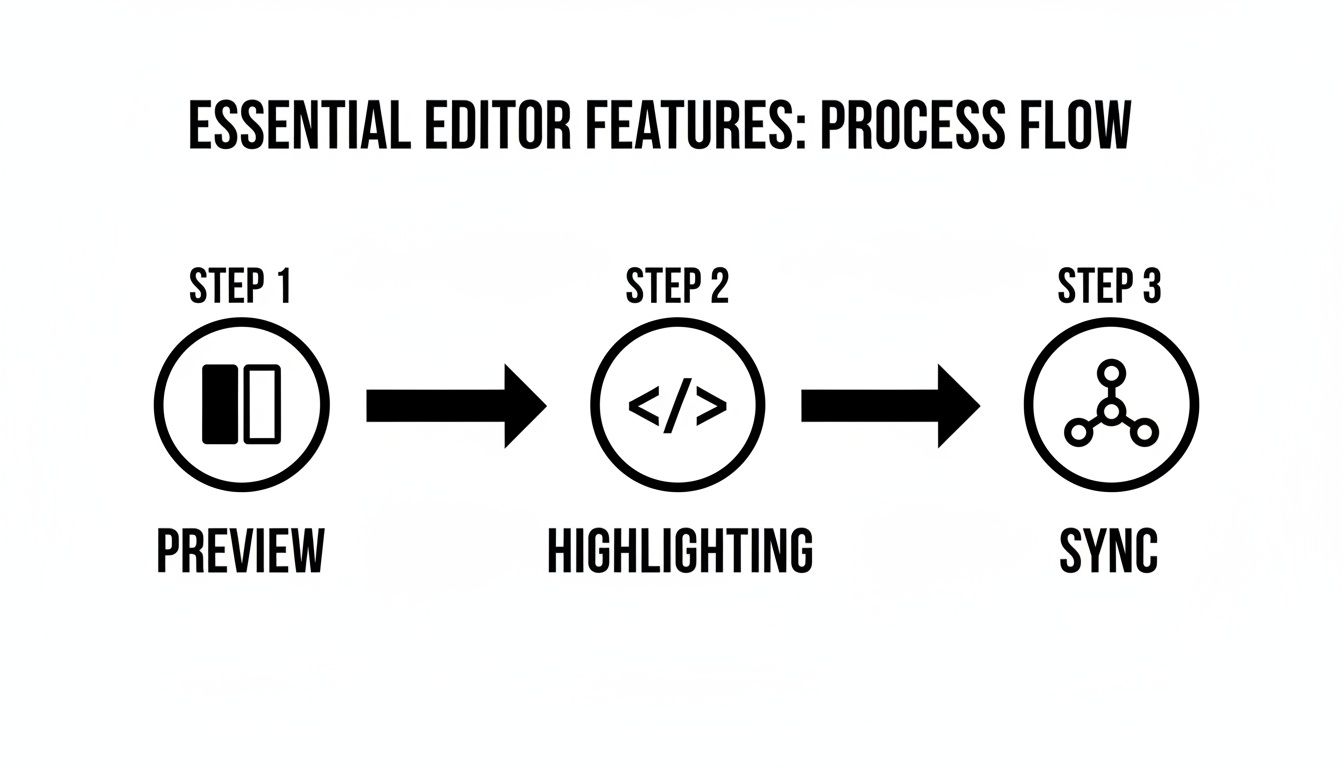
The flow from previewing your work to syncing it with a repository shows just how much friction an integrated online editor removes. It turns complex development steps into simple button clicks.
The Growing Demand for Simpler Workflows
The appeal of this streamlined approach is clear, and it’s driving a lot of growth. The WYSIWYG Editors Software market, which includes many of these hybrid Markdown editors, is expected to jump from USD 211.78 million in 2023 to USD 362.78 million by 2030. This trend signals a huge demand for browser-based tools that can cut setup time by as much as 50% compared to traditional systems.
By connecting directly to services like GitHub, an online Markdown editor transforms a simple folder of text files into a living, breathing website—complete with version history, backups, and a professional deployment pipeline.
To see what this approach can produce, it's worth checking out some impressive static website examples. These sites are incredibly fast, secure, and often managed entirely through Markdown files. If you're curious about the "why" behind this model, you can read more about the benefits here: https://www.jekyllpad.com/blog/why-static-site-generators.
At the end of the day, these editors empower creators to focus on what they do best: creating content. They can trust that the underlying technology will handle the rest, which effectively democratizes web publishing by making modern, efficient development practices available to all.
Understanding Security and Collaboration in the Cloud

Handing your work over to a browser-based tool can feel a bit nerve-wracking. The big question is: where does your data actually go? With many online tools, everything you type is sent to a third-party server for processing and storage. This is what's known as a server-side model.
This setup can open the door to privacy and security issues. Your drafts, confidential notes, and every single keystroke travel over the internet to sit on someone else's computer. If you're working on proprietary company documents or just value your privacy, that's a genuine risk to consider.
The Power of Client-Side Architecture
A far more secure alternative is a client-side editor. The best way to think about it is like a traditional desktop app—say, Notepad or TextEdit—that just happens to run inside your browser. All the magic, from rendering your Markdown to saving your file, happens right on your own machine.
With a client-side editor, your content never leaves your browser. Credentials, like a GitHub access token, stay local. Nothing is sent to a third-party server, giving you a completely private workspace by default.
This is exactly how tools like JekyllPad are built. The architecture is designed to keep your data flowing only between your browser and your GitHub repository—that’s it. It’s a simple, elegant solution that eliminates an entire category of security risks you’d normally worry about with cloud software, putting you back in control.
A Modern Approach to Collaboration
When it comes to working together, a Markdown-centric workflow often looks different from the real-time free-for-all of a Google Doc. While simultaneous editing is great for brainstorming, it can quickly turn into chaos when you need structured version control for things like technical documentation or a series of blog posts.
Instead, many teams have embraced a Git-based workflow. It's inherently collaborative but in a much more orderly and transparent way. Changes are tracked meticulously, and contributions are managed through pull requests, creating a crystal-clear, auditable history of a document’s life.
This structured process is a huge reason why Markdown is so popular in technical circles. For teams that live and breathe Markdown for documentation, understanding the different developer collaboration tools helps show how online editors fit into the bigger picture.
This model brings a few key benefits to the table:
- Clear Ownership: Every single change is tied directly to an author and a commit. No more guessing games.
- Version History: Need to roll back to a version from last Tuesday? It's simple and painless.
- Structured Reviews: Pull requests create a natural checkpoint for others to review and approve changes before they go live.
Ultimately, this turns collaboration from a messy race into an organized, asynchronous process. Everyone can work on their own piece without stepping on each other's toes, creating a solid foundation for building high-quality content together.
Choosing the Right Online Markdown Editor for Your Needs

Picking the perfect online Markdown editor isn’t about finding the one with the longest feature list. It’s about finding the right tool for your specific workflow. Instead of getting bogged down in comparisons, the best way to start is by asking a few simple questions about how you actually write and publish.
Answering these questions honestly will help you cut through the noise and zero in on the features that will genuinely make your life easier.
Define Your Primary Workflow
Think about where your content ends up and how it gets there. A developer writing documentation directly in a GitHub repository has a completely different set of needs than a blogger who wants a more visual, user-friendly interface.
To figure this out, ask yourself:
- Do I live in GitHub? If your projects revolve around version control, you'll want an editor with seamless Git integration. The ability to commit changes directly from the editor without ever opening a terminal is a huge time-saver.
- Do I manage a static site? If you’re working with a static site generator like Jekyll, Hugo, or Eleventy, built-in front-matter editing is a game-changer. It turns the tedious task of managing metadata into a simple, form-based process.
- Am I a Markdown pro or a visual writer? Your comfort with raw Markdown syntax makes a big difference. Some people love a clean, code-centric view, while others prefer a hybrid or WYSIWYG mode that shows a live preview as they type.
Your answers will immediately point you toward a specific type of editor. For example, a developer who blogs on a static site needs an editor that checks all three boxes. This is exactly the kind of workflow where a tool like JekyllPad shines, as it was built from the ground up to solve this exact problem. It blends a secure, client-side experience with deep GitHub integration and intuitive front-matter editing, giving you the best of both worlds.
To make the evaluation process easier, use this checklist to think through what matters most to you.
Feature Checklist for Your Ideal Markdown Editor
| Feature Consideration | What to Look For | Why It Matters |
|---|---|---|
| User Interface (UI) | A clean, distraction-free writing space. Options for split-screen, WYSIWYG, or raw Markdown views. | Your editor should feel comfortable and reduce cognitive load, not add to it. The right UI helps you stay in the flow. |
| GitHub Integration | The ability to browse repositories, open/edit files, commit changes, and manage branches directly within the editor. | For developers and technical writers, this removes friction by keeping your entire content workflow in one place. |
| Front-Matter Support | A dedicated UI for editing YAML front matter, ideally with form fields for common keys like title, date, and tags. |
This is essential for managing static site content. It prevents syntax errors and makes metadata management incredibly efficient. |
| Collaboration | Features like real-time co-editing, commenting, and version history. | Crucial for teams. It allows multiple writers and editors to work on a document simultaneously without creating version conflicts. |
| Security & Privacy | Client-side processing (no data sent to a server), clear privacy policies, and options for self-hosting. | Your content is valuable. An editor that respects your privacy ensures your work stays yours and isn't stored on third-party servers. |
| Customization | Options to change themes (light/dark mode), font sizes, and syntax highlighting. Support for custom CSS. | A little bit of personalization goes a long way in making an editor feel like your own, improving comfort during long writing sessions. |
| Export Options | The ability to export your work to various formats like HTML, PDF, or even Word documents. | Versatility is key. You never know when you'll need to share your content in a different format for colleagues or stakeholders. |
This checklist should give you a solid framework for comparing your options.
The right editor isn't the one with the most features—it's the one with the right features for you. Prioritize tools that remove friction from your most common tasks.
Ultimately, the goal is to find an online Markdown editor that gets out of your way and lets you focus on what really matters: creating great content. If you want to see how different tools compare, you can explore our comparison of top online Markdown editors for more ideas. By matching the tool to your workflow, you can transform your entire writing process.
Common Questions About Markdown Editors
As you start looking into online Markdown editors, you’ll probably have a few questions pop up. It’s totally normal. Figuring out if this workflow is the right move for your projects means getting some clear answers first.
We’re going to tackle the big ones—like the classic Markdown vs. visual editor debate—and clear the air on whether you need to be a developer to use a Git-integrated tool. Let's get into it.
Is Markdown Really Better Than a Visual (WYSIWYG) Editor?
This is probably the number one question people ask, but it sets up a false rivalry. The truth is, it’s not about one being "better" than the other. It’s about picking the right tool for the job you’re doing. Each one shines in different situations.
A classic WYSIWYG (What You See Is What You Get) editor feels immediately familiar. You click a button, your text becomes bold—simple as that. This instant visual feedback is perfect for anyone who prefers working with a graphical interface and wants to see the final product take shape as they write. No guesswork involved.
Markdown, on the other hand, gives you incredible control and freedom. You use simple text-based syntax to create clean, portable HTML. This means no hidden formatting code that can mess things up when you copy and paste your content from one platform to another. It's why so many writers and developers swear by it for its speed, efficiency, and clean, distraction-free writing space.
The best modern tools get that you shouldn't have to pick a side. They offer a hybrid experience, mixing the raw power of Markdown with the visual clarity of a WYSIWYG editor. You get the best of both.
For example, a solid online Markdown editor like JekyllPad hits this sweet spot perfectly. You can fly through your draft using pure Markdown syntax but also see a live preview updating in real-time, showing you exactly how it will all look. This hybrid approach makes switching to a syntax-first workflow feel natural for just about anyone.
Do I Have to Be a Developer to Use a Git-Based Editor?
Not at all. This is a huge misconception that keeps a lot of talented creators from trying out a much more powerful and organized way of working with content. Sure, Git-based editors are built on developer tools like GitHub, but the good ones are designed to hide all that complexity from you.
Think of it like driving a car. You don’t need to be a mechanical engineer to get behind the wheel; you just need to know how to use the steering wheel and pedals. A well-designed Git-based editor is that user-friendly interface sitting on top of a powerful engine.
These platforms take care of all the technical commands—like git add, git commit, and git push—in the background. Instead of you having to type commands into a terminal, you just click familiar buttons like "Save" or "Publish." This smart design makes the powerful version control and teamwork features of Git accessible to everyone, no matter their technical skill level.
With a platform like JekyllPad, for instance, you can:
- Browse your GitHub repositories with a simple file tree.
- Create and edit files just like you would in Google Docs or any other editor.
- Save your changes with one click, which automatically creates a "commit" for you.
This approach truly opens up the Git workflow, empowering writers, marketers, and editors to contribute directly to projects without ever needing to touch the command line.
How Secure Are Online Markdown Editors for Private Projects?
Security is a big deal, and it really comes down to how the editor is built. The most important thing to understand is the difference between server-side and client-side tools. Many online editors are server-side, which means your content gets sent to their servers to be processed and stored.
That model can open up some security holes. Your work, and sometimes even your login details, are sitting on someone else's infrastructure, which could become a target. For private or sensitive projects, that’s a risk many people aren't willing to take.
The safest bet is a client-side online Markdown editor. These tools run entirely inside your web browser. Everything—from rendering your live preview to connecting with services like GitHub—happens right on your own computer. Your data never gets sent to or stored on the editor's servers.
This approach gives you a powerful layer of security and privacy by design. It guarantees that your content stays your own and that sensitive info, like authentication tokens, never leaves your device. When confidentiality matters, always look for a client-side editor.
Ready to try a seamless, secure, and powerful writing workflow? JekyllPad brings together a beautiful Markdown editor and deep GitHub integration, all running 100% in your browser. Start writing for free on JekyllPad.