
An SEO friendly CMS is a content management system designed to make it as easy as possible for your website to rank well in search results. It's built with features that help you optimize content, manage your site’s technical health, and improve performance, often without needing to write a single line of code.
Think of it like the foundation of a house. If you build on a cracked, unstable foundation, everything you add on top—the walls, the roof, the beautiful interior—is at risk. A solid, SEO-friendly CMS provides a strong base, making sure everything you build on it has a better chance of standing tall and being seen.
What Makes a CMS SEO Friendly
Let's switch analogies. Picture your website as a high-performance race car. An SEO friendly CMS is the expertly engineered chassis and engine. It’s what makes the car fast, agile, and easy for the race officials (aka search engines) to inspect and approve. It’s not just a bucket for your content; it’s a platform built for peak performance and visibility.
What this means in practice is that the right system gets technical hurdles out of your way. A good CMS handles the complicated, behind-the-scenes tasks that can make or break your rankings, freeing you up to focus on what really matters: creating fantastic content that your audience will love.
The Two Core Approaches
Broadly speaking, these systems follow two different philosophies for getting the SEO job done. Figuring out which one fits your needs is the first step.
- Traditional Dynamic Platforms: This is the world of systems like WordPress. They are known for their incredible flexibility and massive libraries of plugins. These platforms build pages "dynamically" every time a person visits, and you can add powerful SEO tools like Yoast SEO to control nearly every aspect of optimization.
- Modern Static Site Generators: On the other hand, you have platforms like Jekyll or Hugo. They work differently by pre-building every page into simple, lightweight files. This approach leads to blazing-fast speed and rock-solid security—two things Google values immensely.
A great CMS doesn’t just give you a "publish" button. It actively helps you make that content discoverable by automating technical best practices and giving your work the best possible shot at ranking.
To get the full picture, a solid CMS is just one piece of the puzzle. For a deeper dive into the strategies that drive rankings, this complete guide on how to increase website traffic organically is a great next step after you've got your foundation in place.
Key Features of a High-Performing CMS

To really get a grip on your site's organic performance, you need a CMS that gives you direct access to the levers that matter. These features aren't just a simple checklist; they're the cockpit of your SEO strategy. Without them, you’re essentially flying blind and hoping search engines figure things out on their own.
A truly SEO-friendly CMS puts these controls right where you can reach them, turning complicated technical jobs into straightforward, everyday tasks. It’s the difference between trying to steer a ship with a broken rudder and having a precise, responsive navigation system at your command.
Foundational On-Page Controls
Let's start with the absolute essentials. At its core, your CMS must give you easy control over the elements search engines look at first. These are the non-negotiable building blocks for any on-page optimization.
- Customizable URLs: The power to edit your page slugs is critical. A clean, keyword-rich URL like
/blog/seo-friendly-cmstells both users and crawlers what the page is about far better than a database-generated mess like/p?id=481516. It’s a small detail that reinforces relevance and just looks better. - Editable Title Tags and Meta Descriptions: Think of these as your website’s billboard in the search results. Your CMS has to let you write unique, compelling titles and descriptions for every single page. This is your primary tool for earning that click.
- Heading Tag Management: Using heading tags (H1, H2, H3) correctly builds a clear hierarchy for your content. Your CMS should make it simple to structure your pages logically, which helps both human readers and search engine bots understand the main points.
Advanced Technical SEO Levers
Moving beyond the basics, a top-tier CMS helps you manage the technical stuff that can quietly sabotage an otherwise great SEO campaign. These features often work in the background, keeping your site technically healthy and preventing common pitfalls.
An elite CMS doesn’t just let you publish content; it ensures that content is published in a way that’s perfectly structured for search engine discovery, preventing common errors before they ever happen.
This is where you can gain a real competitive advantage. For instance, a system with built-in redirect management means you can fix a broken link or update a URL on the fly, preserving your hard-earned link equity without waiting for a developer.
Here are the key technical features to look for:
- XML Sitemap Generation: Your CMS should automatically generate and update an XML sitemap. This file is literally a roadmap for search engines, guiding them to all of your important pages so they can be discovered and indexed efficiently.
- Canonical Tag Control: To deal with duplicate content issues, you need direct control over canonical tags. This lets you tell Google which version of a page is the "master" copy, consolidating all its ranking power into one URL.
- Indexability and Crawl Control: You need fine-tuned control over what search engines can and cannot see. This includes easy access to edit your robots.txt file and the ability to add "noindex" tags to individual pages, keeping private or low-value content out of the search results.
- Schema Markup Integration: Native support for structured data (or schema) is a huge plus. It adds a layer of context to your content, which helps you earn rich snippets—like star ratings or FAQs—right in the search results. These can make your listings pop and significantly boost clicks.
WordPress vs. Static Sites for SEO Dominance

When you're trying to pick an SEO-friendly CMS, the discussion almost always lands on a classic matchup: the heavyweight champion, WordPress, versus the lean, mean challengers, static site generators.
This isn't just nerds debating tech. It's a fundamental choice between adaptability and pure performance. Each side offers a unique route to the top of the search results, and figuring out which one is right for you means understanding what makes them tick.
The Power and Pitfalls of WordPress
You can't talk about content management without talking about WordPress. It's a giant, running a mind-boggling 43.2% of the entire web and holding a 62.8% market share among all known CMS platforms. Its popularity comes from a massive ecosystem of plugins like Yoast SEO and Rank Math, which make tricky SEO tasks like managing meta tags or generating sitemaps surprisingly simple.
But there's a catch. Every plugin you add, while helpful, brings its own baggage in the form of extra code. This can lead to performance bloat that tanks your Core Web Vitals scores. The very dynamic power that makes WordPress so flexible also means you have to constantly stay on top of updates, security patches, and performance tuning.
For many, WordPress represents the ultimate in user-friendly SEO control. It democratizes optimization, but this power requires responsible management to avoid performance penalties.
It’s an ideal setup for teams that need a ton of features and a simple backend, but the responsibility for keeping it fast and secure falls entirely on you.
The Unmatched Speed of Static Sites
Static site generators like Jekyll or Hugo work completely differently. Imagine building a house from a prefab kit versus building it brick by brick on-site. Instead of assembling a page from a database every time someone visits, a static site builds every page into a simple HTML file ahead of time.
This pre-built approach gives you two huge SEO wins right from the start:
- Blazing-Fast Speed: There’s no database to query and no server-side code to run. Pages are just there, ready to go, so they load almost instantly. This is a massive boost for user experience and Core Web Vitals—both major ranking factors.
- Ironclad Security: The attack surface is tiny. With no plugins to exploit or complex server processes to hack, static sites are naturally far more secure.
The traditional trade-off was the learning curve; they used to be strictly for developers. But the real question isn't about which one is "better" in a vacuum. It's about what you prioritize. Do you need a massive feature set and point-and-click usability, or is raw, uncompromising speed your number one goal? You can dive into a deeper comparison of content management systems to see how they truly stack up.
How Hosted Platforms Changed the SEO Game
While self-hosted systems like WordPress and static site generators are two powerful sides of the same coin, a third option completely changed the rules for countless businesses: the all-in-one hosted platform. These managed environments, with Shopify as the prime example for e-commerce, have made solid SEO achievable for almost anyone, no technical background required.
Think of it like hiring a professional pit crew for your race car. Instead of you worrying about engine tuning, tire pressure, and aerodynamics, the experts handle it all behind the scenes. Hosted platforms manage the technical heavy lifting—server performance, security, and updates—so you can just focus on driving your business forward.
The Trade-Off for Simplicity
This hands-off approach is a huge win for ease of use. Right out of the box, a platform like Shopify gives you clean URL structures, automatic sitemap generation, and a dead-simple way to edit your meta tags. Performance is already baked into the system, which means you aren't spending weeks fiddling with caching plugins or trying to shave milliseconds off your server response time.
But this convenience comes at a price. When you hand over the keys to a managed service, you're also giving up a lot of flexibility. Trying to customize core functions or implement very specific technical SEO fixes can be a real headache, if it's even possible at all. This "vendor lock-in" means you have to play by their rules, and those rules might not always mesh with more advanced SEO strategies.
Hosted platforms democratized SEO by packaging technical best practices into a simple, user-friendly service. They proved that you don't need to be a developer to achieve solid organic visibility.
Shopify's SEO Success Story
You can’t argue with the results of this model. Just look at Shopify’s explosive growth. It has quickly become the second-most popular SEO friendly CMS, jumping from just a 1.0% market share in 2016 to a projected 6.7% by 2025. This incredible rise is a testament to its ability to automatically handle security, updates, and core vitals, making it the go-to choice for marketers who need to rank without getting lost in the technical weeds. You can explore more about these trends and what they mean for the broader CMS market.
Unlike WordPress, which often feels like it's held together by a dozen different plugins, Shopify integrates mobile optimization and speed right from the start. It's proof that a hosted CMS can deliver great SEO at a massive scale. Still, its success also shines a light on a major gap in the market—the need for a solution that blends the raw performance of a static site with the operational simplicity of a hosted platform, giving creators the best of both worlds.
Getting Static Site SEO Without the Headaches
Static site generators are a dream for SEO. They're ridiculously fast and secure, two things search engines absolutely reward. But there's a catch, and it's a big one: the workflow is often intensely technical. For your average content marketer or writer, being forced to use command lines, Git repositories, and local development environments is a dealbreaker.
This technical wall creates a huge disconnect. You have this high-performance engine capable of incredible SEO results, but the people who actually create the content can't drive it. This friction often sends teams running back to slower, clunkier platforms just for a familiar editing screen, completely undermining the reason they looked at static sites in the first place.
Bridging the Gap With a Visual Interface
The real solution here is a new breed of tools that act as a user-friendly layer on top of all that code. Platforms like JekyllPad plug directly into your site’s code repository but give your team a simple, visual interface that anyone can understand and use. You get the best of both worlds.
This approach neatly separates content creation from the complex world of development. It means your whole team can contribute without having to learn a new technical skill set overnight. Think of it like putting an intuitive dashboard on a finely tuned race car engine—all the power, none of the intimidation.
Here's what that looks like in JekyllPad, offering an editor that feels familiar and straightforward.
This screenshot shows a clean, web-based editor that combines text formatting with simple controls for essential SEO elements, making static site management accessible.
Gaining Power and Simplicity
By providing a familiar WYSIWYG editor, live page previews, and simple controls for metadata, these platforms completely change the game. Your team gets the raw, unfiltered SEO power of a static site combined with the collaborative ease they're used to from a traditional CMS.
A visual editor for a static site generator doesn't just simplify the workflow; it democratizes it. It allows SEOs and content creators to directly harness the performance benefits without being blocked by technical gatekeepers.
This setup ensures your SEO friendly CMS is not just powerful under the hood but actually practical for your team to use every single day. They can get back to focusing on what they do best—creating amazing content—while the system handles the heavy lifting in the background.
For a deeper look into optimizing these platforms, our guide on SEO for static websites provides actionable strategies you can implement right away. It’s the key to making static site SEO a reality for everyone, not just the developers in the room.
How to Choose the Right SEO-Friendly CMS
Picking the right SEO-friendly CMS isn't about finding a magic bullet. There's no single "best" platform. The real goal is to find the right tool for your team, your workflow, and your specific goals. Forget generic checklists for a moment and start by asking the right questions.
How much hands-on control do you genuinely need over technical SEO details like redirects, schema markup, and XML sitemaps? Is blistering, uncompromised speed your top priority, or do you need a vast plugin ecosystem to add new features whenever you want? Most importantly, what does your team's day-to-day content creation process actually look like?
Evaluate Your Technical and Content Needs
Answering these questions forces you to weigh the trade-offs. A traditional CMS like WordPress is incredibly user-friendly for writers, but keeping it fast and secure often feels like a full-time job. A hosted platform like Shopify handles the technical heavy lifting for you, but you might hit a wall when you need to make advanced SEO customizations.
This is where a modern static site generator, combined with a visual editor, really shines. It offers a powerful middle ground, giving you that elite performance and security without forcing your content team to become developers.
This workflow chart lays out the different paths you can take to get a high-performing static site up and running.
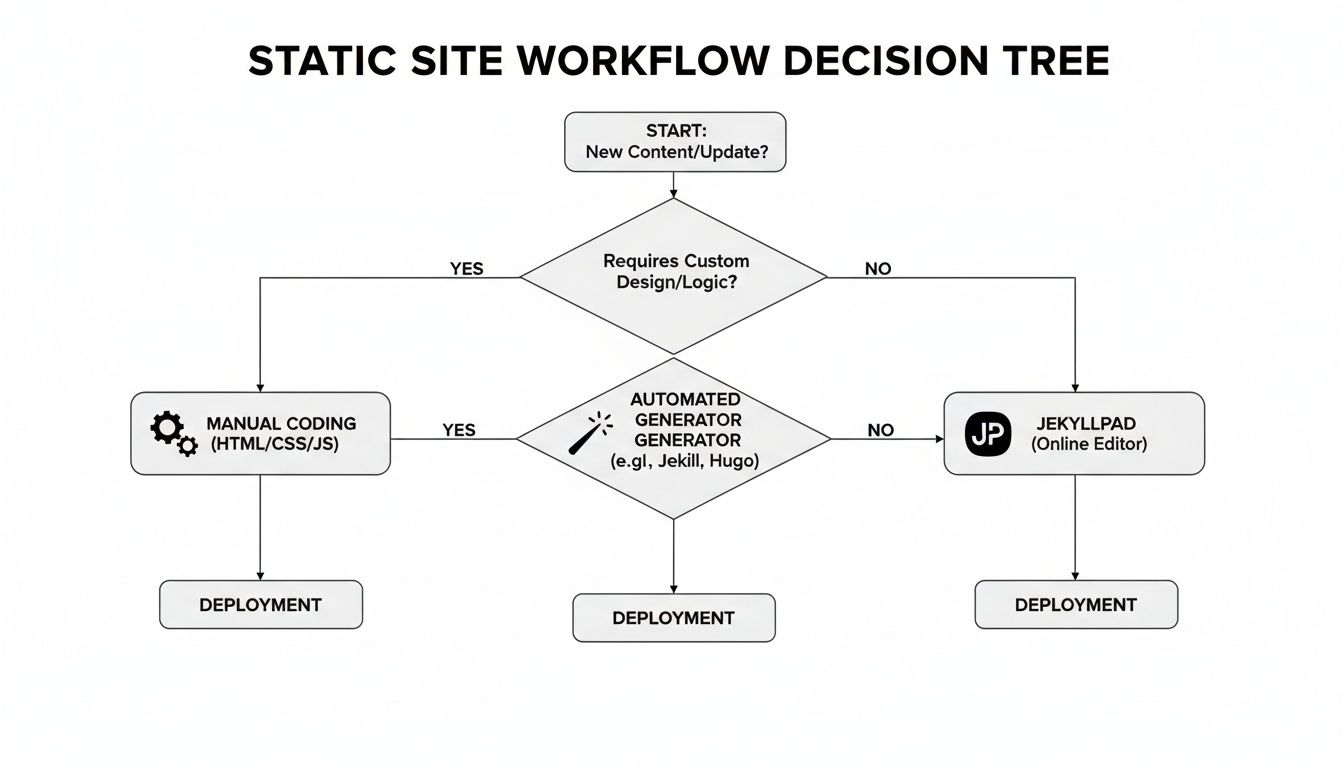
The big takeaway here is that modern tools have made the once-intimidating process of building a static site accessible to just about everyone. The path you choose should directly empower your content team, not hold them back.
The ideal CMS aligns with your technical resources, content strategy, and long-term ambitions. It should empower your team, not create technical roadblocks that slow down your momentum.
To help frame your decision, I've put together a quick comparison table. It's designed to help you score different options against the most critical SEO and workflow features.
CMS Evaluation Quick Guide
| Feature/Criteria | Static Site + JekyllPad | WordPress (Self-Hosted) | Shopify (Hosted) |
|---|---|---|---|
| Page Speed & Core Web Vitals | Excellent. Natively fast, pre-built pages. | Fair to Good. Requires heavy optimization and caching plugins. | Good. Optimized infrastructure, but app-heavy stores can be slow. |
| Control Over Technical SEO | Excellent. Full control over every line of code. | Good. Extensive control, but often relies on plugins. | Fair. Good basics, but limited access to core files (e.g., robots.txt). |
| Ease of Use for Content Editors | Excellent. Visual, no-code editor simplifies content updates. | Excellent. The gold standard for user-friendly content management. | Very Good. Intuitive interface designed for e-commerce. |
| Security & Maintenance | Excellent. No live server or database reduces attack surface. | Fair. Requires constant updates to plugins, themes, and core. | Excellent. Fully managed and secured by the platform. |
| Customization & Flexibility | Very Good. Total design freedom, but new features need development. | Excellent. Massive plugin and theme library for any feature. | Fair to Good. Theme-based, with customization limited by the platform. |
| Hosting Costs & Scalability | Low. Static files are cheap to host and scale infinitely. | Varies. Can range from cheap shared hosting to expensive managed plans. | Predictable. Monthly subscription fee includes hosting. |
Ultimately, choosing a CMS is a strategic decision. Running through a comprehensive website audit checklist can help you see if a potential platform can actually deliver on all your SEO needs.
By understanding these differences, especially how a system works with a headless architecture, you can make a much smarter choice. For a deeper dive on that topic, check out our guide on what is a headless CMS and see how it can completely change your workflow.